
A rising SaaS bill is a reason to investigate self-hosting. Whether migration saves money depends on its full operating cost. The difficult part is moving the data, permissions, integrations, and everyday habits that have accumulated around the service. This playbook helps you choose one manageable migration, rehearse it, and define a cutover you can recover from without losing new work.
Start with an internal tool whose failure has a practical workaround. Keep the existing service available until the replacement passes agreed checks. A successful move gives you a system you can operate and restore, as well as a different invoice.
Move your chosen apps onto a VPS you control, with root access to configure and maintain your stack.
Choose What Is Worth Moving
Write down the outcome you want: predictable spending, control over data exports, a required integration, or the ability to choose your upgrade schedule. Then check whether the proposed replacement actually supports the features your team uses. A low hosting price does not compensate for missing access controls, unreliable exports, or hours of manual administration.
Separate the application decision from the hosting decision. Moving the same software between hosts can be relatively straightforward; replacing one product with another requires data mapping and behavioral testing. A contact export, for example, may omit attachments, audit history, custom fields, or relationships between records.
Your first candidate should have a documented export, a supported import path, an accountable operator, and a tolerable maintenance window. If a tool is embedded in billing, authentication, or a customer-facing transaction, treat it as a separate engineering project. For a lower-risk starting point, compare the workflows and permissions in these self-hosted Trello alternatives.
- Move now: the replacement meets essential requirements, a rehearsal succeeds, and someone owns operations.
- Investigate first: exports are incomplete, licensing is unclear, or an integration has no tested replacement.
- Keep the service: the operational burden outweighs the benefit, or its failure would be harder to manage yourself.
Map Data, Users, and Integrations

Build a migration inventory before provisioning the final server. Record an owner and a verification method for each item. Count the things that must survive, rather than assigning arbitrary risk scores to them.
| Inventory item | What to record | How to verify the replacement |
|---|---|---|
| Records and files | Export format, record IDs, attachments, custom fields, relationships, and retention needs | Compare totals and representative records; open files and confirm relationships |
| Users and access | Roles, groups, shared links, service accounts, and authentication method | Test allowed and denied actions with representative accounts |
| Integrations | Inbound webhooks, scheduled jobs, API clients, OAuth callbacks, and outbound email | Run a controlled end-to-end transaction and check its result |
| Operations | Backup scope, restore procedure, monitoring, update owner, and recovery access | Restore into an isolated environment and verify the application |
| Exit conditions | Acceptance criteria, write-freeze process, rollback boundary, and old-service retention | Rehearse the decision to proceed or stop before the live move |
Identify every writer, including background workers, mobile clients, imports, scheduled jobs, and webhook retries. Disabling the web interface alone may leave records changing behind it. Record which system is authoritative at each stage and who can switch it.
Also record what will not migrate. Tell users if old comments, execution history, shared links, or authentication sessions will be unavailable. If a password hash is incompatible or inaccessible, plan a password reset or a new sign-in flow instead of promising seamless account transfer.
Choose a Migration Method
Choose the simplest method that meets your measured recovery needs. Downtime depends on your export and import duration, data volume, provider limits, and validation work. Use the rehearsal to estimate the window; generic minute ranges are not a reliable schedule.
| Method | When it fits | Main trade-off |
|---|---|---|
| Freeze, export, and import | A write pause is acceptable and the supported transfer fits that window | Simple ownership of writes, but the application stays unavailable during final transfer and checks |
| Bulk copy, then final delta | Most data can move ahead of time and the source exposes a trustworthy change feed or incremental export | Shorter final transfer; deletions, late events, and update ordering still need reconciliation |
| Phased migration | Users or components can move independently with a clear source of truth | More engineering for identity mapping, routing, retries, and consistency |
Parallel systems do not automatically make a migration safer. If both accept changes, define conflict resolution and ensure retries cannot create duplicate side effects. Test updates and deletions, not only newly created records. When the source offers no dependable incremental export, a rehearsed write freeze is often easier to reason about than an improvised synchronization service.
Write a stop condition for each phase. Examples include missing attachments, failed permission tests, an incomplete export, or an import that exceeds the approved window. A decision to postpone before accepting new writes is a useful outcome of rehearsal.
Prepare and Size the Target Environment

Choose the application version and supported database first. Read the publisher’s deployment requirements, then measure a representative workload with realistic data and concurrency. CPU count and RAM alone do not tell you how many users, workflows, or imports a server can support.
Measure memory during imports and normal traffic, storage growth, database response time, queue depth, and the application’s own success rate. Include the operating system, database, workers, backups, and temporary export files in capacity planning. Decide how you will expand capacity before running out of it. Storage technology is one input; it is not a guarantee of faster queries.
For container deployments, our Docker VPS hosting guide covers the infrastructure context. Use persistent storage for application state, restrict administrative access, and keep the database off the public network unless a specific controlled design requires it. Choose a region by testing the paths your users and integrations actually use.
- Use a separate rehearsal hostname and restrict access to the test instance.
- Disable real email, payment actions, scheduled jobs, and production webhooks during testing.
- Configure HTTPS, access recovery, monitoring, and off-server backups before cutover.
- Pin compatible application and database versions for the rehearsal; evaluate upgrades separately.
- Keep deployment configuration and secrets recoverable without storing plaintext secrets in the article, repository, or shared export.
Rehearse the Export and Restore
Use the SaaS provider’s supported export and the replacement application’s documented importer. A database dump is appropriate only when you control a compatible database; it cannot turn an arbitrary SaaS export into another product’s schema. Keep the original export unchanged and perform transformations on a copy.
Rehearse a PostgreSQL Restore
The following PostgreSQL example assumes you control both databases, have installed compatible client tools, and have reviewed roles, extensions, ownership, and application compatibility. Replace the example hostnames and role names with your own. Use the normal password prompt or a protected PostgreSQL password file; do not put passwords into the command text.
umask 077
pg_dump --host=source-db.example.com --username=migration_reader \
  --dbname=appdb --format=custom --file=appdb.dump &&
  pg_restore --list appdb.dump > appdb.contents.txt
PostgreSQL documents that pg_dump takes a consistent database export while other clients continue working. That snapshot does not include later changes, and a single-database dump does not contain cluster-wide roles. Match the client and server versions to PostgreSQL’s compatibility rules and inspect warnings before continuing.
Restore into a new, empty rehearsal database. The example intentionally omits original ownership and access grants: the target role must own the restored objects, and you must configure and test the required privileges separately. Confirm required extensions exist first. Restore only a trusted dump; restoration can execute code from the source.
createdb --host=rehearsal-db.example.com --username=app_owner \
  --template=template0 appdb_rehearsal &&
pg_restore --host=rehearsal-db.example.com --username=app_owner \
  --dbname=appdb_rehearsal --no-owner --no-privileges \
  --exit-on-error --single-transaction appdb.dump
The restore options make this example stop on an error and group the restore in one transaction. Large or specialized migrations may need a different restore strategy; test that choice before the live window.
Copy Ordinary Uploads With rsync
For ordinary uploaded files on a server you control, preview a transfer over SSH before copying. Run this on the source host after creating the destination directory and verifying its SSH host key. The example copies file content and timestamps without trying to reproduce privileged ownership or delete destination files:
rsync -rt --dry-run --itemize-changes -e ssh \
  /srv/app/uploads/ deploy@rehearsal.example.com:/srv/app/uploads/
Review the preview and confirm the source, destination, and expected changes. Proceed with this separate copy command only after that review:
rsync -rt --itemize-changes -e ssh \
  /srv/app/uploads/ deploy@rehearsal.example.com:/srv/app/uploads/
The source’s trailing slash copies its contents. Both hosts need rsync. Set and verify the destination permissions needed by the application. Do not use this file-copy recipe on a running database’s data directory; use that database’s supported backup method.
Validate more than totals. Check sample records from early and recent periods, custom fields, attachment hashes, user roles, search results, and a complete business transaction. A correct record count can still hide broken associations or unreadable files. Record the actual export, transfer, import, and verification times so the cutover plan has evidence behind it.
Cut Over With a Recoverable Write Boundary
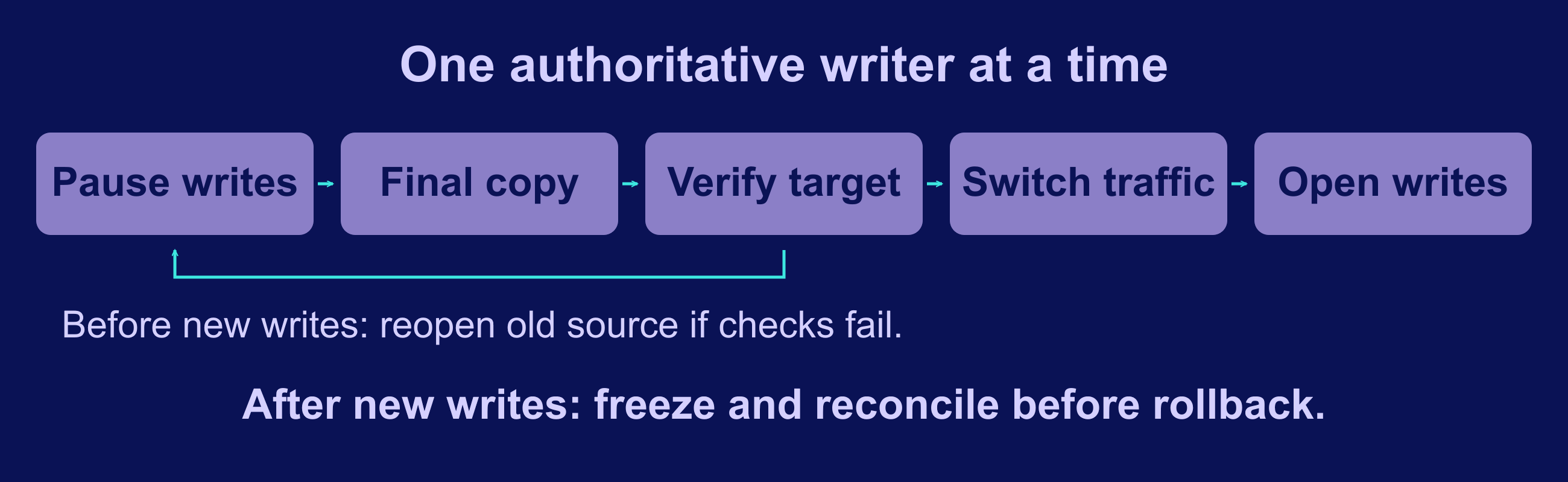
Agree on the last moment when the old system accepts changes and the first moment when the new one does. This write boundary matters more than a DNS update: cached DNS, queued jobs, and retrying integrations can continue reaching the old endpoint.
- Notify users and pause every source writer identified in the inventory. Drain or preserve in-flight jobs and record pending webhook deliveries.
- Take the final export or verified delta and record its cutoff. Retain a recoverable copy of the old system and its configuration.
- Import and reconcile the final data while the target remains closed to ordinary writes. Run the acceptance checks from rehearsal.
- Switch the required endpoint, proxy route, or DNS record. Verify HTTPS, authentication, callbacks, and access from the user’s path.
- Enable target writers deliberately and monitor real transactions. Keep the old system read-only and preserve its logs until the agreed retention period ends.
Before the target accepts new writes: a failed validation can usually be handled by leaving traffic on the old system and resuming its writers, provided that system is still intact. Confirm no target side effects occurred first.
After the target accepts new writes: pointing traffic back is not a complete rollback. Freeze both sides, preserve the target’s new records and side effects, then use the rehearsed reverse-transfer or reconciliation procedure. If schemas are incompatible or reconciliation is untested, a controlled repair on the target may be safer than restoring an old snapshot.
Set a clear decision owner, a communication channel, and evidence-based abort criteria. Do not delete the failed target or overwrite its logs while investigating. A backup restores an earlier state; it does not automatically preserve changes made after that state.
Check Cost and Ongoing Operations
Compare equivalent scopes after the rehearsal. Include server charges, backup storage, bandwidth or object storage, paid application features, monitoring, overlap with the old subscription, and the time required to operate the system. Separate one-time migration effort from recurring expense. Self-hosting is not automatically cheaper at a particular team size.
| Cost or operating input | Use this evidence |
|---|---|
| Current SaaS spending | Your invoices, actual seats, usage charges, and features that must be retained |
| Target infrastructure | A current quote for the tested capacity, storage, network allowance, and backup design |
| Software and support | The required edition, licence terms, support scope, and any paid extensions |
| Operator time | Recorded maintenance, monitoring, restore-test, and incident-handling time |
| Transition cost | Rehearsal work, import development, temporary instances, and overlapping subscriptions |
Define application targets from what users need and the current service baseline. Compare the same transaction, dataset, concurrency, and observation period before and after the move. Disk and network microbenchmarks can help diagnose a bottleneck, but they do not prove that login, search, or job processing works correctly.
Assign an update owner, test restores, check alerts, and review access regularly. Set backup frequency and retention from the amount of data you can afford to lose and the time you can tolerate recovery taking. Our self-hosted backup guide helps you plan that second system: the one you need when the first one fails.
Apply the Checklist to an n8n Migration

An automation platform shows why migration is more than copying records. Workflows depend on credentials, callback URLs, scheduled triggers, and external side effects. The following is a planning example based on n8n’s documentation, not a measured customer case study or a promise of cost or performance gains.
Move n8n Workflows Without Duplicating Executions
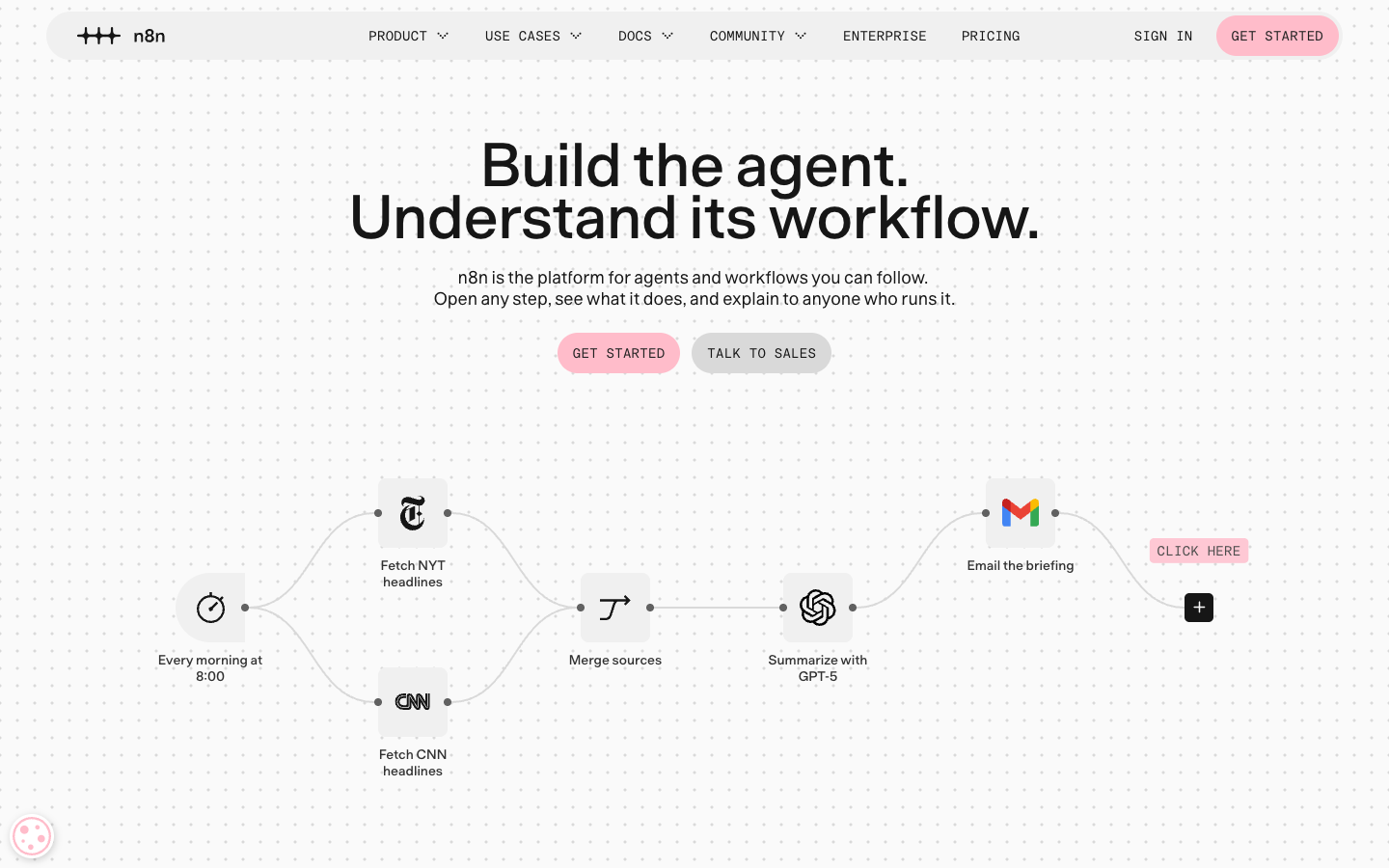
The official n8n homepage shows a sample workflow; its example data is not a result measured for this guide. Start with one noncritical workflow. In the source editor, download its JSON; in the target editor, use Import from File. The official export and import guide explains the UI flow. Workflow JSON includes credential references, and nodes may contain embedded authentication headers, so treat the file as sensitive. Recreate or reconnect credentials through the target’s normal credential setup and test every node before publishing the imported workflow.
A workflow export is not a complete instance backup. For a self-hosted-to-self-hosted move, follow n8n’s full backup and restore procedure: it covers the user folder, database, configured storage, and deployment configuration. Preserve the matching credential encryption key securely. An encrypted database without its key cannot restore working credentials. A Cloud workflow export does not grant access to the hosted instance’s server files.
- Inventory child workflows, installed nodes, variables, credentials, time zones, and callbacks before moving the workflow.
- Keep schedules and production triggers off during rehearsal. Use test accounts and endpoints that cannot send real invoices, messages, or payments.
- Configure the target’s public webhook URL and proxy settings for the installed n8n version, then update and test the external service’s callback registration.
- At cutover, stop the old trigger before enabling the new one; preserve pending events and use stable event IDs to avoid duplicate processing.
- Check a complete event through its final external result, then watch failures and retries after enabling normal traffic.
Size the instance with representative executions. n8n’s memory guidance identifies payload size, node behavior, and concurrent workflows as relevant factors; a workflow count alone is not a capacity specification. Also check the current licence and required feature edition before replacing a paid service. For an n8n-specific implementation path, continue with our n8n migration guide.
Finish the first migration before expanding the scope. Keep the inventory, timings, acceptance results, and recovery notes. Those records make the next migration easier to judge and give your future self a workable runbook.
Frequently Asked Questions
Will self-hosting reduce my SaaS bill?
Can I migrate without downtime?
Is a VPS snapshot enough for rollback?
What if the SaaS export misses data?