
A firewall migration can leave your existing SSH session working while blocking every new login. It can also remove IPv6 protections or restore a different policy at reboot. A dependable iptables-to-nftables migration starts with ownership, backups, and a tested way back.
This guide explains the decision process and gives a deliberately narrow cutover example for a standalone Debian or Ubuntu host using iptables-nft and systemd. Keep the first migration equivalent to the existing policy. Routers, container hosts, and systems managed by UFW, firewalld, or a control panel need their own integration plan. On an unmanaged VPS, you own that policy and its recovery procedure.
Configure your firewall with full root access, and use the browser VNC console if a rule blocks SSH.
Check the Backend and Policy Owner
The name iptables does not identify the kernel backend. Check both address families, inspect the complete active rules, and find every program that writes them. The following commands read configuration; they do not migrate it.
Understand the iptables Compatibility Backend
sudo iptables --version
sudo ip6tables --version
sudo nft list ruleset
sudo systemctl list-unit-files nftables.service netfilter-persistent.service ufw.service firewalld.service
sudo systemctl --no-pager --all list-units nftables.service netfilter-persistent.service ufw.service firewalld.service
A version string containing (nf_tables) identifies the compatibility backend; (legacy) identifies the older API. The xtables-nft manual explains this distinction. An inactive service does not prove its rules are absent. Inspect startup scripts, configuration management, scheduled jobs, and application-generated chains too.
| Observed setup | What it means | Migration decision |
|---|---|---|
| iptables-nft, static host policy | iptables syntax already controls the nf_tables backend | Translate and review the policy; the scoped example below can fit |
| iptables-legacy or mixed backends | Legacy and nftables policies can exist independently | Rehearse a separate console-based cutover for both backends |
| UFW, firewalld, or a control panel | A higher-level tool owns some or all rules | Keep that owner or follow its documented migration procedure |
| Containers, VPN forwarding, NAT, or dynamic bans | Other services and traffic paths depend on generated rules | Design and test the integrations before replacing any tables |
These are supported deployment choices, not evidence that iptables has a universal retirement deadline. Docker, for example, documents both firewall backends and warns against modifying its generated bridge-network rules. Read its firewall integration guidance for the installed Engine version. Do not disable Docker’s firewall management to make this tutorial fit.
Scope gate: the executable replacement below assumes both iptables commands report nf_tables; there is no active legacy policy, NAT, forwarding workload, bridge/ARP policy, unrelated native table, or dynamic rule writer; and you control the whole ruleset. Check explicit legacy tools if installed. If any assumption is unproven, use the inventory and translation steps only, then build a system-specific cutover.
Back Up Rules and Recovery Access

Open the provider console and confirm that you can authenticate before the maintenance window. Keep a second administrator connection available. Install the distribution’s nftables and iptables utilities beforehand, inspect package/service changes, and capture the baseline only after that preparation. Do not stop a working firewall service merely to make it inactive.
Use a new, root-only backup directory. This example refuses to overwrite an earlier run and stops when an export fails. If it stops partway through, inspect the error and retain the partial directory; do not treat it as a complete backup.
sudo bash <<'SH'
set -euo pipefail
backup=/root/firewall-migration
test ! -e "$backup"
install -d -m 700 "$backup"
umask 077
iptables-save > "$backup/ipv4.rules"
ip6tables-save > "$backup/ipv6.rules"
nft list ruleset > "$backup/nft-current.nft"
test -s "$backup/ipv4.rules"
test -s "$backup/ipv6.rules"
test -s "$backup/nft-current.nft"
if [ -e /etc/nftables.conf ]; then
  cp -a /etc/nftables.conf "$backup/nftables.conf.before"
fi
SH
Read all three exports. Confirm the expected tables, policies, and rules are present for IPv4 and IPv6; an empty or unexpectedly short file is a stop condition. Save the old loader’s configuration and enabled state as well. Keep an off-server copy protected as operational configuration, and record any provider firewall rules separately.
A snapshot can supplement these records, but a disk restore is not the same as restoring the running packet-filter policy. The console recovery plan must identify the exact saved files and the original loader. Avoid combining the migration with SSH-port changes, a distribution upgrade, or a new network layout.
Translate and Review Both Address Families
Use the Official nftables Migration Reference
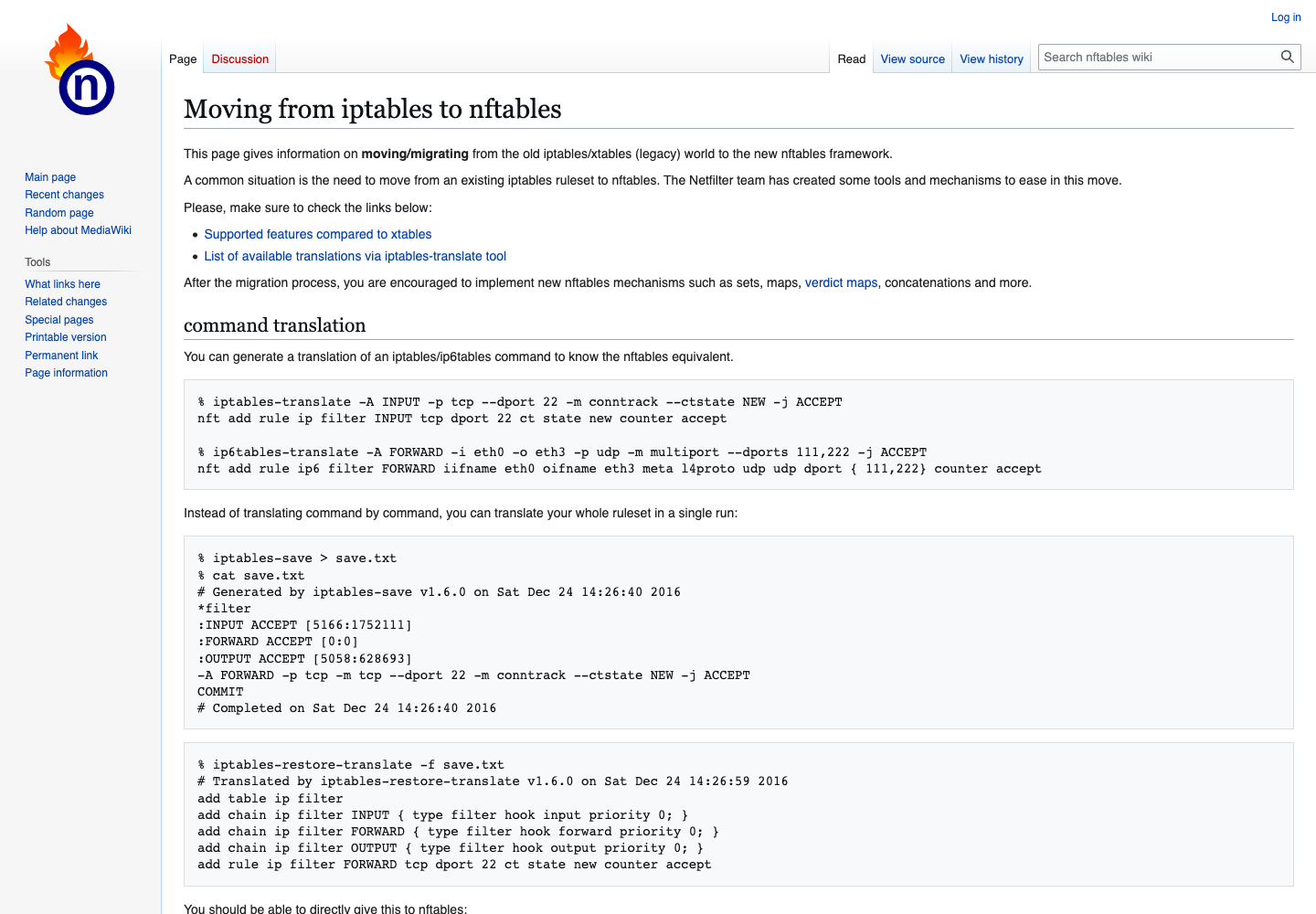
The documentation screenshot shows historical example output, not commands executed for this article or a current benchmark. Use the installed translation utilities to convert saved syntax without loading rules. iptables-translate handles one command; the two restore-translate tools consume the respective save-file formats. Translation support varies by extension and version, so successful text output is only a starting point.
sudo bash <<'SH'
set -euo pipefail
cd /root/firewall-migration
umask 077
iptables-restore-translate -f ipv4.rules > ipv4-translated.nft
ip6tables-restore-translate -f ipv6.rules > ipv6-translated.nft
test -s ipv4-translated.nft
test -s ipv6-translated.nft
SH
Compare each translated rule with its source. Review comments and diagnostics, default policies, chain hooks and priorities, source restrictions, connection tracking, and any marks or special matches. Resolve every unsupported expression explicitly. Do not delete a rule just because its translation is difficult.
Keep the initial IPv4 ip and IPv6 ip6 tables separate if that is what the translator emits. Combining them into inet tables or introducing sets can be a later, independently tested refactor. A syntax migration and a policy redesign are easier to verify separately.
Define the Traffic That Must Keep Working

Write acceptance checks before loading the candidate. Include traffic that should remain denied. Identify the actual listening SSH port and addresses rather than assuming port 22; socket activation or command-line overrides can differ from a configuration-file reading.
sudo sshd -T | grep '^port '
sudo ss -lntp
sudo ss -lnup
| Traffic path | What to preserve | How to check |
|---|---|---|
| Administration | Actual SSH port, allowed source addresses, established sessions | Open a new login from the permitted administration path |
| Host applications | Required TCP/UDP listeners and intended source restrictions | Exercise the real service from another host |
| IPv6 and control traffic | The existing IPv6 policy, neighbor discovery, and needed ICMP errors | Test IPv6 reachability and application traffic where deployed |
| Outbound dependencies | DNS, updates, time sync, APIs, and monitoring under the existing output policy | Run representative application and health checks |
| Denied access | Ports and sources that must remain blocked | Confirm rejected paths from a controlled external test host |
Keep loopback and required established/related traffic handling intact. ICMPv6 is part of IPv6 operation; blocking it indiscriminately can break more than ping. Ubuntu’s nftables guide explains address-family handling and control traffic. A host input policy does not validate forwarded traffic, which is outside this example.
Do not add public application ports just because they appear in a sample firewall. Your listeners, network paths, and existing restrictions determine the policy. Keep provider-level filtering in the test inventory: it can hide an accidentally permissive host rule.
Rehearse and Arm a Runtime Rollback
For the scoped, fully owned nf_tables ruleset, create two replacement batches: the reviewed translated policy and the saved original. Each contains its flush and replacement in one file. flush ruleset removes all nftables tables, so this is unsuitable when another tool owns any of them.
sudo bash <<'SH'
set -euo pipefail
cd /root/firewall-migration
umask 077
{ printf 'flush ruleset\n'; cat ipv4-translated.nft ipv6-translated.nft; } > candidate.nft
{ printf 'flush ruleset\n'; cat nft-current.nft; } > rollback.nft
nft -c -f candidate.nft
nft -c -f rollback.nft
SH
The nft manual defines -c as a check without applying changes. It does not prove the access policy is correct. Stop on unsupported xt compatibility expressions, errors, or any rule that fails validation or the restoration rehearsal. An ownership notice requires you to confirm the existing policy owner and freeze its writes; it does not prove the saved ruleset is restorable. Keep the original iptables exports for console recovery; do not assume every compatibility ruleset can be restored through native syntax.
Rehearse the replacement, loss-of-access test, and timed restoration on an isolated equivalent VM. Confirm that the rollback restores new SSH access and the original policy. On the real host, freeze other rule changes for the window and verify the backups still represent the current baseline.
After that rehearsal, arm a system-level timer. The ten-minute interval is an example review window, not a measured migration duration; choose one that you have rehearsed. Confirm the nft binary path on your distribution and use a unique unit name for each attempt.
sudo systemd-run --unit=firewall-rollback --on-active=10m \
  --timer-property=AccuracySec=1s --property=Type=oneshot \
  /usr/sbin/nft -f /root/firewall-migration/rollback.nft
sudo systemctl cat firewall-rollback.service
sudo systemctl --no-pager status firewall-rollback.timer
sudo systemctl --no-pager list-timers firewall-rollback.timer
Proceed only when the timer is waiting and its command and deadline are correct. systemd-run creates the transient service and timer independently of the SSH shell. This runtime timer does not survive a reboot and does not restore boot configuration. Keep console access; a scheduled job is not proof that restoration will succeed.
Apply the Candidate and Test New Connections
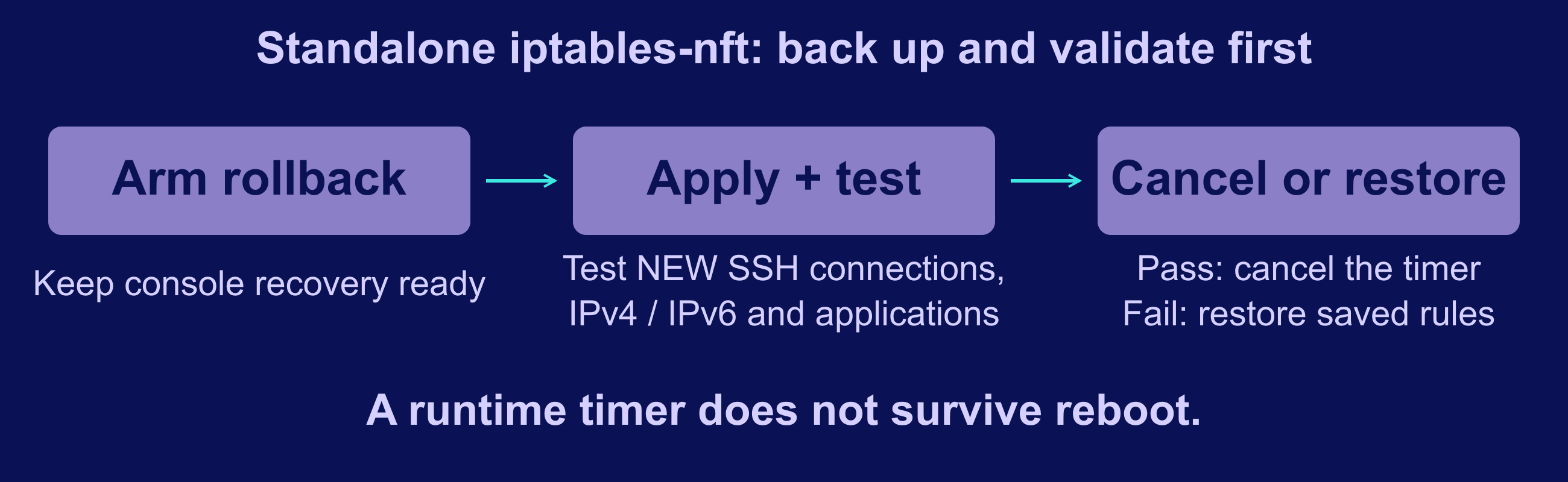
With the timer still armed and sufficient time left, check and load the exact reviewed file:
sudo nft -c -f /root/firewall-migration/candidate.nft &&
sudo nft -f /root/firewall-migration/candidate.nft
sudo nft list ruleset
The nftables batch mechanism applies the flush and new configuration together. It avoids a separately executed empty-firewall step, but it cannot prevent a valid rule from denying the wrong traffic. Do not run a standalone flush first.
- Open a new SSH connection from the allowed source; keeping the old session alive is insufficient.
- Test every required application from outside the server, including IPv4 and IPv6 where used.
- Exercise outbound dependencies and monitoring, and confirm selected denied paths remain blocked.
- Read the active rules and counters, and check whether any unexpected writer changed the policy.
Use real hostnames when testing HTTPS so certificate and virtual-host checks remain meaningful. A server-side connection to localhost does not prove external access. If a check fails, leave the rollback armed or restore the saved batch through the console, then investigate before another attempt.
Only after all checks pass, stop the pending timer and inspect its service history. Stopping a timer does not undo a rollback that has already started. If the deadline raced your tests or the service ran, verify which policy is actually loaded before proceeding.
sudo systemctl stop firewall-rollback.timer
sudo systemctl --no-pager list-timers --all firewall-rollback.timer
sudo journalctl -u firewall-rollback.service --no-pager
sudo nft list ruleset
Configure Persistence Without Flushing Live Rules
Runtime success and boot persistence are separate checks. For the Debian/Ubuntu layout used here, inspect the installed unit and existing configuration before choosing /etc/nftables.conf. Other distributions may use different paths or service behavior.
sudo systemctl cat nftables.service
sudo systemctl is-enabled nftables.service
sudo systemctl is-enabled netfilter-persistent.service
Keep the backed-up original file and loader state. Once the candidate has passed the runtime tests, install that same reviewed file and validate the installed copy. If validation fails, restore the previous configuration before any reboot or service action.
sudo install -o root -g root -m 600 \
  /root/firewall-migration/candidate.nft /etc/nftables.conf &&
sudo nft -c -f /etc/nftables.conf
Enable the intended loader only after the check passes. If your inventory proved netfilter-persistent was the sole old static loader, disable its boot activation separately. Do not apply this example to UFW, firewalld, or an application-owned policy.
sudo systemctl enable nftables.service &&
sudo systemctl disable netfilter-persistent.service
Enabling and disabling units controls startup links; it is separate from starting or stopping them. The commands above deliberately omit --now. Inspect ExecStop before stopping or restarting a firewall unit: an implementation may flush live rules. Do not make a service-status label look cleaner at the expense of the tested policy.
Reboot in a maintenance window with working console access and a written boot-recovery procedure. The earlier transient timer cannot protect this test. After boot, check the loaded rules, loader journal, a new SSH login, and the full acceptance list again. Keep versioned configuration and reviewable changes as part of your operations workflow.
Troubleshoot Before Retiring the Old Policy

| Symptom | First investigation |
|---|---|
| Old SSH session works; new login fails | SSH port/source allowance, rule order, and default input policy |
| IPv4 works; IPv6 fails | IPv6 rules, required ICMPv6, actual listeners, and provider filtering |
| Policy changes after reload or reboot | The installed file, enabled loaders, unit actions, and other rule writers |
| Containers or VPN clients lose connectivity | Forwarding/NAT and application ownership; return to an integration-specific plan |
| Candidate fails check mode | The reported location, unsupported extension, missing object, or version mismatch |
For a true iptables-legacy source, a successful nft load does not remove the old xtables policy. Both can affect traffic. Plan the exact transition and rollback of each backend from the console, including original default policies and the old boot loader. Flushing legacy rules without handling a DROP policy can still leave access blocked. Changing an alternatives symlink alone is not a completed migration.
Retain backups until the reboot test and a representative operating period pass. Watch infrastructure monitoring for failed health checks and new connection errors. Record the final policy owner, restore procedure, and test results. No rule-count comparison or generic throughput claim can substitute for those checks.
Frequently Asked Questions
Do I need to migrate if iptables reports nf_tables?
Can I copy a minimal nftables example over my current firewall?
Does nft -c prove that I will retain SSH access?