

A VPS is like renting your own apartment in a building: you get your own walls, your own lock on the door, and your own space — instead of sharing a dorm room with strangers (shared hosting) or buying the entire building outright (dedicated server). That, in a nutshell, is what a VPS server is. A Virtual Private Server gives you a slice of a physical machine with dedicated CPU, RAM, and storage that nobody else can touch, at a fraction of the cost of owning hardware.
Whether you are launching a business website, self-hosting applications, running a game server, or setting up a trading terminal, a VPS gives you the control and performance to do it on your own terms. This guide breaks down how VPS technology works under the hood, how it compares to other hosting types, what people actually use it for, and how to pick the right plan for your project.
What Does VPS Stand For?
VPS stands for Virtual Private Server. Let’s unpack that word by word:
- Virtual — The server is not a separate physical machine. It is created by software that carves a physical server into isolated compartments.
- Private — Your compartment is yours alone. The resources allocated to you (CPU cores, memory, disk space) cannot be consumed by another user on the same machine.
- Server — It behaves exactly like a standalone server. You get your own operating system, your own IP address, full root or administrator access, and the ability to install any software you want.
The concept has been around since the early 2000s, but the technology behind it — hardware-level virtualization, fast SSD storage, high-bandwidth networks — has matured dramatically. Today’s VPS plans deliver performance that would have required a full dedicated server just a few years ago.
How Does a VPS Work?
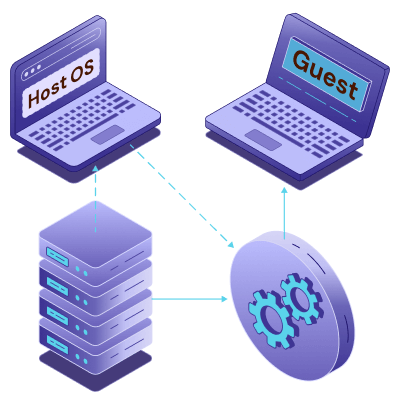
At the core of every VPS is a hypervisor: a thin layer of software that sits between the physical hardware and the virtual machines running on top of it. The hypervisor’s job is to divide the physical server’s resources — CPU, RAM, storage, and network — into isolated pools, and then assign each pool to a separate virtual server.
Think of the hypervisor as the building manager. It decides how many apartments (VPS instances) fit inside the building (physical server), makes sure each apartment gets the water pressure and electricity it was promised, and prevents one noisy tenant from disturbing the others.
The Hypervisor Layer
Not all hypervisors are created equal. The three most common in the VPS industry are:
KVM (Kernel-based Virtual Machine) — The industry standard for modern VPS hosting. KVM is built into the Linux kernel and provides full hardware virtualization. Each VPS runs its own independent kernel, which means true isolation and the ability to run any operating system, including Windows. KVM accounts for roughly 62% of the VPS market today.
OpenVZ — A container-based virtualization technology. OpenVZ is lighter on overhead, which allows providers to pack more instances onto a single machine. The trade-off is that all VPS instances share the same Linux kernel, which limits OS choices and provides weaker isolation than KVM. It holds about 28% of the market.
VMware / Hyper-V — Enterprise-grade hypervisors typically found in corporate data centers rather than retail VPS hosting. They offer advanced features like live migration and high availability clustering, but at a higher licensing cost.
If you are shopping for a VPS, look for KVM-based plans. The stronger isolation, broader OS support, and consistent performance make it the better choice for the vast majority of workloads. VPS.us uses KVM across all its plans for exactly these reasons.
Dedicated Resources vs. Shared Resources
This is the fundamental difference between a VPS and shared hosting. On a shared hosting plan, your website competes with dozens — sometimes hundreds — of other sites for the same pool of CPU and memory. If another site on your server gets a traffic spike, your site slows down. You have no control over it.
On a VPS, the resources assigned to you are guaranteed. If your plan includes 2 vCPU cores and 4 GB of RAM, those resources are reserved for your instance whether you are using them or not. No other user on the machine can borrow them. This is what makes VPS performance predictable and consistent, which is critical for anything beyond a simple blog or portfolio site.
VPS vs. Shared Hosting vs. Dedicated Server

Choosing between shared hosting, VPS, and a dedicated server comes down to how much control, performance, and budget flexibility you need.
Here is how they compare side by side:
| Feature | Shared Hosting | VPS | Dedicated Server |
|---|---|---|---|
| Resources | Shared pool across all users | Dedicated allocation per instance | Entire physical machine |
| Root Access | No | Yes | Yes |
| Performance | Variable, depends on neighbors | Consistent and predictable | Maximum available |
| Scalability | Limited, plan upgrades only | Easy vertical scaling (add CPU/RAM) | Hardware swap required |
| Security | Shared environment, higher risk | Isolated instance, custom firewalls | Fully isolated hardware |
| Starting Price | $3–10/mo | $5–30/mo | $80–200/mo |
| Best For | Personal blogs, small static sites | Growing businesses, apps, dev/staging | Enterprise, high-traffic, compliance |
The sweet spot for most people is VPS. Shared hosting works fine when you are just getting started and your site gets a few hundred visitors a day. But the moment you need consistent performance, SSH access, the ability to run background processes, or support for something beyond basic PHP hosting, you have outgrown it. A dedicated server, on the other hand, gives you maximum power but at a cost that only makes sense if you are running high-traffic production systems or need hardware-level compliance isolation.
In addition to its features, VPS hosting offers numerous advantages that make it an attractive solution for a wide range of hosting needs. These benefits ensure better performance, security, and cost-effectiveness:
- Cost-Effectiveness: VPS hosting provides many benefits of a dedicated server at a much lower cost, making it an economical choice for businesses and individuals.
- Improved Performance: With dedicated resources, VPS hosting offers better performance than shared hosting, ensuring faster load times and seamless user experiences.
- Enhanced Security: The isolated nature of VPS hosting reduces the risk of data breaches and malware spreading between users. Users can also implement custom security measures for additional protection.
- Flexibility: From hosting websites to running custom applications, VPS hosting supports a wide range of use cases, catering to various technical and business requirements.
VPS hosting sits right in the middle: real server capabilities, real isolation, real control — at a price point that starts lower than most people expect.
What Is a VPS Used For?

This is where VPS hosting really shines. Because you get full root access and dedicated resources, the use cases are nearly limitless. Here are the ten most common reasons people spin up a VPS today:
1. Web Hosting
The most straightforward use case. A VPS can host WordPress, WooCommerce, static sites, or any CMS-based website with performance that shared hosting cannot match. If your site gets more than a few thousand visitors a month, or if you run plugins and dynamic content that need reliable CPU and memory, a VPS is the right foundation. You also get the flexibility to fine-tune your web server (Nginx, Apache, LiteSpeed) and PHP settings for your specific traffic patterns.
2. Self-Hosting Applications
The self-hosting movement is growing fast — up 47% year-over-year in 2025, driven by tools like n8n, Nextcloud, Plausible Analytics, Vaultwarden, and others. A VPS is the natural home for self-hosted software because you control the environment completely: you pick the OS, the database, the reverse proxy, and you decide who has access. No vendor lock-in, no per-seat SaaS pricing, and your data stays on your server.
Also, the Vibe coding trends exploded in 2025 thanks to AI and the VPS allows users to deployed their application on the
3. Game Server Hosting
Minecraft, Palworld, Valheim, Satisfactory, Terraria — multiplayer games need a server that stays online 24/7 with low latency and enough RAM to handle the world state. A VPS gives you exactly that, plus the ability to install mods, manage whitelists, and run multiple game instances if your plan has headroom. The key is choosing a server location close to your player base to minimize ping.
4. Forex and Trading VPS
Traders running MetaTrader 4 or MetaTrader 5 need a server that never sleeps. Even a few seconds of downtime can mean missed trades. A trading VPS keeps your expert advisors (EAs) running around the clock with minimal latency to broker servers. Most traders opt for a Windows VPS with 2–4 GB of RAM, positioned in a data center near their broker (New York, London, or Tokyo, depending on the markets they trade).
5. Development and Testing Environments
Developers use VPS instances as staging servers, CI/CD runners, and sandbox environments where they can test deployments before pushing to production. Because you can snapshot a VPS, clone it, or destroy and rebuild it quickly, it is ideal for iterative development workflows. Spin up a fresh instance, run your test suite, tear it down — and do it all over SSH from your laptop.
6. VPN Server
Running your own VPN on a VPS gives you encrypted internet access without trusting a third-party VPN provider with your traffic. Tools like WireGuard or OpenVPN can be set up on a basic VPS in under 30 minutes. You control the logs (or lack thereof), you pick the server location, and you get consistent speeds without the overcrowding that plagues commercial VPN services.
7. Email Server
Self-hosting email with tools like Mailcow, Mail-in-a-Box, or Stalwart gives businesses full control over their communications. A VPS provides the static IP and uptime needed for reliable email delivery. It requires more setup and maintenance than using Gmail or Outlook, but for organizations that need data sovereignty or want to avoid per-user SaaS fees, it is a solid approach.
8. Remote Desktop (Cloud PC)
A Windows VPS can serve as a cloud-based desktop that you access from anywhere — your laptop, tablet, or even a phone. It is particularly useful for running Windows-only applications when you are on a Mac or Linux machine, accessing a consistent work environment while traveling, or giving remote contractors a controlled workspace without shipping hardware.
9. AI and Machine Learning Workloads
For smaller inference tasks, fine-tuning lightweight models, or running AI-powered APIs, a VPS with adequate CPU and RAM can handle the job. Some providers also offer GPU VPS plans for more intensive workloads. If you are deploying models built with tools like Ollama, vLLM, or llama.cpp, a VPS gives you a persistent endpoint without paying per-token API fees.
10. Backup and Storage Server
A VPS in a different geographic location makes an excellent off-site backup destination. Tools like restic, BorgBackup, or Syncthing can push encrypted backups to your VPS on a schedule. It is cheaper than most cloud backup services at scale, and you retain full control over encryption keys and retention policies.
These are just the starting points. People run everything from home automation controllers to Discord bots to private media servers on their VPS. If it runs on Linux or Windows, it can run on a VPS.
How to Choose the Right VPS Plan

Not every VPS plan is built for the same workload. Here is how to match your requirements to the right specs.
CPU and RAM: How Much Do You Need?
The answer depends entirely on what you plan to run. Here is a practical sizing guide:
| Use Case | vCPU | RAM | Notes |
|---|---|---|---|
| Personal blog or portfolio | 1 | 1 GB | Enough for low-traffic static or WordPress sites |
| Small business website | 1–2 | 2 GB | Handles moderate traffic with a database backend |
| WooCommerce / e-commerce | 2 | 4 GB | Needs headroom for concurrent shoppers and payment processing |
| Self-hosted apps (n8n, Nextcloud) | 2 | 4 GB | More RAM helps if running multiple services |
| Game server (Minecraft, Palworld) | 4 | 8 GB | RAM is the bottleneck for most game servers |
| Forex trading (MT4/MT5) | 2 | 2–4 GB | CPU matters for running multiple EAs simultaneously |
| Dev/staging environment | 2 | 4 GB | Mirror your production specs where possible |
| AI inference (small models) | 4+ | 8–16 GB | RAM is critical for loading model weights |
When in doubt, start with a smaller plan and scale up. With KVM-based VPS, upgrading CPU and RAM usually takes just a reboot.
Storage Type: SSD vs. NVMe
Standard SSDs are dramatically faster than old spinning-disk drives, but NVMe (Non-Volatile Memory Express) pushes performance further. NVMe drives connect directly to the CPU over PCIe lanes instead of going through the SATA interface, which means read/write speeds that are 3–5x faster than SATA SSDs.
For most websites and applications, SSD storage is perfectly adequate. But if your workload involves heavy database operations, large file transfers, or anything I/O-intensive, NVMe makes a noticeable difference in real-world performance.
Bandwidth and Data Transfer
Some VPS providers meter your bandwidth (you get a set amount per month, like 2 TB, and pay overage fees). Others offer unmetered bandwidth, meaning you can transfer as much data as your port speed allows without extra charges.
Unmetered is simpler and more predictable for budgeting. Just pay attention to the port speed — unmetered on a 100 Mbps port is very different from unmetered on a 1 Gbps port.
Managed vs. Unmanaged VPS
Unmanaged VPS gives you a blank server with an OS installed. You handle everything: updates, security, software installation, troubleshooting. It is the most affordable option and gives you the most control, but it requires comfort with the Linux (or Windows) command line.
Managed VPS includes server administration from the provider: OS updates, security patches, monitoring, and often a control panel like cPanel or Plesk. It costs more per month, but saves hours of maintenance work. It is the right call if you want to focus on your application, not your infrastructure.
Operating System: Linux vs. Windows VPS
Linux VPS (Ubuntu, AlmaLinux, Debian, Rocky Linux) is the default choice for web hosting, self-hosted apps, and development. It is free, lightweight, well-documented, and runs the vast majority of server software.

Windows VPS is necessary when you need to run Windows-specific applications: ASP.NET, MSSQL Server, MetaTrader, or any software that requires a Windows desktop environment. It costs slightly more due to the Windows license, but is the only option for certain workloads.
Location Matters
The physical distance between your VPS and your users directly affects latency. A server in New York will respond faster to users in the US East Coast than one in Frankfurt. If your audience is global, choose a central location or consider running VPS instances in multiple regions.
When selecting a data center, also consider:
- Proximity to your users — lower latency means faster page loads and snappier applications.
- Legal jurisdiction — data residency laws may require hosting in specific countries.
- Network quality — look for providers with Tier 1 network peering and multiple upstream providers.
VPS.us offers multiple locations across the United States, giving you the flexibility to place your server where it performs best for your audience.
Getting Started with Your First VPS

Once you have picked a plan, here is the fast path from signup to running application:
Step 1 — Choose your plan. Match your workload to the CPU, RAM, and storage you need using the sizing guide above.
Step 2 — Select your operating system. Ubuntu 22.04 or 24.04 LTS is the most beginner-friendly Linux option. Choose Windows Server if your application requires it.
Step 3 — Connect via SSH. Once your VPS is provisioned (usually within minutes), connect using your terminal: ssh root@your-server-ip. On Windows, use PowerShell or a tool like PuTTY.
Step 4 — Secure your server. Before deploying anything, take five minutes to lock things down:
- Update all packages (
apt update && apt upgradeon Ubuntu) - Create a non-root user with sudo access
- Set up SSH key authentication and disable password login
- Configure a firewall (UFW on Ubuntu:
-
ufw allow 22 && ufw allow 80 && ufw allow 443 && ufw enable) - Install fail2ban to block brute-force attempts
Step 5 — Deploy your application. Install your web server, database, CMS, game server, or whatever you are building. From here, the server is yours to configure exactly how you want it.
The entire process — from order to live application — can take as little as 15–20 minutes if you know what you are deploying..
Final Words
VPS hosting bridges the gap between shared hosting and dedicated servers, offering a versatile and cost-effective solution for a wide range of applications. With dedicated resources, enhanced performance, and the ability to customize your environment, VPS hosting empowers businesses and individuals to achieve their hosting goals without breaking the bank.
Whether you’re hosting a website, running an application, or developing a project, VPS hosting provides the flexibility and reliability needed to succeed in today’s digital landscape.
Explore Reliable VPS Hosting with VPS.us
Looking for a VPS hosting solution tailored to your needs? VPS.us offers high-performance plans featuring SSD storage, full root access, and 24/7 support. Their KVM1-US plan provides exceptional scalability and flexibility, perfect for small to medium-sized projects. Choose VPS.us today and take the next step in building your online success!
Frequently Asked Questions
What Is a VPS?
How Does a VPS Work?
Can I host multiple websites on a VPS?
Is a VPS the same as a cloud server?
Is VPS hosting faster than shared hosting?
Is a VPS good for WordPress?
Do I need technical skills to manage a VPS?

