

Managing finances across several accounts, budgets, investments, and recurring expenses can leave sensitive data spread across multiple services. Hosted finance apps reduce the administrative work, but they also require you to trust the provider’s security practices, data policies, and long-term availability.
A self-hosted finance manager gives you another option: install an open source application on infrastructure you control and access it through a browser or supported client. This arrangement provides greater control over storage, access, and backups, but it also makes you responsible for maintaining the application and server.
Start with the workflow you need: envelope budgeting, detailed transaction records, desktop accounting, or supported bank imports. The five projects below are not interchangeable. Maybe is an archived project, not a maintained recommendation for a new installation. Project status and bank-sync documentation were checked on 29 September 2026.
If you are comfortable managing infrastructure, the benefits of self-hosted applications include greater control over both your software and its data.
What Is a Self-Hosted Finance Manager?
A self-hosted finance manager is an application installed on a home server, VPS, or other infrastructure under your control rather than operated entirely by a finance-service provider.
Depending on the application, it may help you manage:
- Accounts: Track bank accounts, cash, credit cards, loans, and other balances.
- Transactions: Record income, expenses, transfers, and recurring activity.
- Budgets: Set spending targets and compare them with actual results.
- Categories: Organize income and expenses for analysis.
- Reports: Review cash flow, balances, spending patterns, and financial trends.
- Investments: Track holdings and portfolio values when supported.
Capabilities vary considerably. Some applications specialize in envelope-style budgeting, while others use double-entry accounting or focus on net-worth and investment tracking.
Self-hosted does not always mean browser-based. Firefly III, Actual Budget, and Kresus support server deployments, while GnuCash is primarily desktop software. Maybe also shipped a server application, but its original repository is now archived. This distinction affects deployment, multi-device access, and who will provide future fixes.
Benefits and Trade-Offs of Self-Hosting
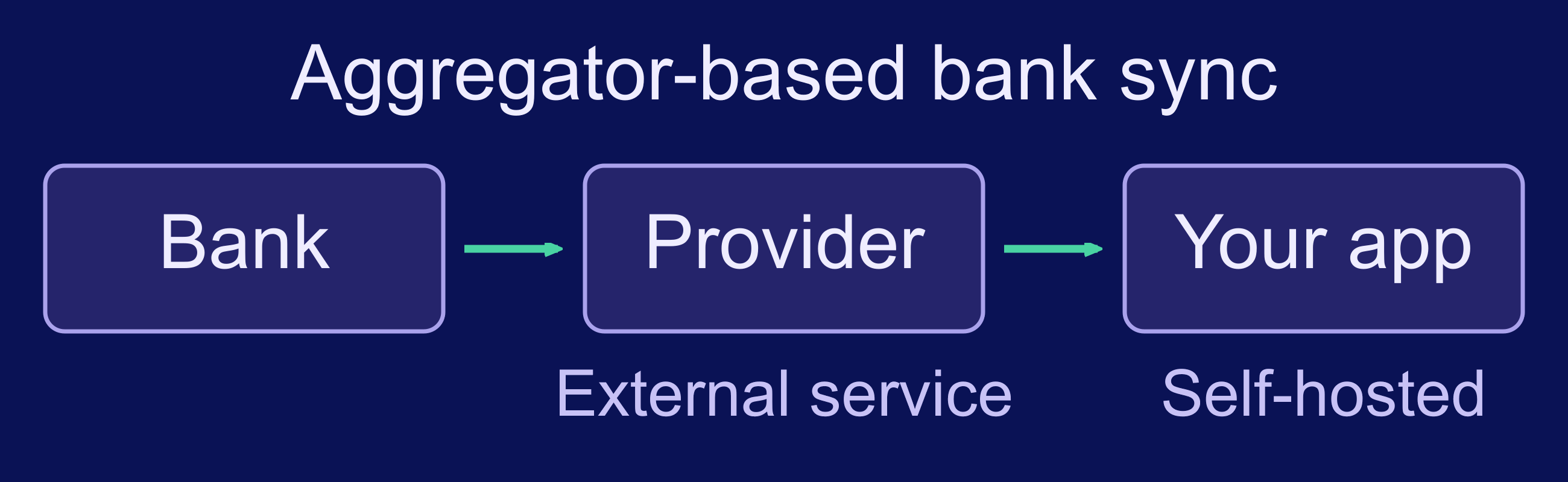
Self-hosting is not simply a way to avoid a subscription. Its main advantage is control over where the application and its primary database run.
- Privacy: Store financial records on infrastructure you administer.
- Configuration control: Choose how the application is installed, updated, exposed, and backed up.
- Data access: Maintain direct access to databases, files, and supported exports.
- Customization: Modify or extend open source software when its license and architecture permit it.
- Deployment flexibility: Use a home server, private network, or remotely accessible VPS.
That control comes with operational responsibilities. You must apply security updates, monitor the server, configure encrypted access, protect credentials, and maintain tested backups. Bank synchronization may still send data through an external aggregation provider, so self-hosting does not guarantee that every part of the data flow remains private.
Five Open Source Finance Tools to Compare
The interface examples below come from official project screenshots, documentation, or a public demo. Displayed balances are sample data, not financial results. Maybe’s screenshot is historical because the original project is archived. Open any screenshot to inspect it at full size.
Compare the application model as well as features. The table includes Maybe to explain why older recommendations need rechecking; it is not a shortlist of five equally suitable maintained server applications. Follow the official sources linked below before importing sensitive records.
| Tool | Primary use | Interface | Notable limitation |
|---|---|---|---|
| Firefly III | Transaction tracking and budgeting | Web | Investment tracking is not its main focus |
| Actual Budget | Envelope-style budgeting | Web and local-first clients | Bank sync depends on region and external services |
| Maybe | Net worth, accounts, and investments | Web | Archived; original project no longer maintained |
| GnuCash | Personal and small-business accounting | Desktop | Not a conventional browser-based server application |
| Kresus | Bank-account and transaction aggregation | Web | Connector availability depends heavily on Woob support |
Firefly III
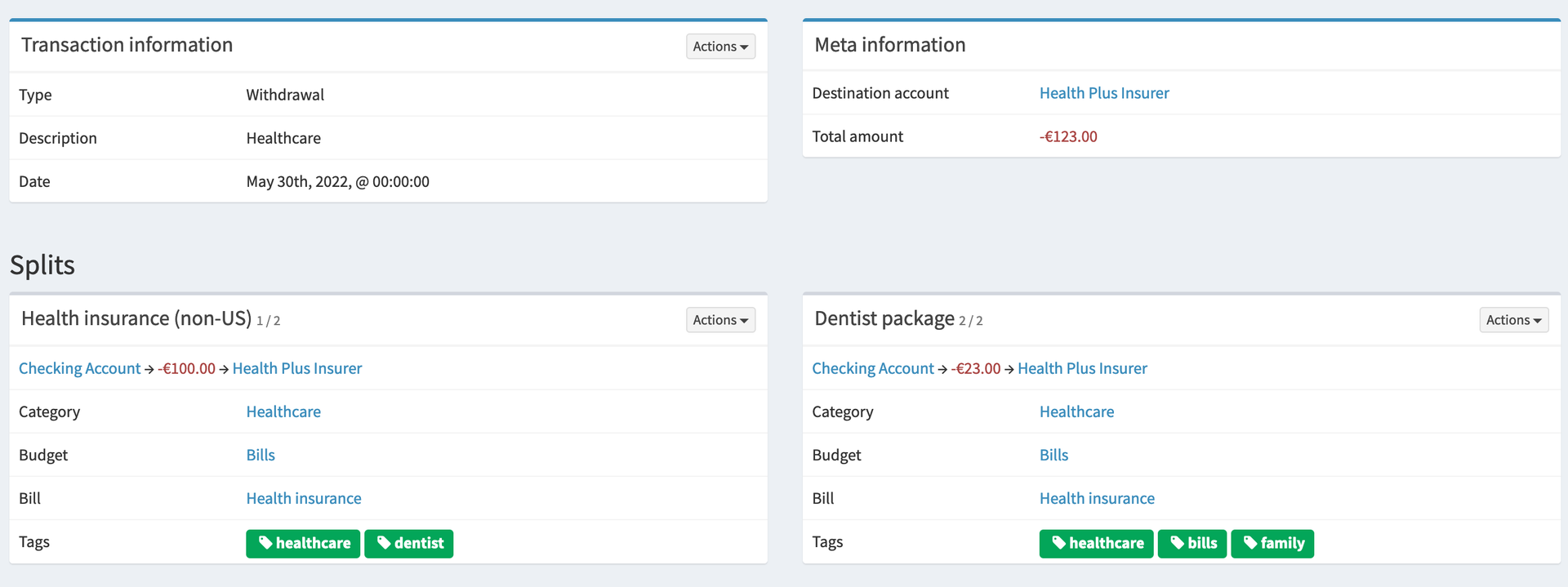
Firefly III is a self-hosted personal finance manager for transactions, accounts, budgets, categories, recurring activity, and reports. It uses double-entry bookkeeping internally while focusing on personal money management.
It is a strong option for users who want detailed transaction management and reporting through a browser. Its API and separate data-importer project also provide options for importing financial information, although supported sources and third-party requirements must be checked separately.
Firefly III is less suitable if your primary requirement is detailed portfolio analysis. It can record asset-related transactions, but investment management is not its central purpose.
Actual Budget
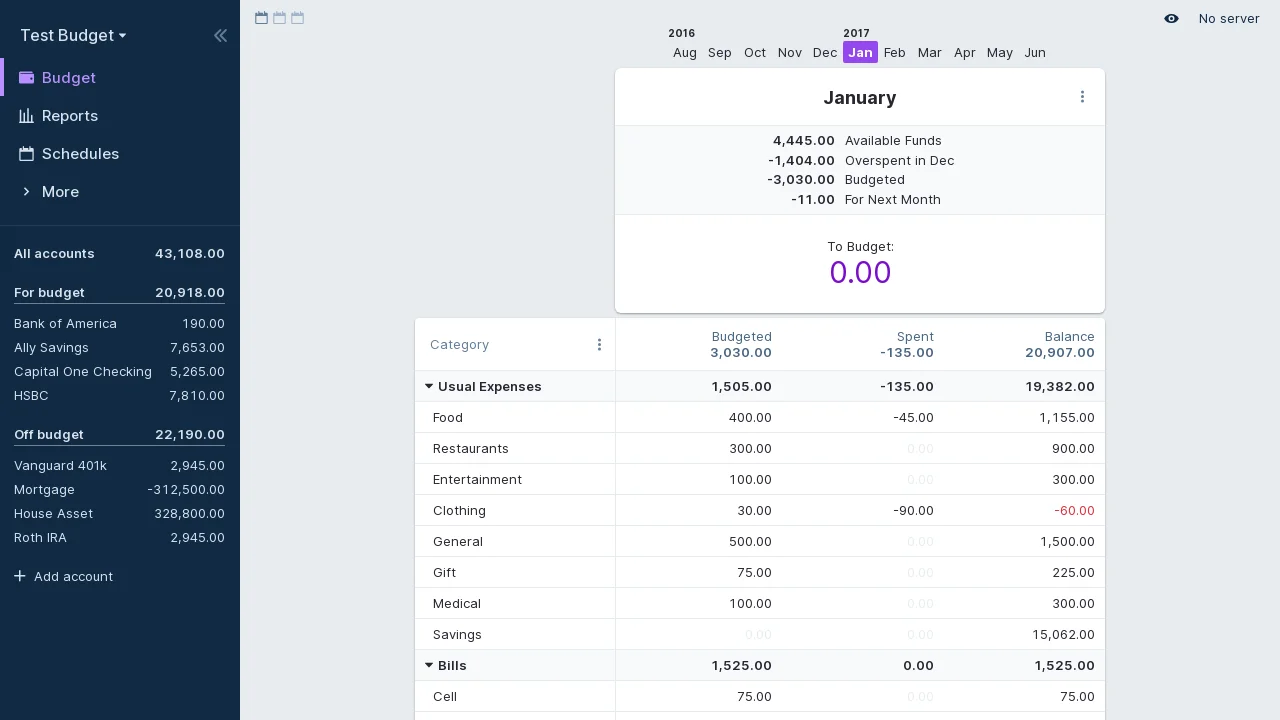
Actual Budget is an open source, local-first finance application with envelope budgeting and a tracking-budget option. It supports transaction management, schedules, reports, and synchronization between clients.
A self-hosted Actual server can synchronize data across devices and provide browser access. The local-first model means clients can continue working with locally stored data rather than depending on a constant connection to the server.
The official bank-sync guide requires an Actual server and an account with a supported provider. Coverage and account eligibility differ by region; GoCardless Bank Account Data is listed as closed to new accounts. Bank-sync tokens are stored on the server and are not protected by budget-data end-to-end encryption. Fetching bank transactions is a separate action from syncing your budget; the documented interface does not fetch bank data automatically.
Maybe — Archived Original Project
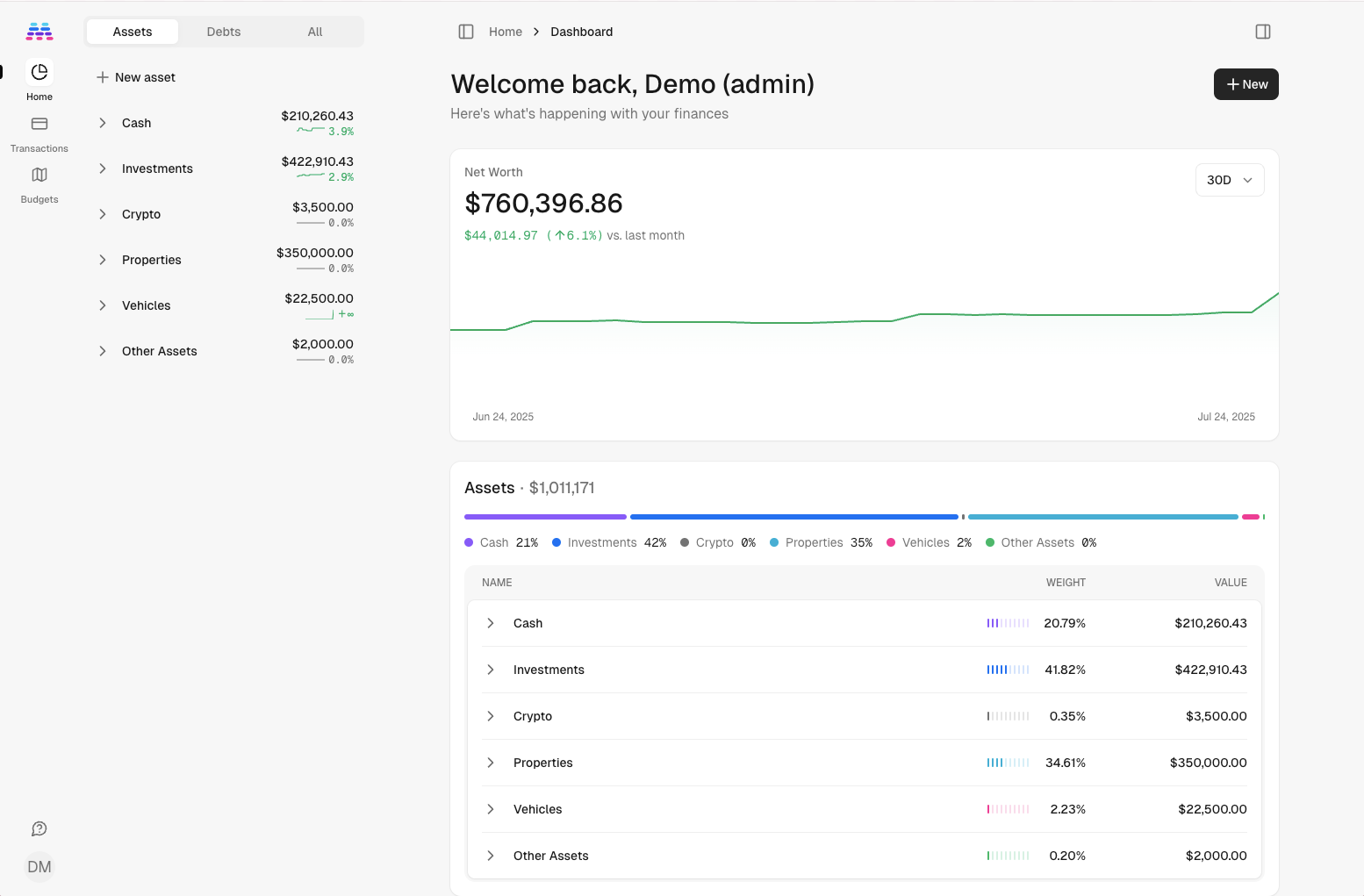
The original Maybe repository was archived on 27 July 2025 and explicitly says it is no longer maintained. Its source and Docker deployment instructions remain available, but their availability is not a promise of future fixes.
For an existing installation, export and back up your records before planning a migration. For a new service containing sensitive financial data, choose a maintained project or independently review a maintained fork, including its release history, security policy, and migration compatibility.
Do not use an old roadmap or a working demo as evidence that an archived project is maintained. A fork is a separate project and needs its own review.
GnuCash
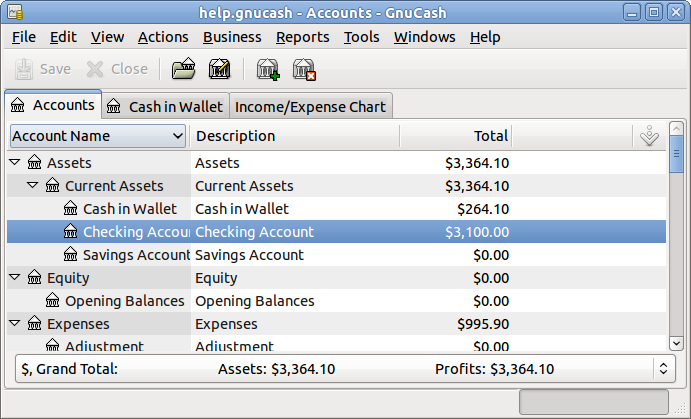
GnuCash is an open source desktop accounting application for personal and small-business use. It provides double-entry accounting, scheduled transactions, reports, reconciliation, budgeting, and imports including QIF and OFX.
Unlike the other tools in this comparison, GnuCash is primarily a desktop application. It is therefore not a direct choice for users who want to install a web application on a VPS and access it through a browser.
GnuCash is best suited to users who want detailed accounting features and are comfortable managing the finance file on a desktop system. Remote desktop access or file synchronization can introduce security and file-locking concerns, so those arrangements require a different deployment plan from a typical web-based finance manager.
Kresus
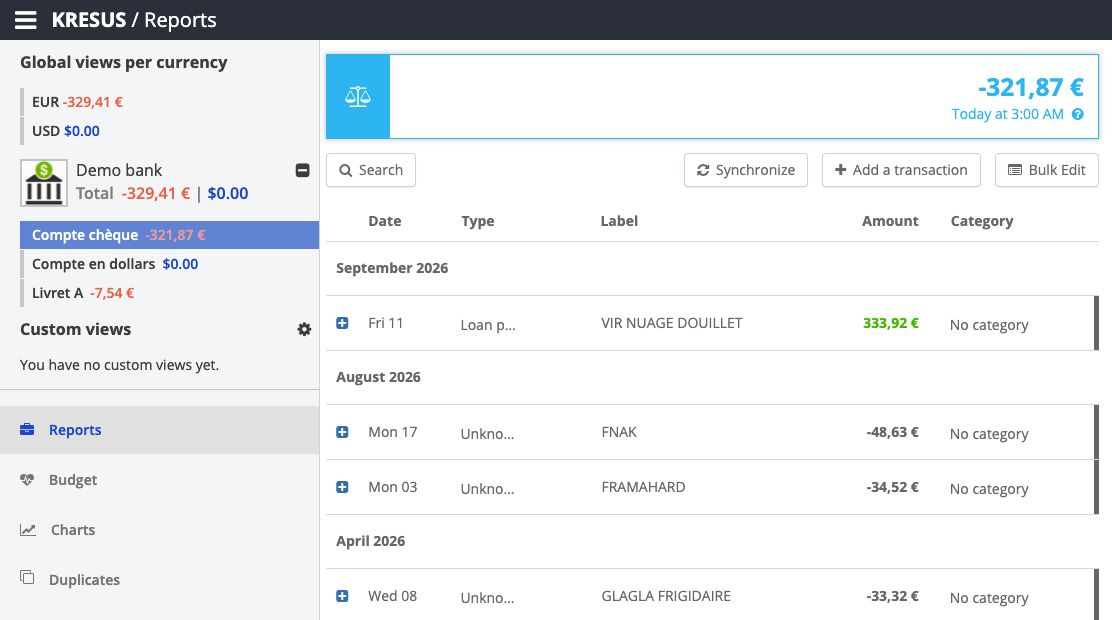
Kresus runs on your server and retrieves bank transactions through Woob. It provides categories, charts, alerts, and budgeting views.
Check your exact bank and authentication method against current Woob connector support before deploying. Coverage is not universal, and bank-side authentication or website changes can interrupt retrieval. Do not infer availability from the country alone.
Check that your financial institutions have maintained connectors before selecting Kresus. If they do not, another application with reliable file imports may require less ongoing troubleshooting.
Features to Evaluate Before Choosing a Tool
A long feature list does not make an application suitable for your workflow. Evaluate how well each option handles your existing records, routine tasks, and preferred access method.
Account and Transaction Management
Look for support for the account types you use, including checking accounts, savings, credit cards, cash, loans, and investments. Search, transfers, recurring transactions, split transactions, and reconciliation can substantially reduce routine work.
Test how the application treats transfers between accounts. If it records a transfer as unrelated income and expense transactions, reports and budgets may become inaccurate.
Budgeting Method
Finance tools use different budgeting models. Actual Budget emphasizes envelope budgeting, while Firefly III provides budget limits and transaction-based reporting. Traditional accounting tools may offer budgets without making them the center of the workflow.
Choose a method you will maintain consistently. Complex budgeting features add little value if recording and categorizing each transaction becomes too time-consuming.
Bank Synchronization
Automatic bank imports reduce manual data entry but can weaken the privacy advantage of self-hosting. Determine whether the connection uses direct bank APIs, a financial-data aggregator, or browser-automation connectors such as Woob.
Also check geographic coverage, authentication requirements, costs, and maintenance history. A connector that works with one institution does not imply support for another institution in the same country.
Import, Export, and Migration
If you already have financial records, verify support for the formats you can export from your current service. Common formats include CSV, OFX, QFX, and QIF, but support differs by application.
Run a small test import before moving the complete dataset. Review dates, currencies, transfers, category mappings, opening balances, and duplicate detection. Export support is equally important because it determines how easily you can migrate away later.
Reports and Investment Tracking
Decide which reports you actually use. Spending by category, cash flow, account balances, net worth, and budget performance are common requirements, but not every tool calculates them in the same way.
Investment support also varies from simple balance tracking to individual holdings and market-price updates. Do not assume that an application described as a finance manager includes portfolio analytics.
Mobile and Multi-Device Access
Browser-based applications may provide responsive interfaces, but that does not guarantee a full mobile experience. Check whether the project offers a supported mobile app, offline access, or client synchronization.
If multiple people will use the application, also verify whether it supports separate users, shared budgets, and appropriate access controls. Some personal finance projects are designed around one user or one household database.
Self-Hosted Finance Manager vs. Hosted Finance App
A hosted finance app reduces server administration because its provider runs the service. Check what its backup, export, integration, and support commitments actually cover. Managed hosting does not remove your responsibility for account access and recovery.
Self-hosting is a better fit when control over storage, deployment, and retention is more important than reducing administrative work. It also gives you the ability to keep using a chosen software version, subject to security considerations and project compatibility.
Choose self-hosting if you can maintain the server and have a clear privacy or control requirement. Choose a hosted service if automatic integrations, managed security, and minimal administration are more important. Neither model is inherently more secure; the result depends on how well it is operated.
How to Deploy a Self-Hosted Finance Manager
Deployment details vary by application, but the following process applies to most browser-based options.
Confirm Application Requirements
Review the project’s official documentation for supported operating systems, databases, container images, memory requirements, and upgrade procedures. Check whether the application requires additional workers, caching services, or scheduled jobs.
GnuCash does not follow this server-deployment model because it is a desktop application. For that tool, focus on securing the workstation and finance files instead.
Prepare the Server
Choose a home server or VPS that meets the published requirements for the application, database, reverse proxy, and backup jobs. Leave enough free storage for database growth, uploaded documents, logs, temporary upgrade files, and local backup staging.
Limit remote administration to secure methods, update the operating system, and configure a firewall before making the application public.
Install the Application
Follow the project’s current installation documentation and pin versions where its deployment guidance recommends doing so. Many self-hosted finance applications provide container-based options, but the exact images, environment variables, and supporting services differ.
If you plan to use containers, review how Docker VPS hosting supports application deployments. Do not copy unreviewed environment files because they may contain default passwords, exposed ports, or outdated image tags.
Configure Encrypted Access
Use HTTPS for remote access and redirect unencrypted HTTP requests. Keep database ports and internal application services off the public internet unless the project explicitly requires otherwise.
Use unique credentials and multi-factor authentication when the application supports it. If access is limited to a small number of users, a VPN or identity-aware proxy can further reduce public exposure.
Import and Validate Your Data
Create a backup of the source data before migration. Import a limited date range first, then compare account balances, transfers, categories, and recurring transactions with the original application.
Do not delete the source records immediately after migration. Retain them until you have completed at least one reporting cycle and confirmed that the imported data is accurate.
Configure and Test Backups
Back up the database together with required configuration files, encryption keys, uploaded files, and application secrets. A database dump without the keys or configuration needed to read it may not be sufficient for recovery.
| Keep in recovery set | Verify during restore |
|---|---|
| Database and uploaded files | Balances, transaction history, and attachments match the saved point in time. |
| Application version and configuration | The supported application version starts against the restored data. |
| Required secrets and encryption material | You can unlock the records and sign in; keep this material encrypted with restricted access. |
Store at least one copy separately from the primary server and follow established self-hosted backup practices. Test restoration periodically in an isolated environment instead of relying only on successful backup-job notifications.
Security Requirements for Financial Applications

Financial records require stricter controls than a low-risk test application. Before exposing the service remotely:
- Apply operating-system, application, container-image, and dependency updates.
- Use unique passwords and multi-factor authentication where available.
- Encrypt browser connections with HTTPS.
- Restrict administrative interfaces and database ports.
- Run the application with the minimum permissions it needs.
- Monitor failed logins, application errors, storage capacity, and backup results.
- Keep recovery copies separate from the server and test them regularly.
- Review third-party bank connectors before providing financial credentials.
Self-hosting moves responsibility rather than eliminating risk. A poorly maintained public server may expose financial data more readily than a professionally managed service, while a carefully restricted deployment can provide meaningful control over storage and access.
Conclusion
For envelope budgeting, start by testing Actual Budget. For detailed browser-based transaction management, consider Firefly III. Kresus is relevant when your institutions have working Woob connectors; GnuCash suits desktop double-entry accounting. Treat the original Maybe project as archived, and evaluate any successor independently.
Choose the simplest maintained tool that supports your records and access needs. File import can be preferable to a bank connector when you want fewer external integrations, but you still need to validate transfers, balances, and duplicates.
Before committing, test your preferred tool with sample data, confirm that required bank connectors work in your region, and complete a restoration test. That process will show whether the privacy and control benefits justify the additional administration.
Frequently Asked Questions
Is a self-hosted finance manager automatically more private?
Which open source finance tool is best for budgeting?
How can I check whether a tool fits my existing records?
Can these applications run on a VPS?
How should I back up a self-hosted finance application?
Does self-hosted bank synchronization avoid third parties?

