

Website analytics help organizations understand how visitors interact with their websites. By collecting information about page views, traffic sources, user behavior, and conversions, analytics platforms provide insights that guide marketing, product development, and content strategies.
For many years, most websites relied on cloud analytics services to gather this information. These tools are convenient and powerful, but they also rely on third-party infrastructure that processes and stores visitor data outside the website owner’s control.
This has led many developers, businesses, and privacy-focused organizations to explore self hosted analytics tools. These platforms allow you to collect analytics data while running the software on your own infrastructure, giving you full control over how visitor data is stored and processed.
What Are Self Hosted Analytics Tools?
Self hosted analytics tools are web analytics platforms that run on infrastructure controlled by the website owner instead of a third-party service, allowing organizations to deploy self hosted analytics software on their own servers.
Unlike traditional analytics solutions that process data on external servers, self hosted tools store analytics data on your own server or VPS. This allows organizations to maintain direct control over the information collected from website visitors.
How Self Hosted Analytics Works
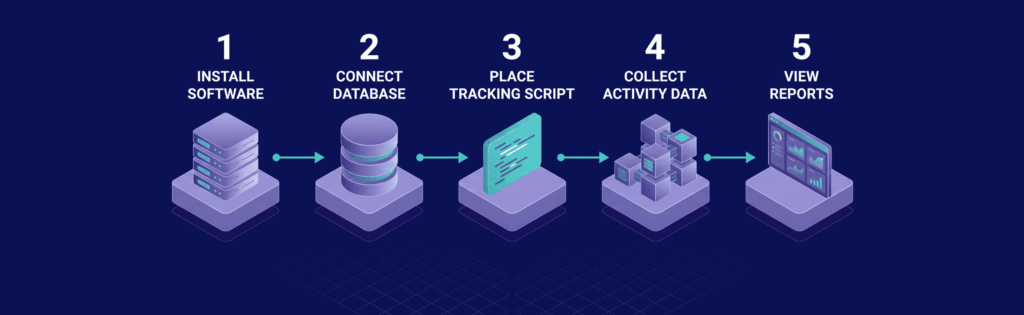
Self hosted analytics tools operate in a way that is similar to cloud analytics platforms. The difference lies primarily in where the software runs and where the data is stored.
The typical workflow includes several steps:
- installing the analytics software on a server
- connecting the analytics platform to a database
- placing a tracking script on your website
- collecting visitor activity data
- viewing reports and dashboards through the analytics interface
Because the system runs on infrastructure you control, analytics data can remain entirely within your own environment instead of being processed by an external analytics provider.
Self Hosted vs Third-Party Analytics
Traditional analytics platforms process visitor data on servers operated by the analytics provider. This means that the organization running the website must trust a third party to handle visitor data responsibly.
Self hosted analytics tools remove this dependency. The website owner controls where data is stored, how long it is retained, and how it is analyzed.
This difference is one of the main reasons self hosted analytics tools have gained popularity among developers and privacy-focused organizations.
Why Businesses Are Choosing Self Hosted Analytics

The increasing adoption of self hosted analytics platforms is driven by several practical and regulatory concerns.
Organizations are becoming more aware of the importance of data ownership, user privacy, and transparency in tracking practices.
- Data ownership and control: Self hosting ensures that all analytics data remains within your own infrastructure rather than being processed by external companies.
- Privacy and regulatory compliance: Self hosted tools can make it easier to meet privacy regulations such as GDPR because organizations can control how visitor data is collected, processed, and stored.
- Reduced reliance on third-party tracking services: Companies can avoid sending visitor data to external analytics providers.
- Customization and flexibility: Self hosted platforms often allow deeper customization of tracking rules, reports, and integrations.
- Predictable long-term costs: Running analytics software on existing infrastructure can reduce recurring subscription costs associated with cloud analytics services.
For developers and organizations with technical resources, these advantages can make self hosting a very appealing option.
Key Features to Look for in Self Hosted Analytics Tools

Not all self hosted analytics platforms provide the same capabilities. Some tools focus on simple website statistics, while others offer advanced event tracking, reporting, and marketing analytics.
Before selecting a platform, it is useful to understand the core features that define a strong analytics system.
Traffic and Visitor Tracking
The primary function of any analytics tool is to track website traffic and visitor behavior.
Typical metrics include:
- page views
- visitor sessions
- referral sources
- geographic location
- browser and device information
These metrics help website owners understand how users discover and interact with their site.
Event Tracking and Conversions
Event tracking allows analytics platforms to record specific actions taken by users on a website.
Examples include:
- clicking buttons
- submitting forms
- downloading files
- playing videos
- completing purchases
Tracking these events provides deeper insight into user engagement and conversion performance.
Real-Time Analytics
Some analytics platforms provide real-time or near real-time dashboards that show visitor activity as it happens.
This feature can be useful for monitoring traffic spikes, measuring campaign performance, or tracking live events such as product launches.
Real-time insights allow teams to respond quickly to unexpected changes in traffic patterns.
Privacy and Data Control
Privacy features are especially important for organizations that want to minimize personal data collection.
Many modern self hosted analytics tools include features such as:
- anonymized IP tracking
- cookie-less analytics options
- configurable data retention policies
- reduced personal data collection
These capabilities allow website owners to gather useful analytics information while respecting user privacy.
The Best Self Hosted Analytics Tools
Several open-source and self hosted analytics platforms have become popular alternatives to traditional analytics services and are often considered among the best self hosted analytics options available today.
Matomo
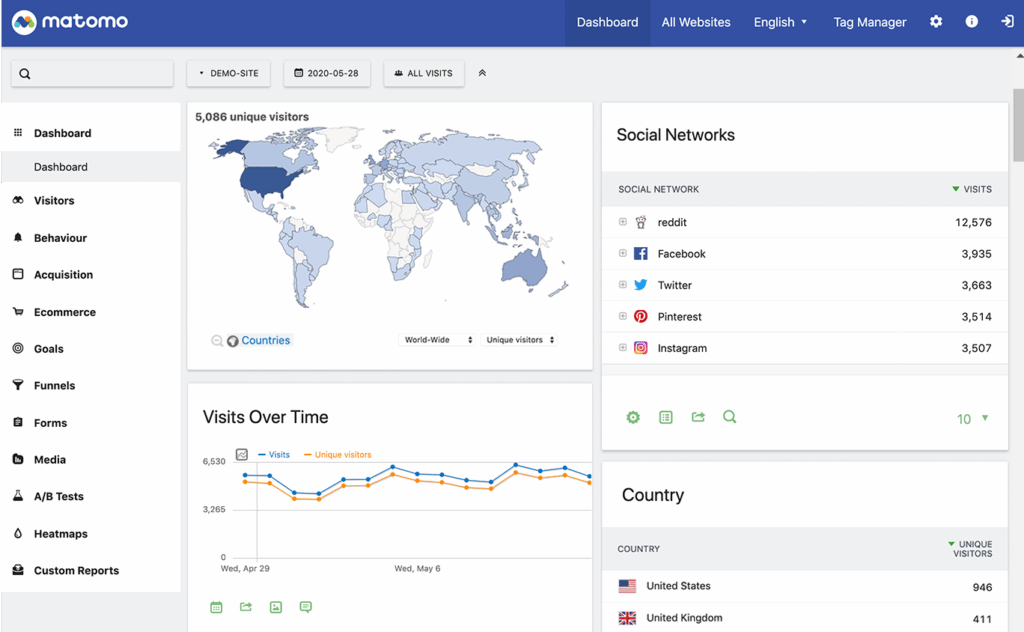
Matomo is one of the most widely known analytics platforms that supports self hosted deployment. It offers a comprehensive feature set similar to many enterprise analytics tools.
The platform includes visitor tracking, customizable dashboards, event tracking, and detailed reports. Matomo is also known for its strong privacy controls, making it a common choice for organizations that must comply with strict data protection regulations.
Plausible Analytics
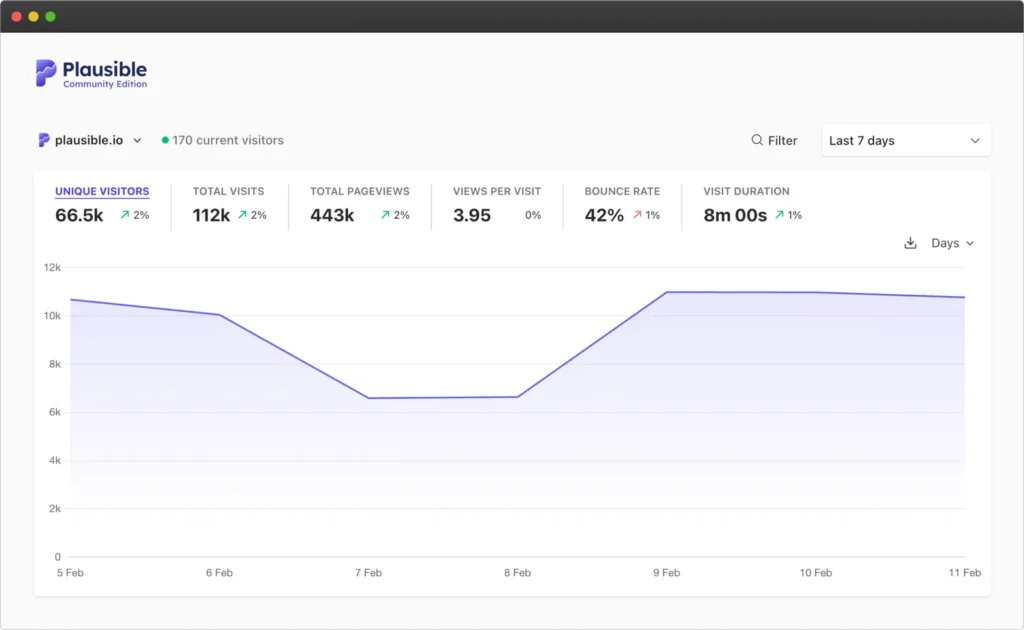
Plausible is a lightweight analytics platform designed with privacy and simplicity in mind.
It collects minimal data and typically operates without tracking cookies, which makes it attractive for websites that prioritize privacy-friendly analytics.
Plausible’s interface focuses on clear and simple metrics that provide quick insights without complex configuration.
Umami
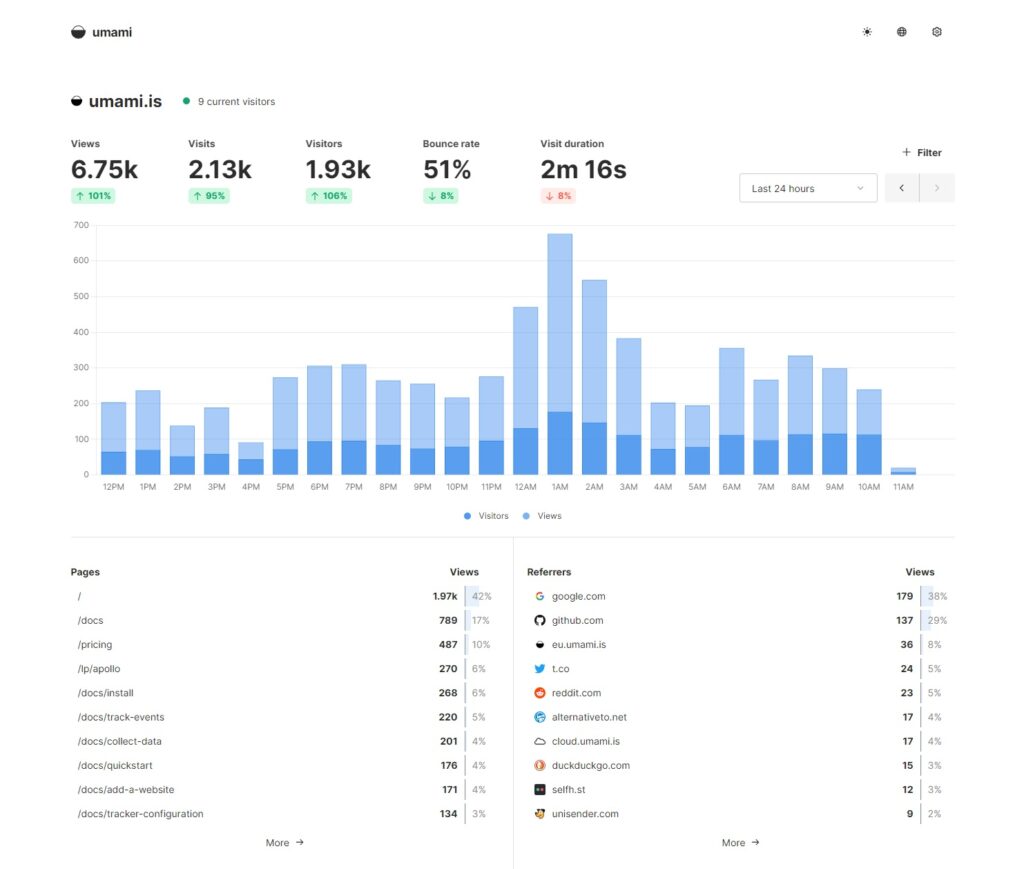
Umami is an open-source analytics platform designed for modern web environments.
It offers a clean interface, multi-site tracking, and event tracking while minimizing the amount of personal data collected from visitors.
Many developers choose Umami because it is lightweight and relatively easy to deploy on self hosted infrastructure.
Ackee
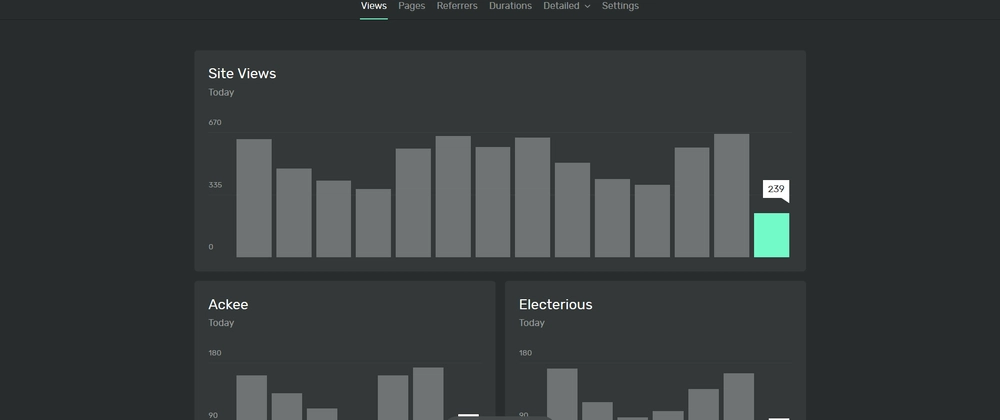
Ackee is a privacy-focused analytics platform that emphasizes minimal data collection.
It provides essential website statistics while anonymizing visitor data and avoiding many traditional tracking techniques.
Ackee is often used by developers who want simple analytics with strong privacy protection.
GoatCounter
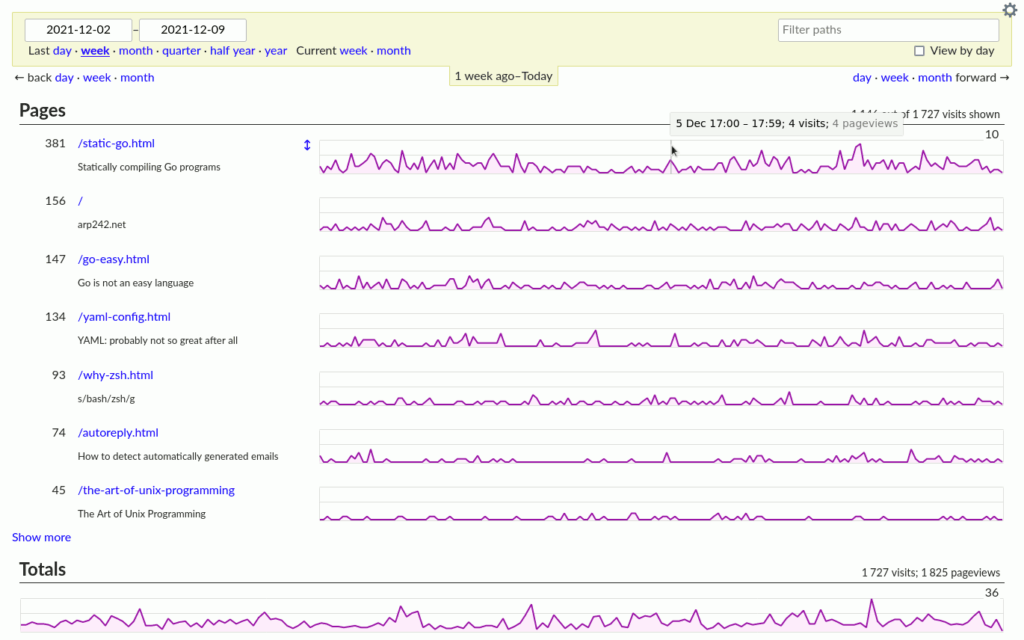
GoatCounter is a lightweight analytics tool focused on providing basic traffic statistics.
It tracks page views, referral sources, and visitor activity without collecting excessive user information. Its minimal resource requirements make it suitable for small websites and personal projects.
Self Hosted Analytics vs Cloud Analytics

Choosing between self hosted and cloud analytics depends on your technical resources and priorities.
Advantages of Self Hosted Analytics
Self hosted platforms provide several important advantages:
- complete ownership of analytics data
- improved privacy transparency
- customizable analytics infrastructure
- independence from third-party analytics providers
For organizations that prioritize data sovereignty, these benefits can be significant.
Limitations of Self Hosting
Despite its advantages, self hosting also comes with responsibilities.
Website owners must maintain the server environment, install updates, and ensure that the analytics platform runs reliably.
For smaller teams without technical expertise, cloud analytics platforms may still be easier to manage.
Hosting Requirements for Self Hosted Analytics Platforms
Running self hosted analytics software requires server infrastructure capable of handling data collection, storage, and reporting.
Typical requirements include:
- a Linux server environment
- a database such as MySQL or PostgreSQL
- enough storage to retain analytics data
- adequate CPU and RAM to process visitor activity
A virtual private server is often an ideal environment for running analytics software because it provides dedicated resources and full control over the server configuration. A VPS provides isolated computing resources on shared hardware while still allowing users to install and manage their own software stack.
Even relatively modest VPS configurations can support a self-hosted analytics platform for small and medium-sized websites.
How to Implement Self Hosted Analytics
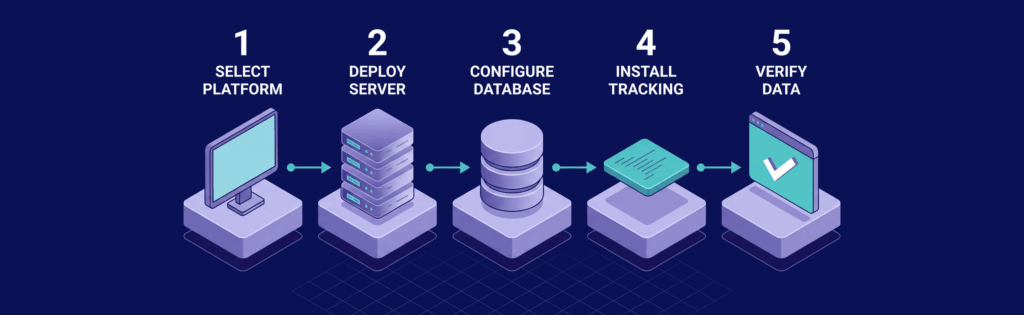
Deploying a self hosted analytics platform usually involves a straightforward installation process once the server environment is prepared.
The general steps include:
- selecting a self hosted analytics platform
- deploying the software on a server
- configuring the required database
- installing the tracking script on your website
- verifying that analytics data is being collected correctly
Most modern analytics platforms provide documentation that guides users through the installation process.
Privacy Considerations for Analytics Tracking
Privacy regulations have changed the way websites collect and process visitor data.
Many self hosted analytics tools are designed to support privacy-friendly tracking methods that reduce reliance on personal data.
Common privacy features include:
- IP address anonymization
- cookie-less analytics tracking
- configurable data retention periods
- transparent tracking policies
These capabilities help organizations gather useful insights while minimizing the privacy impact on website visitors.
Final Words
Self hosted analytics tools offer a powerful alternative to traditional cloud analytics platforms. By running analytics software on infrastructure you control, you gain direct ownership of visitor data while improving transparency in how analytics information is collected.
Although self hosting requires some technical setup and maintenance, many modern analytics platforms make deployment relatively straightforward.
For developers, businesses, and privacy-focused organizations, self hosted analytics provides a flexible and privacy-respecting way to understand website traffic and user behavior.
Run Self Hosted Analytics on Reliable VPS Infrastructure
Self hosted analytics platforms require a stable server environment to process visitor data, store analytics records, and generate reports efficiently. Running these tools on a VPS ensures consistent performance and full control over the software stack.
At VPS.us, we provide virtual private servers designed for developers and businesses that want the flexibility to deploy applications like analytics platforms, databases, and monitoring tools. Our infrastructure uses high-performance NVMe storage and reliable networking to support demanding workloads.
A practical starting point is the KVM1-US VPS plan, which includes 1 vCore CPU, 1 GB ECC RAM, 20 GB NVMe storage, and unmetered traffic on a 1 Gbps dual-link network connection. This configuration offers a simple and affordable environment for deploying lightweight self hosted analytics platforms while maintaining full root access and control over your server environment.

