
A Kamal deployment can fail at several independent layers: the container image, SSH access, the registry, application health checks, DNS, or TLS. This guide shows how to validate each layer, deploy a containerized application behind Kamal Proxy, and test a rollback before relying on the VPS in production.
The examples use Kamal 2.12.0, an AMD64 VPS, and Ubuntu 24.04 LTS. Adapt the app-specific values and test the workflow on a staging VPS before using it for production. The configuration has been checked against the current Kamal documentation; it is a template, not a report of a benchmark or live deployment.
Prepare and Test the Application Container
Before changing the server, confirm that you have the required components: a Dockerized web application, a Linux VPS with a public IP and SSH-key access, a domain you control, and a container registry. If you are new to running containers on your own server, review the fundamentals of Docker VPS hosting before continuing.
Architecture matters. An ARM64 image built on an Apple Silicon or ARM Linux workstation will not run natively on an AMD64/x86-64 VPS. Check the target server with uname -m: x86_64 means AMD64, while aarch64 means ARM64. The deployed image must include the target platform.
Size the VPS for deployment peaks rather than steady-state usage. During a rollout, old and new application containers can briefly coexist while Docker retains image layers and logs.
| Workload | What to measure before sizing |
|---|---|
| App only | Peak RAM and CPU, image size, and deployment overlap |
| App + worker | App requirements plus worker concurrency and memory |
| App + database | App requirements plus database RAM, disk growth, and I/O |
| App + worker + database | Combined peaks, storage growth, and backup space |
Measure peak consumption and allow deployment headroom. The right plan depends on the application, worker concurrency, database load, image size, and traffic.
Keeping the database external simplifies the first deployment. If you colocate it on the VPS, you remain responsible for off-server backups, restore testing, storage monitoring, and ensuring the database has enough memory during overlapping deployments. Place the VPS near both the users and the database; proximity to your workstation primarily affects administrative latency.
Make the Container Deployable
Test the exact production image locally before troubleshooting the VPS. This separates container build and startup errors from registry, SSH, proxy, and server problems.
Validate the Production Start Path
The Dockerfile needs a non-interactive production command, declared dependencies, and no reliance on source files or credentials mounted from your workstation. The application must bind to 0.0.0.0. A service bound to 127.0.0.1 inside its container is unavailable to the proxy on the Docker network.
This Node.js example exposes internal port 3000:
FROM node:22-alpine
WORKDIR /app
COPY package*.json ./
RUN npm ci --omit=dev
COPY . .
ENV HOST=0.0.0.0 PORT=3000
EXPOSE 3000
CMD ["npm", "start"]
This example assumes that the application does not require a separate build step or development dependencies at runtime. Applications that compile TypeScript, frontend assets, or native modules should use a suitable multi-stage Dockerfile. The application must actually read HOST and PORT, or configure those settings in its server code. Add a .dockerignore that excludes credentials, .git, local dependencies, and environment files from the build context.
Build and test the image with the current Docker CLI syntax:
docker build --platform linux/amd64 -t app:test .
docker run --rm -d --name app-test -p 127.0.0.1:3000:3000 app:test
curl -i http://127.0.0.1:3000/
Check the container with docker ps --filter name=app-test; expect app-test to show Up. On an ARM64 development machine, --platform linux/amd64 targets an AMD64 VPS. Use a compatible CI runner or remote builder if emulation cannot build native dependencies reliably.
Make Health Checks Proxy-Safe
Provide a lightweight endpoint such as GET /up that returns 200 OK without authentication, redirects, rate limiting, or optional third-party dependencies. A representative response is:
For example, /up can return status 200, content type text/plain, and body OK.
The endpoint should confirm that the application can accept traffic. Avoid making readiness depend on optional analytics, email, or other external services. If a database is essential for every request, the health check may verify basic database availability, but keep the check fast and avoid expensive queries.
Test it through the published local port:
curl -i http://127.0.0.1:3000/up
Expect an unredirected 200 response.
Secure the VPS and Verify SSH Access

Use a clean Ubuntu 24.04 LTS server and apply available security updates. Kamal connects over SSH; the account must be able to manage Docker. This guide uses a preconfigured deploy account with Docker already installed.
The VPSus DevOps server configuration guide provides additional background on server preparation and deployment requirements.
Test the Deployment User
Kamal defaults to root. For the non-root deploy account used here, an administrator should first install Docker using the official Ubuntu installation instructions, install the SSH key, and grant the account access to Docker. Membership in the Docker group grants root-level privileges; a separate username does not create a security boundary from the daemon. Keep provider console or recovery access available while changing SSH settings.
Before disabling password authentication, open a second terminal and verify key-based, non-interactive access:
ssh-add -l
ssh -o BatchMode=yes deploy@SERVER_IP 'id && docker version'
Replace SERVER_IP with the VPS address. The remote command must print the expected account and both Docker client and server details without prompting for a password. A client-only response or daemon permission error is a failed prerequisite. Reconnect after changing group membership, and keep the existing login method until the replacement has been tested.
Expose Only the Proxy
The application can listen on port 3000 inside Docker without publishing that port on the VPS’s public interfaces. Public ingress should normally be limited to SSH and Kamal Proxy.
| Port | Service | Policy |
|---|---|---|
| 22/TCP | SSH | Public; restrict to administrative source IPs when practical |
| 80/TCP | HTTP | Public |
| 443/TCP | HTTPS | Public |
| 3000/TCP | Application | Private |
| 5432/TCP | PostgreSQL | Private |
| 6379/TCP | Redis | Private |
Ports 80 and 443 need public ingress for web traffic and certificate handling. Restrict port 22 to a stable office address, VPN, or management network when operationally practical.
After Docker is installed, inspect actual listeners and published ports:
sudo ss -lntup
docker ps --format 'table {{.Names}}\t{{.Ports}}'
Confirm that application, database, and cache ports are not published on the host at 0.0.0.0 or [::]; the application still binds to 0.0.0.0 inside its own container. Docker changes packet-filtering rules, so inspect accidental mappings such as 5432:5432 even if a host firewall appears restrictive.
Configure DNS and Registry Credentials
Kamal Proxy needs a publicly resolving hostname before it can obtain a trusted HTTPS certificate. Create an A record such as app.example.com that points to the VPS’s public IPv4 address. Add an AAAA record only if the server has correctly configured public IPv6. An incorrect AAAA record can direct IPv6-capable clients to the wrong server. This single-server example uses the documented automatic TLS mode; DNS must point directly to the server and the ACME challenge must be reachable on port 443.
Verify the records from outside the VPS:
dig +short A app.example.com @1.1.1.1
dig +short AAAA app.example.com @1.1.1.1
curl -I http://app.example.com
The first command should return the VPS IPv4 address. The second should be empty unless IPv6 was intentionally configured. Before a service listens on port 80, curl may return a connection error; that does not by itself distinguish a closed firewall from the absence of a listener. Confirm the provider firewall, host firewall, and server listeners separately.
Create the private repository before the first push and scope its credentials to the required repository. The simple registry configuration below uses one credential for Kamal’s local and remote logins; verify its push and pull permissions and rotate it deliberately.
Treat release tags as immutable. A tag such as myapp:4f31c2a should identify one build, while myapp:latest can change and is unsuitable as the sole rollback reference. Keep token values and application secrets out of config/deploy.yml and Git.
Initialize Kamal and Configure deploy.yml
Pinning the Kamal CLI prevents an unplanned upgrade from changing deployment behavior. The following commands install the version used by this guide and create the configuration skeleton:
gem install kamal -v 2.12.0
kamal version
kamal init
Use a working Ruby environment on the deployment workstation. Verify that kamal version reports 2.12.0; if another version is selected, resolve that before continuing. Run kamal init only in an application that has not already been initialized, then inspect .kamal/secrets and config/deploy.yml. See the installation guide for prerequisites.
Map the Application to the VPS
The configuration below assigns one web role to the tested server, routes the hostname through Kamal Proxy, and builds an AMD64 image for an x86-64 VPS. Replace the documentation IP, domain, registry, repository, and username. NODE_ENV assumes a Node.js app; retain DATABASE_URL only if the application needs a database, and add its other required variables. These example addresses are not working infrastructure.
For a custom registry, keep the registry hostname in registry.server and use the repository path in image. Repeating the registry hostname in both values can produce an incorrect fully qualified image name.
service: myapp
image: team/myapp
servers:
  web:
    - 203.0.113.10
ssh:
  user: deploy
proxy:
  host: app.example.com
  ssl: true
  app_port: 3000
  healthcheck:
    path: /up
registry:
  server: registry.example.com
  username: registry-user
  password:
    - KAMAL_REGISTRY_PASSWORD
env:
  clear:
    NODE_ENV: production
  secret:
    - DATABASE_URL
builder:
  arch: amd64
The builder.arch setting prevents an Apple Silicon workstation from unintentionally producing an ARM-only image for an AMD64 server. The service value namespaces containers and related resources, while image identifies the repository containing the releases. Use separate service names or destination overrides when multiple environments share infrastructure.
Keep Secrets Out of the Configuration
Keep secret values out of deploy.yml. List the names under env.secret and explicitly map the exported values in .kamal/secrets, as described in Kamal’s environment-variable documentation. Populate the workstation environment through your password manager or protected CI secret store before invoking Kamal. Exporting a variable alone does not replace this mapping:
KAMAL_REGISTRY_PASSWORD=$KAMAL_REGISTRY_PASSWORD
DATABASE_URL=$DATABASE_URL
printf '%s\n' '.kamal/secrets' >> .gitignore
git check-ignore -v .kamal/secrets
Expect git check-ignore -v .kamal/secrets to report a matching ignore rule. Before committing, also inspect git diff --cached to ensure that no credentials or generated environment files have been staged. An ignore rule does not remove an already tracked secret: inspect git ls-files .kamal/secrets, and investigate any output before committing.
Validate the Effective Configuration
Inspect the effective configuration locally before deployment. Its output can contain resolved secrets; do not paste it into tickets, public logs, or the article:
kamal config
The command should exit with status 0. Confirm the service, web server, proxy host, port 3000, /up health path, custom registry, repository path, and amd64 builder architecture. If you use a destination such as staging, validate that configuration separately with kamal config -d staging.
Run Setup and Deploy a New Release
Once the configuration is valid and the required secrets resolve locally, run the initial bootstrap from the application directory:
kamal setup
kamal setup performs the initial deployment and can bootstrap Docker where the SSH account permits it. Here, Docker and access were prepared beforehand. Treat SSH, registry login, image build/pull, proxy startup, and application readiness as separate stages when reading the output.
Verify the result with kamal app details; the application container should be running on the web server. Read setup output as a sequence of independent stages. For example, a completed image push confirms registry publishing, while successful remote commands confirm SSH access. This makes it easier to identify the first failed layer.
Use kamal setup for initial provisioning. Run kamal deploy for normal releases. If setup fails, record the failed stage and release identifier before troubleshooting. Redact credentials, secret values, server addresses, and SSH details before sharing logs.
Ship a Committed Release
Test the normal release path with a visible change, such as displaying the Git SHA in the application footer. Commit the change so that the release identifier corresponds to a known source revision.
git add -p
git diff --cached
git commit -m "Show release version"
git status --short
kamal deploy
Confirm that git status --short is empty before deployment. With the configuration used here, kamal deploy reads the existing config/deploy.yml; no destination or architecture flag is needed.
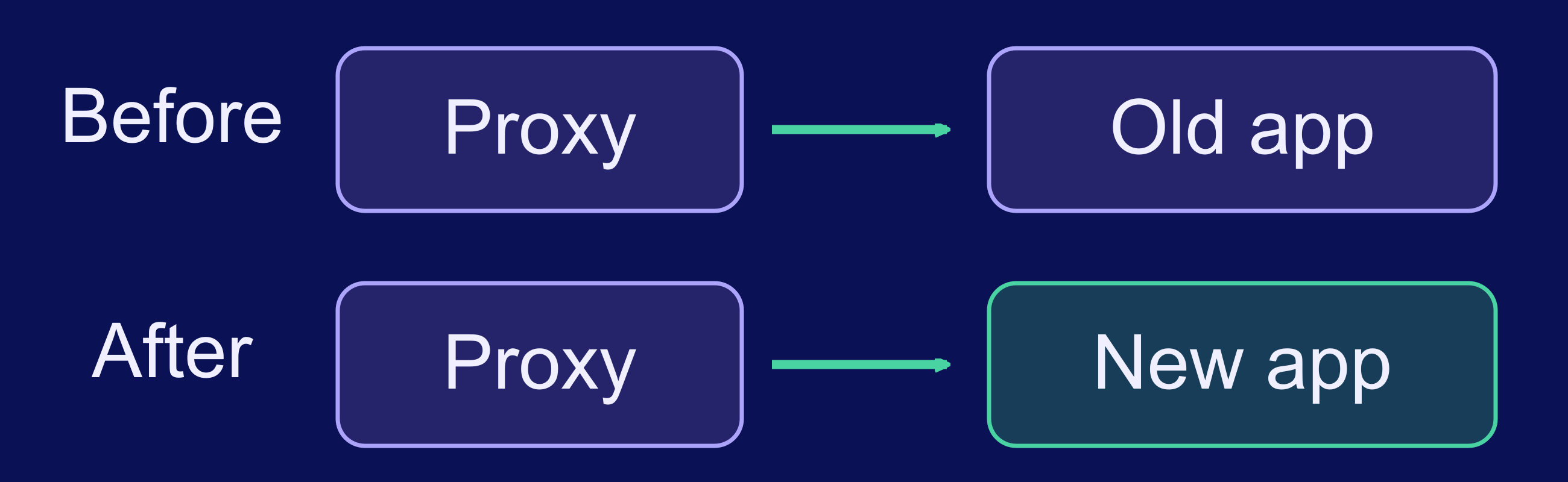
The deployment sequence builds and transfers the new image, starts its container, then switches proxy traffic after a successful health check. The old release serves traffic while the replacement is checked; the old container is stopped after the handoff. Keep enough RAM and disk for overlap, and make database migrations and assets compatible across both versions.
These checks gate the deployment. They are not continuous uptime monitoring after the switch; configure separate monitoring for the running service.
Record the release SHA and verify the public application:
git rev-parse HEAD
curl -fsS https://app.example.com/
Compare the Git SHA with the version reported by Kamal. The HTTPS response should contain the visible release marker added for this test.
Isolate Deployment Failures by Layer
A deployment is not verified until an external client reaches the expected release over trusted HTTPS. Run these commands from a machine outside the VPS:
curl -Iv https://app.example.com/
curl -fsS https://app.example.com/
curl -fsS https://app.example.com/up
Expect successful certificate verification, the new release marker, and OK from /up. If a command fails, inspect Kamal with kamal app details, kamal app logs, and kamal proxy details. Use docker ps, docker inspect, and docker logs directly on the VPS when Kamal’s output does not isolate the problem.
Troubleshoot in this order:
- Confirm that SSH connects non-interactively.
- Confirm that the image builds for the target architecture.
- Confirm that the registry push succeeds.
- Confirm that the server can authenticate and pull the image.
- Confirm that the container remains running.
- Confirm that
/upresponds on the configured internal port. - Confirm that Kamal Proxy routes the configured hostname.
- Confirm that public DNS points to the VPS.
- Confirm that the certificate is trusted and matches the hostname.
This order prevents DNS or TLS symptoms from triggering unnecessary image rebuilds.
If the Container Never Becomes Healthy
Separate a container that never started from one that started but failed its health check. For startup failures, inspect the production command, required environment variables, image architecture, runtime dependencies, memory pressure, and free disk space.
For a running container, test /up from the relevant Docker network context. Check the 0.0.0.0 binding, app_port, redirects, host authorization, rate limiting, and mandatory startup dependencies. Match application logs to the unhealthy release’s timestamp rather than searching unrelated historical entries.
If the Container Is Healthy but the Domain Fails
Confirm that Kamal Proxy owns ports 80 and 443 and that Apache, Nginx, or another listener is not competing for those ports. The application port should remain private.
Next, compare the public A and AAAA records with the VPS addresses and confirm that proxy.host exactly matches the requested hostname. If HTTP routing works but trusted HTTPS fails, inspect certificate issuance and hostname matching rather than rebuilding the application.
Test Rollback and Production Readiness
Test rollback first on a staging or disposable application. Kamal rollback needs the previous image to remain on the server; it does not pull that image from the registry. List retained containers, then substitute the exact known-good version for the placeholder below:
kamal app containers -q
kamal rollback 'REPLACE_WITH_PREVIOUS_VERSION'
curl -fsS https://app.example.com/
curl -fsS https://app.example.com/up
kamal proxy details
kamal app logs
Confirm that the public page shows the previous release, /up returns OK, and the logs show no new startup errors. Check local container/image retention before relying on a rollback target; registry retention alone is insufficient.
Rollback changes the application image; it does not reverse database migrations. Use backward-compatible schema changes, such as expand-and-contract migrations, when old and new application versions may overlap. Maintain a separate database recovery plan with encrypted off-server backups and scheduled restore tests. A Docker volume provides persistent storage, not an independent backup.
| Kamal handles | You still own |
|---|---|
| Versioned application deployment, health-gated proxy switching, and rollback workflow | Database recovery, monitoring, OS security, secrets, and log and image retention |
Production-readiness checklist:
- Trusted HTTPS and external health checks pass
- Previous immutable image retained and rollback tested
- Database backup stored off-server and restore tested
- External uptime monitoring enabled
- Container log rotation configured
- Disk and memory alerts enabled
- OS updates scheduled
- Secret rotation documented
- Database and cache ports remain private
- Image cleanup policy preserves required rollback releases
Use suitable open-source infrastructure monitoring tools to watch uptime, resource pressure, logs, and deployment incidents after launch.
Confirm the Complete Deployment Path
A reliable Kamal deployment requires more than a successful kamal setup. Validate the production container before provisioning the server, restrict public ports, confirm DNS before enabling TLS, and use a health endpoint that accurately reflects application readiness. The deployment is ready for production only after a normal kamal deploy, an external HTTPS check, and a tested rollback all succeed.
Frequently Asked Questions
What does a VPS need to run Kamal?
Does Kamal automatically configure HTTPS?
What is the difference between kamal setup and kamal deploy?
Why does a Kamal health check fail when the application works locally?
How do you roll back a Kamal deployment?
Does a Kamal rollback reverse database migrations?
Can Kamal deploy an ARM64 image to an AMD64 VPS?

