

Firecrawl has become a popular tool for developers building AI applications, retrieval-augmented generation (RAG) systems, data pipelines, and large-scale web crawling projects. Firecrawl is designed to extract and structure web content in a way that is particularly useful for AI workflows. This guide explains what Firecrawl is, why organizations choose to self host it, and what to consider when deploying and managing your own Firecrawl environment.
What Is Firecrawl?
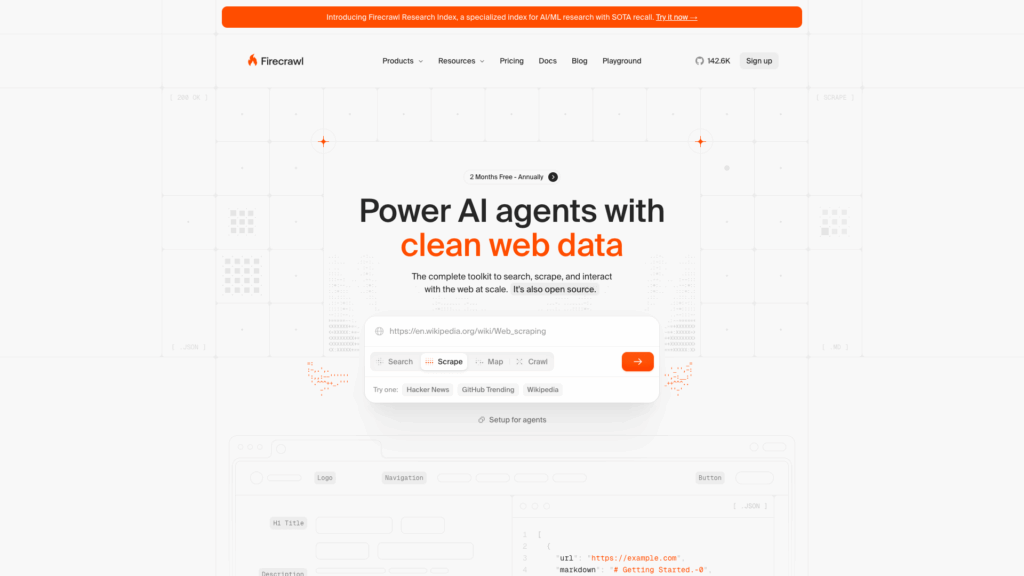
Firecrawl is an open source web crawling and content extraction platform designed to simplify the process of collecting website data. Many developers comparing Firecrawl to other open source crawling and content extraction platforms find that its ability to transform web content into structured formats makes the data easier to ingest for AI systems, search applications, knowledge bases, and data processing pipelines. Unlike traditional scrapers that require considerable customization, Firecrawl streamlines content extraction while ensuring compatibility with modern websites.
How Firecrawl Works
Firecrawl crawls websites, processes content, removes unnecessary elements, and converts pages into structured data formats. The organized output is easier to integrate into AI applications and data processing workflows, with developers accessing the results via API-driven methods.
Common Firecrawl Use Cases
Organizations use Firecrawl for a variety of purposes, including knowledge base generation, AI chatbot training, content indexing, market research, and large-scale website monitoring. Its focus on structured output makes it effective when information needs to be programmatically processed rather than simply stored.
Firecrawl and AI Data Pipelines

Many AI applications require current, well-structured information gathered from websites. Firecrawl automates the process by collecting content and preparing it for indexing, vector databases, or retrieval systems. This capability is particularly attractive for teams building RAG applications and AI-powered search solutions. When evaluating an open source alternative, factors such as deployment flexibility, scalability, and integration options become essential.
Managed vs Self Hosted Firecrawl
Managed services simplify deployment and maintenance but can introduce limitations in customization, resource allocation, pricing, or data governance. For organizations seeking a Firecrawl self host alternative to managed platforms, running your own infrastructure can offer greater flexibility.
Self hosting provides enhanced control over infrastructure and data, though it requires technical expertise to deploy, secure, and maintain the environment properly.
Why Self Host Firecrawl?
Organizations choose self hosted deployments for various operational, security, and financial reasons. Managed platforms can be convenient, but they may not be ideal for projects with sensitive information, strict compliance requirements, or large-scale crawling operations. Self hosting offers several key advantages:
Greater Control Over Data
Organizations maintain direct ownership of the collected data and storage systems, ensuring that sensitive information is managed internally.
Improved Privacy and Compliance
Sensitive data remains within a controlled environment rather than relying on third-party platforms, which helps meet compliance and privacy requirements.
Custom Configuration Options
Infrastructure, storage, and deployment settings can be tailored to match specific workloads, allowing for optimized performance and flexibility.
Potential Cost Savings at Scale
For high-volume crawling operations, self hosting may become more cost-effective over time by using dedicated infrastructure.
Better Integration With Internal Systems
Self hosted environments can be integrated with existing workflows and tools, enhancing overall operational efficiency.
No Dependence on Third-Party Service Availability
Self hosting eliminates dependency on external platforms, ensuring continuous operation regardless of third-party downtime.
Firecrawl System Requirements

Before deploying Firecrawl, it is crucial to evaluate the resources needed to support your workload. Requirements vary depending on factors such as crawl frequency, concurrency levels, data retention policies, and downstream processing demands.
CPU Requirements
Web crawling, content processing, and API operations require sufficient CPU resources. For small projects, a few dedicated virtual CPU cores may suffice; larger deployments may need additional cores for responsiveness and throughput.
Memory Requirements
Memory usage depends heavily on concurrent crawling and data processing loads. Enterprise deployments typically benefit from additional RAM to support multiple operations simultaneously.
Storage Considerations
The volume of content to be retained and the required access speed drive storage requirements. Utilizing fast NVMe storage can enhance database performance, indexing operations, and overall retrieval speeds.
Network and Bandwidth Requirements
Web crawling generates significant network traffic. Adequate bandwidth and reliable connectivity are necessary to maintain stable performance during large-scale operations.
Deployment Options for Self Hosted Firecrawl
Selecting the right deployment option depends on your infrastructure preferences, budget, and scalability needs. Each approach offers its own advantages:
VPS Deployment
Virtual private servers (VPS) are often the most practical solution for small to medium-sized Firecrawl deployments. They provide dedicated resources, root access, and predictable costs. For more insights on getting started, check out our DIY Unmanaged VPS: Control & Cost Savings Guide, which offers detailed tips for unmanaged hosting.
Dedicated Server Deployment
Dedicated servers offer full access to physical hardware without resource competition from neighbors, making them ideal for large-scale crawling operations.
Cloud Instance Deployment
Cloud platforms offer rapid scaling and geographic distribution. Resources can be adjusted dynamically as workload demands fluctuate, making cloud infrastructure an attractive option for variable crawling needs.
Docker-Based Deployment
Containerized deployments simplify installation, updates, and service management. Docker standardizes environments across development, testing, and production. Learn more about container efficiency in our docker VPS hosting article.
How to Self Host Firecrawl
Deploying Firecrawl successfully requires careful planning to ensure long-term stability, security, and scalability. Most deployments follow these steps:
- Prepare Your Server Environment: Choose an appropriate server and operating system with sufficient CPU, memory, storage, and network capacity. Hardening the server and applying updates is essential before deployment begins.
- Install Required Dependencies: Ensure all necessary components and dependencies are installed by reviewing the project documentation thoroughly.
- Deploy Firecrawl Services: Follow the recommended architecture to deploy the Firecrawl services, using containerized setups when possible to ensure consistency.
- Configure Storage and Databases: Set up your storage systems and databases based on expected data volumes and performance requirements.
- Configure API Access: Secure API endpoints and integrate Firecrawl with external applications, AI systems, or automation platforms.
- Test the Deployment: Conduct comprehensive testing of crawling functionality, API endpoints, and storage systems to identify issues early.
Security Best Practices

When self hosting Firecrawl, security must remain a constant priority. Protect your deployment with these best practices:
Secure API Endpoints
Restrict API access and implement strong authentication to prevent unauthorized use.
Restrict Administrative Access
Ensure that administrative interfaces are only available to authorized users by using VPNs, ACLs, and strong authentication methods.
Enable SSL Encryption
Deploy SSL certificates to secure data transmission for both user-facing services and API endpoints.
Implement Authentication Controls
Use strong passwords, multi-factor authentication, and role-based access controls to safeguard your system.
Monitor Logs and Activity
Continuously monitor logs to identify suspicious activity, performance issues, or operational anomalies before they escalate.
Performance Optimization Tips

As crawl volume increases, effective resource management becomes vital. Consider the following tips to maintain optimal performance:
- Optimize Crawl Concurrency: Balance the crawling speed with available system resources.
- Monitor Resource Usage: Regularly track CPU, memory, storage, and network utilization to avoid bottlenecks.
- Use Fast Storage: NVMe drives can significantly speed up database and indexing operations.
- Implement Caching Where Appropriate: Caching can reduce processing overhead and improve response times.
- Separate Services for Large Deployments: Isolate system components to enhance scalability and reliability.
- Regularly Update Components: Keep all software components current to benefit from performance improvements and security fixes.
Common Challenges When Self Hosting Firecrawl
Self hosting introduces additional operational responsibilities. Some common challenges include:
- Managing Large Crawl Volumes: Increased workload requires careful resource planning.
- Handling Website Rate Limits: Some websites may limit crawl frequency or volume, necessitating adaptive strategies.
- Storage Growth Over Time: Rapidly accumulating data can require proactive storage management.
- Maintaining Service Availability: Infrastructure failures must be promptly addressed to ensure continuous operation.
- Scaling Infrastructure Efficiently: Balancing performance growth with budget constraints can be challenging.
- Keeping Dependencies Updated: Regular maintenance is essential for stability and security.
Who Should Self Host Firecrawl?

Self hosting Firecrawl is best suited for organizations that require direct infrastructure control. It is especially beneficial for:
- AI Development Teams: Teams building AI models, such as those involved in RAG applications, can benefit from self hosted setups. Teams working on AI projects might also explore our self hosted LLM deployment guide for additional insights.
- RAG Application Builders: Developers creating retrieval-augmented generation systems need current, structured data.
- Research Organizations: Entities collecting data for research purposes can maintain full privacy and control.
- Data Collection Projects: Projects that require high-volume web crawling benefit from dedicated infrastructure.
- Businesses With Strict Data Privacy Requirements: Companies requiring full control over sensitive data and compliance mandates.
- High-Volume Crawling Operations: Organizations that manage large-scale crawling operations will find self hosting more cost-effective and manageable.
Final Words
Self hosting Firecrawl offers greater control over infrastructure, data management, security, and scalability. Whether you are developing AI systems, RAG applications, research platforms, or large-scale data collection projects, self hosting provides significant advantages over managed services. However, these benefits require careful planning, strong security measures, vigilant monitoring, and ongoing infrastructure management. By choosing the right resources and following best practices, you can build a Firecrawl environment that supports both current workloads and future growth.
Deploy Self Hosted Firecrawl on VPSus
If you’re planning to run Firecrawl in production, selecting an infrastructure with dedicated resources and fast storage is crucial. For reliable performance in your self hosted Firecrawl deployment, consider the VPSus solutions that offer full root access, dedicated resources, and flexible Docker-based setups.
Frequently Asked Questions
What is Firecrawl used for?
What are the benefits of self hosting Firecrawl?
How do I secure my self hosted Firecrawl deployment?
What are the system requirements for deploying Firecrawl?

