

Remote access tools let you control computers from anywhere. Self hosting remote desktop software gives you full control over that infrastructure instead of trusting third-party cloud services. With growing distributed teams and tighter security requirements, many organizations prefer self hosted solutions that keep data and access under their own policies rather than rely on external providers.
Cloud remote access platforms are easy to start with, but they may introduce privacy concerns, vendor lock-in, or recurring subscription costs. Self hosting removes those constraints, letting you choose your own server, network, and authentication methods while tailoring performance to your needs.
What Self Hosted Remote Desktop Is And How It Works
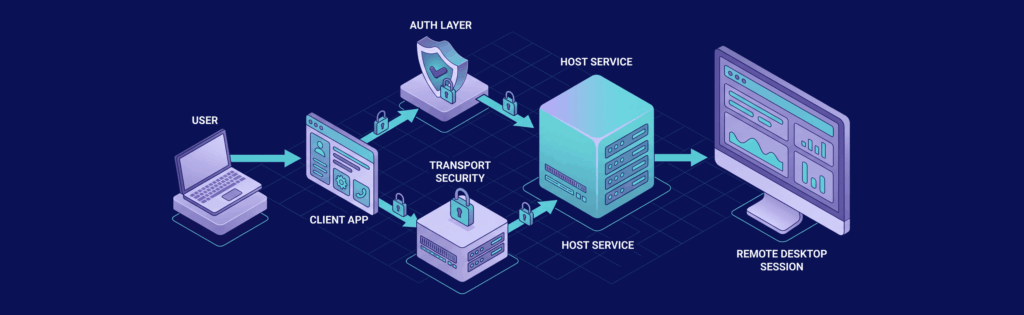
Self hosted remote desktop software allows you to run your own remote access infrastructure instead of depending on a third-party relay or cloud platform. You choose where the server runs, how users authenticate, and how traffic is routed across networks. This control is especially important in environments where security, latency, or compliance cannot be delegated to an external provider.
To understand how it functions in practice, it helps to break it down into architectural components and connection behavior.
Core Architecture Components
Every self hosted remote desktop setup relies on a few fundamental building blocks. These components work together to establish, secure, and maintain remote sessions.
- Host Service: The host service runs on the machine that will be accessed remotely. It listens for incoming connections, validates authentication requests, and manages active sessions. Depending on the software, it may integrate with system login services or operate as a standalone daemon.
- Client Application: The client initiates the connection to the host. It can be a desktop application, mobile app, or web-based interface. The client handles user authentication input, encryption negotiation, and rendering of the remote display.
- Authentication Layer: Authentication verifies identity before granting access. This may use local credentials, centralized directory services such as LDAP or Active Directory, or token-based systems. Strong authentication is critical because remote desktop endpoints are frequent targets for brute-force and credential-stuffing attacks.
Connection Flow And Networking
Once the architecture is in place, connection flow determines how traffic moves between client and server. Network configuration directly impacts security and usability.
- Direct Internet Exposure: In basic setups, the remote desktop service is exposed through a public IP and designated port. This requires careful firewall configuration and secure authentication because exposed services attract automated scanning.
- VPN Or Tunnel-Based Access: A more secure approach is to require users to connect through a VPN or SSH tunnel before accessing the remote desktop service. This prevents direct exposure of remote desktop ports and significantly reduces attack surface.
- Encryption And Transport Security: All session data should be encrypted using TLS, HTTPS with WebSockets, or SSH depending on the implementation. Encryption protects screen data, keystrokes, and file transfers from interception. Proper certificate management is essential to prevent man-in-the-middle attacks and trust warnings.
Core Features And Security Requirements

Choosing a self hosted remote desktop solution requires understanding the features that matter most for usability and safety. These capabilities ensure that remote sessions are efficient, auditable, and protected.
- Encryption and TLS: Secure encryption prevents eavesdropping on sessions. Look for software that supports modern TLS versions and certificate management so connections are encrypted end-to-end.
- Access Control: Role-based permissions let administrators define who can access which machines and which actions they can perform. Granular access control is critical in enterprise environments.
- Two-Factor Authentication (2FA): Adding 2FA protects against credential compromise by requiring a secondary authentication factor such as an OTP or hardware key.
- Session Logging and Auditing: Audit trails provide visibility into who connected, when, and what they did, which is essential for security compliance and incident response.
- IP Restrictions and Firewalls: Limiting access by IP or integrating with firewall rules reduces the attack surface. Combining this with intrusion prevention tools like fail2ban helps protect against brute-force attempts.
- Zero-Trust And VPN Integration: Incorporating zero-trust networking principles means verifying identity and device trust for every session, often combined with VPN or identity-aware access controls before granting access.
Performance And Infrastructure Planning
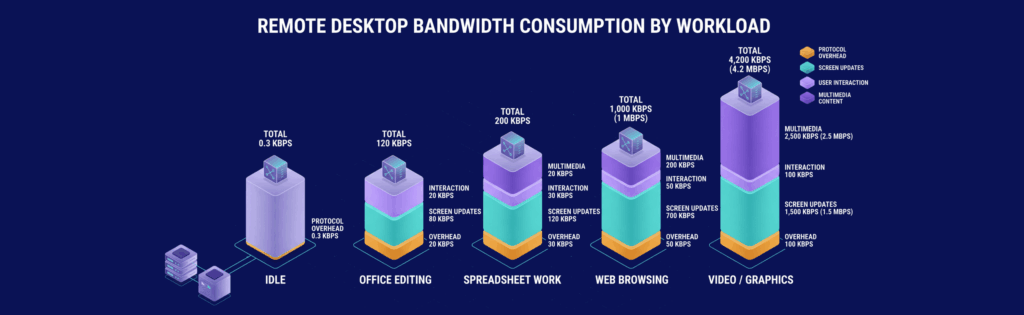
Self hosted remote desktop performance is influenced by both server resources and network conditions. Planning hardware and connectivity helps avoid sluggish sessions and dropped connections.
Servers should have sufficient CPU and RAM for the number of concurrent remote sessions you expect to run. More CPU cores help with graphical workloads or when multiple users connect simultaneously. Memory supports active session processes and reduces latency.
Network performance is equally important. Low latency and solid bandwidth help keep input and screen updates responsive, which matters most for interactive use cases like remote troubleshooting or virtual desktops. Bandwidth usage increases with session resolution and interactive updates, so compression and session optimisation features can help reduce load. Here is a table illustrating the network usage for main activities type:
| Workload | Protocol overhead | Screen updates | Interaction | Multimedia |
|---|---|---|---|---|
| Idle | 0.3 Kbps | 0 | 0 | 0 |
| Office editing | 20 Kbps | 80 Kbps | 20 Kbps | 0 |
| Spreadsheet updates | 30 Kbps | 120 Kbps | 30 Kbps | 20 Kbps |
| Web browsing | 50 Kbps | 700 Kbps | 50 Kbps | 200 Kbps |
| Video / graphics | 100 Kbps | 1500 Kbps | 100 Kbps | 2500 Kbps |
For servers involving graphics or multimedia workloads, GPU acceleration support can improve performance. On the network side, hosting on a VPS or in a data center with good peering can reduce latency for geographically distributed users.
Popular Self Hosted Remote Desktop Solutions
There are multiple categories of self hosted and open source remote desktop software, each designed for different use cases. Some prioritize simplicity and low resource usage, while others focus on enterprise features and integration capabilities.
Lightweight Administrative Tools
Many open source remote desktop software tools are designed primarily for system administrators who need secure command-line or minimal graphical access. They typically consume fewer resources and are easier to deploy. They are ideal for managing servers rather than providing full desktop virtualization environments.
Full Desktop Access Platforms
These solutions provide complete graphical desktop sessions and often support file transfer, clipboard synchronization, and multi-monitor setups. They are better suited for IT support teams or remote workforce environments. However, they require more CPU and RAM, especially with multiple concurrent users.
Browser-Based Remote Access
Some platforms allow users to connect through an HTML5 browser interface without installing a client. This improves accessibility and simplifies user onboarding. The trade-off can be slightly higher latency compared to native clients, depending on implementation.
Enterprise-Focused Solutions
Enterprise-grade platforms often include role-based access control, session recording, centralized logging, and integration with identity providers. These features are important for compliance and audit requirements. They also tend to require more careful deployment planning and stronger infrastructure.
Deployment Models And Architecture Options
Self hosted remote desktop software can be deployed in several ways depending on your infrastructure:
- On-Premise Deployment: Running software directly on your local network is ideal for internal support or access within controlled environments. This minimizes latency and keeps traffic private.
- Virtual Private Server Hosting: Hosting the remote desktop server on a VPS gives you flexible external access and strong uptime. Services like VPS.us offer scalable VPS plans where you can install and manage your remote desktop stack yourself.
- Dedicated Server Deployment: For higher performance and heavier workloads, dedicated servers ensure you have all resources available without sharing with others.
- Containerised Deployment: Using Docker or other container platforms makes installation and updates repeatable and isolated from host systems.
- Reverse Proxy And VPN Models: Reverse proxies can add a layer of security and load balancing, while VPN tunnels extend internal services over secure links without exposing remote desktop ports directly to the internet.
Self Hosted Versus Cloud Remote Desktop

The decision between self hosted and cloud remote desktop solutions depends on operational priorities, security requirements, and budget.
Control And Data Sovereignty
Self hosting ensures that session data, credentials, and logs remain under your control. This is important for organizations subject to regulatory frameworks that restrict data storage locations. Cloud providers may store metadata or route traffic through external regions, which can introduce compliance concerns.
Maintenance Responsibility
With self hosting, you are responsible for updates, patches, and monitoring. This gives you flexibility but requires internal expertise. Cloud services reduce operational burden at the cost of reduced customization and potential vendor dependency.
Cost Structure
Cloud remote desktop services often charge per user or per session. Costs scale with growth. Self hosting typically involves fixed server costs plus time spent maintaining the system, which may be more predictable long term for stable teams.
Scalability Considerations
Cloud services can scale quickly by adding user licenses. Self hosted environments require resource planning and possible infrastructure upgrades. However, on a VPS or scalable environment, resources can still be adjusted as needed.
Maintenance, Troubleshooting, And Best Practices

Ongoing maintenance determines whether your self hosted remote desktop system remains stable and secure. Reactive troubleshooting alone is not enough. A proactive monitoring strategy reduces downtime and security incidents.
Monitoring And Logging
Logging connection attempts, session durations, and authentication failures helps detect misuse or misconfiguration. System-level monitoring tracks CPU, RAM, and network utilization to ensure the server can handle concurrent sessions. Alerts should be configured for unusual activity patterns.
Handling Connection Failures
Connection issues often stem from firewall rules, expired certificates, or incorrect DNS records. Testing connectivity step by step, starting from network reachability to application-level authentication, isolates the problem efficiently. Keeping documentation of port assignments and access rules prevents confusion during troubleshooting.
Patch Management
Remote desktop services must be updated regularly to address vulnerabilities. Delayed patching increases exposure to exploits targeting remote access services. Scheduling controlled maintenance windows allows updates without disrupting users unexpectedly.
Backup And Recovery Planning
Configuration files, authentication settings, and user data should be backed up routinely. Snapshot backups on VPS or dedicated servers allow rapid restoration in case of misconfiguration or system failure. Testing recovery procedures periodically ensures backups are actually usable.
Conclusion
Self hosted remote desktop software gives you ownership, flexibility, and control over how users access your systems. By understanding deployment options, security features, and performance requirements, you can build an environment that suits both your team’s needs and your organisation’s compliance posture.
Whether you choose a lightweight solution for administrative access or a more robust platform for multi-user environments, careful planning and ongoing maintenance are key to a stable and secure remote access experience.
Host Your Projects On A Flexible VPS From VPS.us
If you’re deploying self hosted remote desktop software and need reliable performance with room to grow, we recommend our KVM4-US plan at VPS.us. It includes 4 vCores, 4 GB RAM, and 40 GB NVMe storage, giving you enough resources to handle multiple concurrent sessions while keeping latency and system load under control.
With full root access and KVM virtualization, you can install and configure any remote desktop stack you prefer, from lightweight administrative tools to full graphical environments. Choose KVM4-US if you want balanced CPU power, memory capacity, and fast NVMe storage for a stable self hosted remote access setup.

