

A self hosted wiki provides a central place to store and organize knowledge without depending on external platforms. Whether you need an x8 self hosted wiki or an x2 self hosted wiki solution, this guide covers setup and long-term management for both personal use and teams. Documenting infrastructure, tracking fixes, or building internal guides becomes easier when you control your own data.
What Is a Self Hosted Wiki?
A self hosted wiki is a web application running on your own server that allows you to create, edit, and link pages of content. Unlike cloud tools, you manage your storage, access, updates, and backups. Most setups include a web server, a backend for storing content, and the wiki software. The ability to link pages turns separate entries into a structured system that is both navigable and expandable.
Why Use a Self Hosted Wiki?
People choose self hosted wikis for several key reasons:
- Data Ownership: Your content remains on your infrastructure and is not tied to any external provider. You control how data is stored, backed up, and secured. This control is similar to the approach described in mastering self hosting, where data management is firmly in your hands.
- Flexibility: Customize features, layouts, and integrations to suit your workflow. Options for custom themes, plugins, or integrations with internal systems allow the wiki to grow alongside changes in your processes.
- Cost Control: Avoid recurring subscription fees. Your expenses are predictable and largely depend on the infrastructure you choose.
- Internal Integration: Integrate with authentication systems like LDAP or OAuth to make your wiki part of a broader network of applications.
Downsides to Consider

Hosting your own wiki comes with responsibilities:
- Time-Consuming Setup: Configuring servers, databases, or containers is often necessary. For container deployments, consider reading the guide on Docker VPS hosting solutions for assistance.
- Ongoing Maintenance: Managing updates, monitoring, and fixes becomes your responsibility.
- Security Management: You must handle HTTPS, patching, and access control independently.
- Usability Challenges: Some tools can be less intuitive for non-technical users.
Popular Self Hosted Wiki Software
Several well-known tools are available for self hosted wiki projects. Each has its own strengths:
MediaWiki

MediaWiki is a powerful tool that is well-suited for large-scale documentation where a structured and extensible system is needed, even though it may require more maintenance.
DokuWiki

DokuWiki is lightweight and simple. As it does not require a database, it offers a straightforward setup for smaller wiki instances.
Wiki.js

Wiki.js uses Markdown and provides a modern interface along with Docker support. It is a good choice for modern deployments that require a clean user interface.
BookStack
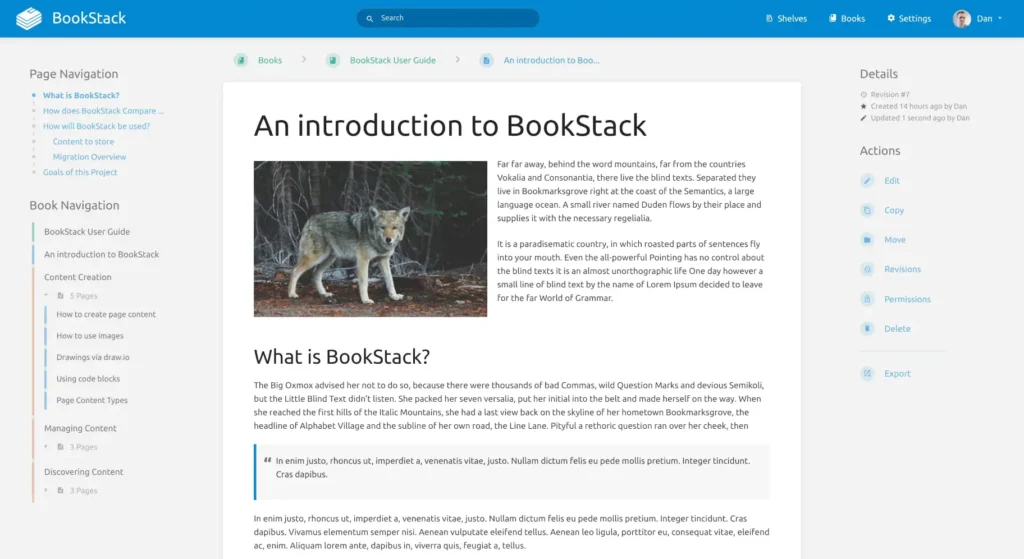
BookStack emphasizes structured content organized through books and chapters, making it intuitive for teams that need clear hierarchies.
TiddlyWiki
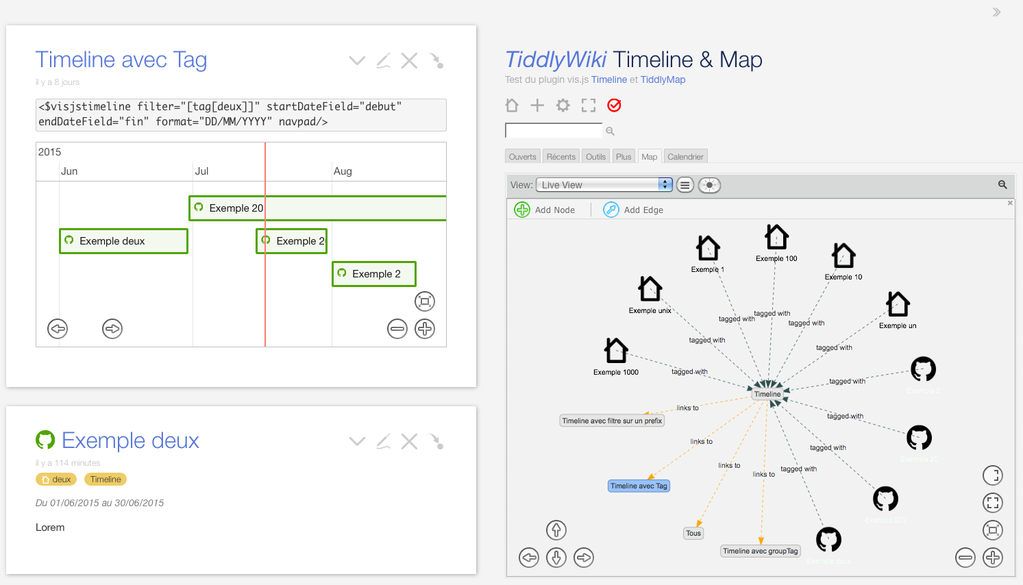
TiddlyWiki is a unique single-file solution that is best for personal use, where portability and simplicity are prioritized over scalability.
Each application comes with its own tradeoffs, so choose based on how well the software fits into your long-term workflow.
Choosing the Right Wiki Software
Selection depends on several factors:
Editing Style
Markdown-based systems allow for fast, technical editing and easy version control integration. In contrast, WYSIWYG editors cater to non-technical users by mimicking traditional document editors. Choosing the wrong format may discourage consistent usage.
Use Case
Personal wikis suit minimal setup and rapid access, while team environments benefit from standardized formatting, permission controls, and consistency. Decide whether speed or structured permission management is more critical for your needs.
Maintenance Expectations
Some tools are quick to install but become challenging to maintain over time. Evaluate update frequency, plugin stability, and community support before committing to a tool, as poor maintenance can pose long-term challenges.
System Requirements and Environment Setup
Before installing any wiki software, decide where it will run:
- VPS: Balances control, performance, and scalability ideal for most wiki setups.
- Local Servers: Suitable for individual use with limited access.
- NAS Setups: Offer convenience but may have restrictions.
Most wiki platforms rely on software stacks such as LAMP for traditional tools, Node.js for modern applications like Wiki.js, or Docker for a simplified deployment experience.
Organizing Content Effectively

A wiki reaches its full potential when content is logically structured. A clear hierarchy prevents the site from becoming a jumble of information.
Hierarchical Structure
Begin with broad categories and gradually refine them into subcategories. An evolving hierarchy is often more effective than trying to design a perfect structure from the beginning.
Naming Conventions
Use clear, descriptive titles and avoid unnecessary abbreviations. Consistency helps maintain readability and prevents the creation of duplicate pages.
User Management and Permissions
For wikis that involve multiple users, define roles clearly to manage read, edit, or administrative rights. Proper permission settings reduce mistakes and streamline onboarding by clarifying user capabilities.
Customization and Extensions
Most wiki platforms support themes and plugins to adjust functionality and appearance. However, limit customizations carefully to avoid introducing instability or conflicts during updates.
Backup and Disaster Recovery

Regular backups are essential since your wiki becomes a central repository of information. A sound backup strategy should include:
Backup Strategy
- Automated Backups: Scheduled tasks that run automatically ensure regular backups without manual intervention.
- Off-site Storage: Storing backups remotely protects data in case of local server failures. For additional insight, consult self hosted backup best practices.
- Regular Rotation: Efficiently manage storage space by cleaning outdated backups while preserving enough history for recovery.
Recovery Testing
It is important to periodically test restores to ensure data can be recovered when needed.
Security Best Practices

Implementing security from the start is critical, particularly for publicly accessible wikis:
- Enforce HTTPS with a valid SSL certificate.
- Limit administrative access using strict controls.
- Consider using firewalls or VPN-only access if the wiki is not intended for public use.
Self Hosted Wikipedia vs Cloud Wiki
The difference centers on control versus convenience. Self hosted wikis allow for full customization, privacy, and predictable costs, while cloud tools may offer easier initial setup at the cost of limited customization and potentially escalating fees.
Common Use Cases
Self hosted wikis can serve various needs:
Personal Knowledge Base
Ideal for organizing personal notes, ideas, and references in one accessible location.
Team Documentation
Centralize processes, onboarding materials, and guides to keep everyone aligned with a single source of truth.
Homelab Documentation
Maintain records of configurations and experiments to minimize repeated setup work over time.
Internal Company Wiki
Replace scattered documents with a structured, searchable resource that can even function as a self hosted Wikipedia-style knowledge base for larger organizations.
Conclusion
A self hosted wiki is a practical tool for managing knowledge. It helps consolidate information, reduce redundant work, and allows you to control how your data is stored and shared. Start with a simple setup and evolve your structure over time to maximize long-term value.

