
Apache vs Nginx on a VPS is a choice about application compatibility, request handling and how you operate the server. Both can serve static files and sit in front of PHP-FPM. Apache is often convenient when an application depends on per-directory configuration; NGINX is a practical choice for centrally managed routing and reverse proxying. Neither name establishes how many visitors your VPS can handle.
This comparison uses publisher documentation checked on 26 October 2026. It does not report a VPS benchmark or measured price advantage. Use it to shortlist a stack, then test the workload that matters to your site.
Choose by Compatibility and Operations
Start with the application you already run. Identify rewrite rules, authentication requirements, file uploads, scheduled jobs and any control panel that manages the web server. A configuration your team understands can be more valuable than a theoretical throughput advantage.
Apache HTTP Server: Flexible Configuration
Apache HTTP Server offers modules and directory-level configuration. Its .htaccess files let permitted settings change within a directory without editing the main server configuration. That can help when migrating an application whose installer or plugins write those rules.
This feature is optional. The Apache documentation recommends using the main configuration when you have access to it, because distributed configuration adds overhead and gives directory owners control over allowed settings. An Apache deployment with AllowOverride None does not have the same lookup behavior as one that enables overrides everywhere.
Apache also has different multi-processing modules. The event MPM uses processes and threads and offloads some connection handling to listener threads. Describing every Apache installation as one process per connection misrepresents modern configurations.
NGINX: Explicit Routing and Proxying
NGINX uses worker processes and event-driven connection handling. You define routing, static-file handling and upstream services in server-managed configuration. It does not interpret Apache .htaccess files; rewrite and access rules must be translated and tested.
The NGINX beginner’s guide covers static content, proxying and FastCGI. Configuration locations depend on your package or control panel: sites-enabled is a packaging convention, not a universal NGINX directory. Both products can be managed without a graphical interface; the official website images here identify the projects rather than showing an installed control panel.
| Requirement | Apache HTTP Server | NGINX open source |
|---|---|---|
| Application writes .htaccess rules | Supports permitted overrides | Translate rules into server configuration |
| PHP application | Can connect to PHP-FPM through mod_proxy_fcgi | Can connect to PHP-FPM through FastCGI |
| Static files or reverse proxy | Supported; review loaded modules and MPM | Supported; configure locations and upstreams |
| Configuration ownership | Central configuration, with optional delegated overrides | Central configuration and controlled reloads |
Understand the Request Path and Capacity
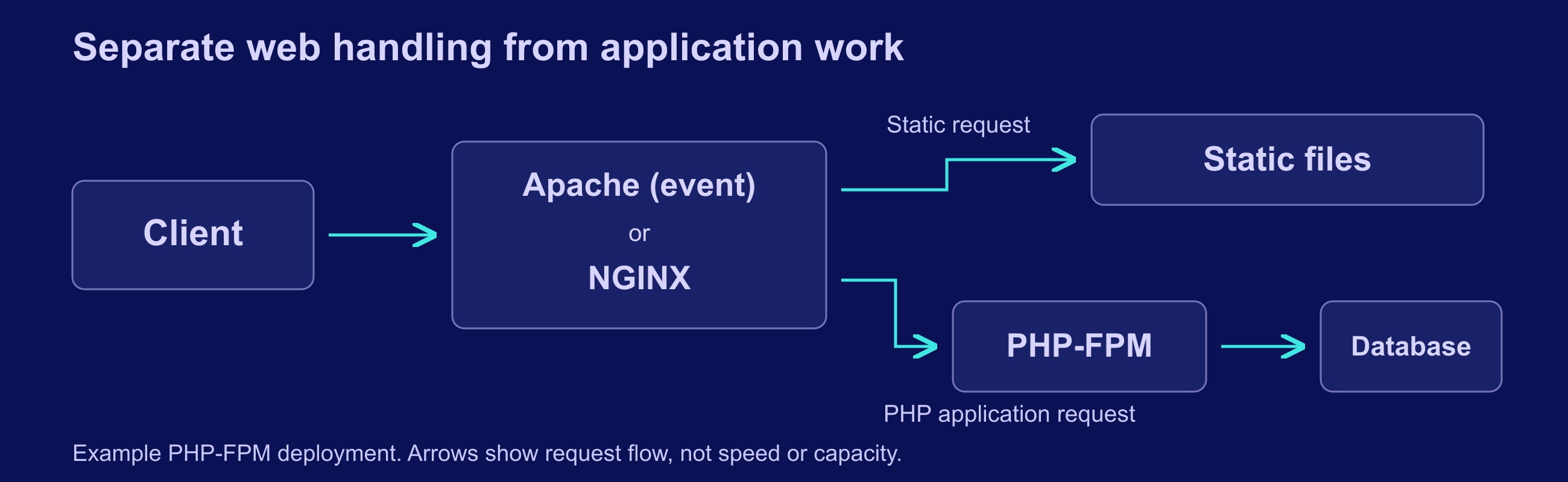
A static request can finish at the web server. A PHP request can pass through PHP-FPM and then wait on a database, storage or an external service. Changing the first component does not remove a slow query or a saturated PHP worker pool. The diagram shows these possible paths, not measured performance or a requirement to run both web servers.
For WordPress or another PHP application, compare Apache event plus PHP-FPM with NGINX plus the same PHP-FPM configuration. Hold the PHP version, opcode cache, application, database and caching rules constant. A cached anonymous page and an uncached checkout request exercise different parts of the system; report them separately.
Capacity settings also describe different things. Apache’s MaxRequestWorkers limits concurrent request processing. NGINX worker_connections includes upstream connections as well as clients and remains subject to open-file limits. PHP-FPM’s pm.max_children bounds simultaneous requests served by a pool. These are not interchangeable visitor counts.
Leave memory for the operating system, database, caches and traffic variation. Increase a worker limit only after checking memory use and queues under representative load. For the wider stack, use the VPS server optimization guide to investigate the actual bottleneck before changing products or buying a larger plan.
Configure, Test and Reload Safely
Back up the current configuration and retain console access before changing a production service. On a systemd-based Debian or Ubuntu installation, the following examples test and reload the selected service. Run only the block for the server you have installed; other distributions and control panels may use different service names or management commands.
Validate an Apache Change
sudo apachectl configtest && sudo systemctl reload apache2
sudo systemctl status apache2 --no-pager
Validate an NGINX Change
sudo nginx -t && sudo systemctl reload nginx
sudo systemctl status nginx --no-pager
The conditional reload runs only if the configuration test succeeds. A successful syntax check still does not prove that routes, permissions or application behavior are correct. Test the site from a client and inspect access and error logs after the reload. NGINX’s reload documentation explains how it starts new workers and retires old workers gracefully; it does not establish a universal reload-speed advantage over Apache.
- Check the homepage, a deep permalink and a missing page with the intended hostname and TLS certificate.
- Test login, logout, uploads and authenticated requests, not just the anonymous homepage.
- Confirm private pages and responses with session cookies cannot enter a shared public cache.
- Test redirects, application callbacks and client IP handling when a trusted proxy sits upstream.
- Keep the previous configuration ready to restore if the change fails functional checks.
Do not enable a second listener on an address and port already owned by the first server. For a planned migration, test separately before moving public traffic.
Check Security and Protocol Support

Choose a supported package source and track advisories for the actual build and enabled modules. A product-level CVE count is not a patch plan: affected versions, distribution backports, configuration and exposure determine whether an advisory applies. The Apache security advisories and NGINX security advisories are starting points, alongside your operating system vendor’s notices.
Disable unused modules and public administrative endpoints, protect private upstreams, limit filesystem permissions and verify certificate renewal. Request filtering or a WAF requires its own installation and rule maintenance; ModSecurity is not a protection automatically included with every Apache installation. Neither server is secure simply because it has fewer visible features.
| Capability | Apache HTTP Server 2.4 | NGINX open source |
|---|---|---|
| HTTP/2 | Available through mod_http2; verify build and configuration | Available through the HTTP/2 module; verify build and configuration |
| HTTP/3 | No delivered HTTP/3 module documented in the reviewed 2.4 module index | HTTP/3 module documented as experimental and not built by default |
| Security updates | Match advisories to package version, vendor backports and enabled modules | Match advisories to package version, vendor backports and enabled modules |
Protocol scope checked 26 October 2026 against the Apache 2.4 module index, mod_http2, and NGINX HTTP/2 and HTTP/3 documentation. Third-party modules, commercial products and future releases are outside this table.
HTTP/3 can be evaluated separately at an edge or reverse proxy, but it is not evidence that your PHP application will become faster. Verify support in the exact package, TLS library, clients and network path before enabling it. Keep working HTTPS available while testing additional protocols.
Measure Performance and Cost on Your Workload
A useful test answers a specific question: can this configuration meet your latency and error targets within the resources you can afford? It should include your real response sizes, cache behavior and dynamic work. Test only systems you own or are authorized to load, using an isolated environment and a separate load generator where practical.
| Workload or check | Record | Control or limitation |
|---|---|---|
| Static delivery | Successful requests per second; latency in milliseconds | Same files, TLS, compression and cache state |
| Dynamic requests | Latency percentiles, error rate and PHP queue length | Same application, PHP-FPM pool, database and dataset |
| Resource pressure | CPU use, memory in MiB, open files and swap activity | Same VPS allocation; observe the complete application stack |
| Operational cost | Actual plan cost and maintenance effort over a stated period | Include backups, support and migration effort; compare like billing terms |
Record exact versions, enabled modules, configuration, test duration, request mix and concurrency. Repeat comparable runs and preserve raw results. Keep failed requests in the report; high throughput with application errors is not a successful result. Measure tail latency as well as averages, and check that the load generator or network has not become the bottleneck.
No numerical comparison chart is included here. The reviewed publisher configuration defaults measure different limits, while the older NGINX-only hardware benchmark does not compare current Apache and NGINX on the same VPS. Plotting either as a performance ranking would answer the wrong question. Your own documented, reproducible results can support a later comparison.
Both projects provide open-source software; commercial support, control panels and managed services are separate choices. There is no justified fixed monthly saving from changing the web server alone. Consult your actual bill and measured resource needs, and compare the operational costs of maintaining the current stack with those of migrating it.
Decide Whether to Migrate

Keep Apache when existing overrides, authentication modules or a supported control-panel setup make it the lower-risk operational choice. Consider NGINX when you want explicit, centrally managed routes for static sites or upstream applications and are prepared to own the configuration. Keep a well-running deployment unless a measurable problem or operational requirement justifies changing it.
For an existing WordPress site, translate every rewrite and access rule before cutover. NGINX does not make a plugin’s Apache rules work automatically, and adding NGINX in front of Apache introduces another configuration and logging layer. A combined stack can be useful, but is not a free performance improvement.
- Inventory application rules, certificates, redirects, scheduled jobs, uploads and dependencies.
- Back up configuration and application data, and verify a restore path using your backup plan.
- Build a separate staging configuration and complete functional and representative load tests.
- Arrange the cutover and rollback so user writes are not lost or split across inconsistent copies.
- After switching traffic, monitor errors, latency, logs and certificate renewal before retiring the previous setup.
If the investigation points to database queries or PHP workers, address that cause first. The related Apache and NGINX overview provides additional context, while the current publisher documentation linked above should govern implementation details.
Conclusion
Apache wins when its configuration model fits your application and operating practices. NGINX wins when its routing and proxy model fits them better. Establish compatibility, test the complete request path and make the decision from verified behavior on your workload. A server-name ranking cannot replace those checks.
Frequently Asked Questions
Is NGINX always faster than Apache?
Can Apache use PHP-FPM?
Will my .htaccess file work with NGINX?
Does HTTP/3 make NGINX the automatic winner?
How much RAM does either server need?