

On a VPS, choosing the right server type makes a significant difference. A lightweight web server can idle comfortably on a 1 vCore KVM VPS, while an application server loaded with frameworks and libraries may consume enough memory at startup to force swapping under load. On plans with 1–2 GB RAM, every extra 100 MB may reduce file cache, database headroom, or worker capacity.
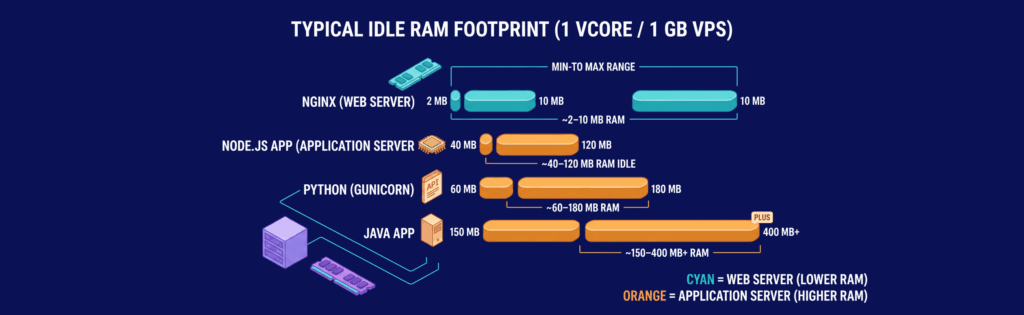
For a concrete example, Apache vs NGINX demonstrates that Nginx often idles in the 2–10 MB range for the master process plus a few workers, while Apache with event MPM remains modest on small installs. By contrast, a typical Java application server or Spring Boot application can start at around 150–400 MB RAM idle before real traffic, connection pools, or JVM growth. A Node.js API process may idle closer to 40–120 MB, while Python using Gunicorn often lands between 60–180 MB depending on the worker count and imported modules. On a 1 vCore VPS, these numbers directly impact how responsive your services feel under load.
| Workload profile | Recommended server type | Typical stack | Idle footprint | Why it fits |
|---|---|---|---|---|
| Static site, docs, landing pages | Web server | Nginx or Apache | 5–30 MB RAM | Efficient at serving files, TLS, and compression |
| JSON API, small app backend | Web + app server | Nginx + Node.js/Gunicorn/Puma | 80–250 MB RAM | Separates request handling from application logic |
| Java API or enterprise app | Web + app server | Nginx + JVM app server | 200–600 MB RAM | Supports heavier frameworks and complex connection management |
| Small microservice on one VPS | App server, optionally behind web server | Node.js, Gunicorn, Puma | 40–200 MB RAM | A more streamlined approach when the service only exposes an API |
Match the server to the workload rather than to the latest buzzwords. If your VPS mostly serves static files, keep the setup lean. When running business logic, memory allocation is critical since architecture oversights become performance bottlenecks almost immediately.
Demystifying Web and Application Servers
A web server acts as the traffic cop and file handler while an application server executes your business logic. On small VPS plans, this distinction is critical. It affects how much RAM remains for your database, how many concurrent requests your system can handle, and whether TLS handshakes or application startup times become a bottleneck.
| Server type | What it is on a VPS | Core functions | Typical idle footprint on 1 vCore / 1 GB VPS | Typical use cases |
|---|---|---|---|---|
| Web server | A lightweight front-end process communicating HTTP(S) directly with clients | Request routing, static file delivery, TLS/SSL termination, redirects, compression, proxying | Nginx: ~2–10 MB RAM, near-0% CPU at idle | Static sites, reverse proxy for apps, TLS offload, media/assets |
| Application server | A runtime environment that executes your application code and returns dynamic responses | Business logic, template rendering, API responses, session handling, middleware, background integrations | Node.js app: ~40–120 MB RAM idle; Python (Gunicorn): ~60–180 MB; Java app: ~150–400 MB+ | APIs, dashboards, SaaS backends, authenticated apps, dynamic websites |
What a Web Server Does
A web server handles request components that do not require your application code to execute. These tasks include accepting HTTP/HTTPS connections, serving static files (CSS, images, JavaScript), redirecting from HTTP to HTTPS, and managing TLS encryption. By terminating TLS at the server level, the application receives a plain internal request without handling encryption itself.
This streamlined process is essential on a VPS because repetitive functions like encryption, compression, and file serving are efficiently managed by Nginx and similar servers. For example, if your page view involves 200 KB of static assets, serving them directly from the web server avoids consuming resources that would otherwise run application workers. Many administrators also employ the web server for basic load balancing across local application processes. More details can be found in the Best Web Server Software guide.
What an Application Server Does
An application server processes the requests sent after the web server has handled the connection. It runs your actual business logic such as login verification, database queries, business rule application, HTML rendering, or generating JSON for an API. While the web server acts as a receptionist, the application server is where the work happens.
This capability comes at a memory cost. Even a small application server loads various libraries, environment variables, connection pools, and framework code before serving any request. On a 1 GB VPS, this difference can mean running a small API smoothly or triggering out-of-memory (OOM) events during traffic spikes. When your service requires personalized responses, permission enforcement, or exposes application APIs, an application server is essential. Conversely, if most of your traffic involves static content and TLS termination, an external application layer might be unnecessary.
Protocol Support: Beyond HTTP

When your application requires streaming, bidirectional updates, or low-overhead internal APIs, simply “supporting HTTP” is not enough. Determining which process should handle a given protocol on your VPS is key. In practice, Nginx excels at client-facing HTTP/1.1 and HTTP/2 delivery, as well as proxying WebSocket traffic. Application servers such as Tomcat or Gunicorn host your business logic, and their protocol support impacts latency, connection reuse, and per-request CPU usage.
| Server / role | HTTP/1.1 | HTTP/2 | WebSockets | gRPC | Notes on VPS impact | Winner for real-time API |
|---|---|---|---|---|---|---|
| Nginx (web server / reverse proxy) | Excellent | Excellent (client side) | Excellent proxy support | Good (as a proxy; not the app runtime) | Efficient at managing keep-alive, TLS, and connections | Strong front-end layer |
| Tomcat (Java app server) | Excellent | Good | Good | Good with a Java gRPC stack | Supports long-lived connections but comes with higher JVM overhead | Best if your app is Java |
| Gunicorn (Python WSGI) | Good | Limited direct benefit; typically used behind a proxy | Not a native strength in WSGI | Poor direct fit | Suitable for classic APIs, not ideal for streaming or gRPC | Weak for real-time |
| App server with native HTTP/2/gRPC stack | Good | Good | Varies | Excellent | Ideal for service-to-service calls with efficient multiplexing | Best overall |
HTTP/2 is valuable because it multiplexes multiple requests on a single connection. In internal tests on a 2 vCore VPS, API calls over HTTP/2 exhibited lower handshake overhead compared to those using HTTP/1.1 with keep-alive.
WebSockets enable persistent connections for server push updates, while gRPC—running over HTTP/2 with compact Protocol Buffers—allows faster service-to-service communication, a benefit for microservices where latency is critical.
Resource Management: Threads, Pools, and Caching
On a VPS, performance issues often stem from queuing rather than raw CPU speed. The server operates efficiently until too many requests contend for available workers, threads, or memory. For instance, thread-based application servers like Tomcat manage many requests concurrently; however, each thread requires additional memory—often between 512 KB and 2 MB for the stack.
In contrast, event-driven servers such as Nginx handle thousands of mostly idle keep-alive connections with a single worker, as they do not allocate one thread per connection. On a 4 vCore VPS, setting `worker_processes auto;` (which typically results in 4 workers) in conjunction with high connection limits has proven effective.
Before scaling your setup, it helps to understand your VPS’s capabilities. The What Is a VPS? guide explains the fundamentals and sets expectations for resource management.
| VPS tier | Typical workload | Web server setting | App server thread/pool starting point | Expected max concurrent connections* |
|---|---|---|---|---|
| 1 vCore / 1 GB | Static site, light API | Nginx: `worker_processes 1` | Tomcat: `maxThreads=50`; Gunicorn: `2 workers` | 300–800 |
| 2 vCore / 2–4 GB | Small app, moderate API | Nginx: `worker_processes 2` | Tomcat: `maxThreads=100`; Gunicorn: `3-5 workers` | 800–2,000 |
| 4 vCore / 8 GB | Busy app, mixed dynamic/static | Nginx: `worker_processes 4` | Tomcat: `maxThreads=150-200`; Gunicorn: `5-9 workers` | 2,000–5,000 |
| 8 vCore / 16 GB | High-concurrency API | Nginx: `worker_processes 8` | Tomcat: `maxThreads=250-400`; Gunicorn: `9-17 workers` | 5,000–10,000+ |
\*Assumes keep-alive is enabled, a reverse proxy is in place, and responses are roughly under 200 KB.
The rule is to match worker processes with available CPU cores and allocate thread pools based on available RAM. Overprovisioning beyond these limits tends to increase latency rather than throughput.
Caching is another effective way to make a small VPS deliver higher performance. An in-memory cache can reduce dynamic request response times from 80–150 ms down to 5–20 ms. Using proxy-level caching via Nginx can also reduce load on upstream services, which is especially beneficial for read-heavy workloads.
Deployment Patterns on VPS: Reverse Proxies, Two-Tier, and Serverless

When CPU usage remains high even after optimizing worker settings and caching, it becomes necessary to rethink the architecture. Separating web traffic handling from application execution is a common and effective approach. One pattern involves using one VPS as a secure front end and another solely for application logic.
Reverse Proxy + App Server
A practical example: an Nginx edge VPS in Frankfurt listens on ports 80 and 443, terminates TLS, and then forwards dynamic requests to a Node.js application server located in Warsaw on port 3000—connected via a private or tightly filtered public link. The edge server handles static files while API calls are proxied, keeping the application server shielded from direct certificate management and allowing for regional optimization.
server {
    listen 443 ssl http2;
    server_name api.example.com;
    location / {
    proxy_pass http://203.0.113.24:3000;
    proxy_set_header Host $host;
    proxy_set_header X-Forwarded-For $remote_addr;
    proxy_set_header X-Forwarded-Proto https;
    }
  }
Verify the setup with:
curl -I https://api.example.com
A correct configuration should return an `HTTP/2 200` response or another valid status code, while direct access to the application port should be blocked for external hosts.
Two-Tier Architecture
For more demanding applications, it can be beneficial to run Nginx on one VPS (for example, a public-facing server labeled `web-01.lon1`) and Tomcat on another (an application server labeled `app-01.lon1`) within a private network. Tight firewall rules ensure that only the web server can communicate with the application server, simplifying maintenance and enhancing security.
Lightweight Serverless Alternative
For bursty workloads such as campaign traffic or transient API usage, a serverless-like VPS setup is worth considering. In this model, a small Nginx front end handles continuous traffic while additional micro-VPS instances running lightweight services (such as Node.js, Go, or Python) are launched on demand. Once the surge subsides, these instances are terminated—saving costs on idle capacity.
Security Considerations: Hardening and Middleware

An effective deployment pattern relies on securing each layer properly. Common problems include exposed application ports, insufficient firewall rules, and unprotected APIs. A basic security checklist involves:
Start at the operating system level: only open critical ports (typically 22/tcp, 80/tcp, and 443/tcp) on your web server. Ensure that if your application server sits behind a reverse proxy, it is not accessible from the public internet. For example, using UFW you might run:
ufw default deny incoming
ufw default allow outgoing
ufw allow 22/tcp
ufw allow 80/tcp
ufw allow 443/tcp
ufw enable
ufw status numbered
For configurations where the application server is separate, restrict access to the proxy’s IP only:
ufw default deny incoming
ufw allow from 198.51.100.10 to any port 3000 proto tcp
ufw allow 22/tcp
ufw enable
Complement these settings with tools like fail2ban to mitigate brute-force attacks, disable outdated TLS protocols, and enforce strict JWT validation in your apps.
| Layer | Minimum control | Concrete baseline |
|---|---|---|
| OS / SSH | Limit exposed services | Use key-only SSH, disable password authentication, and set `PermitRootLogin no` |
| Firewall | Deny all by default | Web server: allow ports 22/80/443; Application server: restrict to proxy IP for its port |
| Abuse protection | Thwart brute-force attacks | Use fail2ban on SSH and sensitive web paths |
| TLS | Secure encryption | Enforce TLS 1.2/1.3, force HTTPS, and automate certificate renewals |
| App middleware | Filter out bad requests early | Implement JWT validations with strict claim checks and rate limits |
Most security issues on a VPS arise due to misconfigurations rather than unknown vulnerabilities.
Cost and Scalability Trade-offs for VPS Plans

Security not only impacts operational reliability but also budgets. Often, the most cost-effective mistake is upgrading to a larger VPS without understanding which layer is limited by resources. While web servers scale efficiently with RAM, application servers can quickly become expensive due to their memory demands.
| Server role | Example VPS tier | Typical monthly cost | Cost per vCore | Cost per GB RAM | Practical throughput range* | Best use |
|---|---|---|---|---|---|---|
| Web server only | 1 vCore / 1 GB | $5–$8 | $5–$8 | $5–$8 | 2,000–10,000 req/min for static content | TLS termination, static assets, reverse proxy |
| Small app server | 2 vCore / 2 GB | $10–$16 | $5–$8 | $5–$8 | 300–1,200 req/min for dynamic requests | Node.js, Python, small Rails apps |
| Medium app server | 4 vCore / 8 GB | $24–$48 | $6–$12 | $3–$6 | 1,000–4,000 req/min for dynamic traffic | Busy APIs, JVM apps, multi-worker backends |
| Split web + app | 1 vCore / 1 GB + 2 vCore / 2 GB | $15–$24 total | — | — | Better tail latency than a mixed setup | Production separation, safer scaling |
\*Throughput numbers depend on response sizes, database performance, and caching efficiency.
Vertical scaling (upgrading a single VPS) is fast but can lead to resource oversupply, while horizontal scaling (adding multiple VPS instances behind a reverse proxy) offers more cost-effective handling of increasing load.
Modern Stack Examples on VPS: Node.js, Python, and Java
Almost every effective VPS setup employs Nginx as the front-end proxy with an application server running on an internal port. This separation improves both performance and security. Below are examples covering three popular stacks.
Node.js: Express Behind Nginx
A minimal Express application typically listens on `127.0.0.1:3000` while Nginx handles public traffic on ports 80 and 443. This configuration keeps the Node.js process off the public internet and allows Nginx to manage slow clients, caching, and TLS termination.
server {
    listen 443 ssl http2;
    server_name app.example.com;
    location / {
      proxy_pass http://127.0.0.1:3000;  # Express app
      proxy_set_header Host $host;       # Preserve the original host header
      proxy_set_header X-Real-IP $remote_addr;
      proxy_set_header X-Forwarded-Proto https;
   }
}
Verify the setup with:
curl -I https://app.example.com
Python: Flask with Gunicorn
Flask’s built-in server is not intended for production. On a VPS, Gunicorn is a popular choice for running WSGI-based Python applications. It spawns several workers to handle concurrent requests and automatically restarts those that crash.
gunicorn -w 3 -b 127.0.0.1:8000 app:app
-w 3 = Starts 3 worker processes, a reasonable starting point for a 2 vCPU server
-b 127.0.0.1:8000 = Binds Gunicorn to localhost on port 8000; Nginx acts as the public-facing reverse proxy
app:app = Refers to the Flask application in the format module:application_object
(module “app.py” containing the Flask instance named “app”)
You can check the service with:
ss -ltnp | grep 8000
curl -I http://127.0.0.1:8000
Java: Spring Boot JAR vs Tomcat
For modern Java applications, running a Spring Boot JAR on a designated port (commonly 8080) is often efficient. Nginx then reverse-proxies the request. Traditional Tomcat deployments remain suitable for legacy WAR packages or when hosting multiple applications.
Test with:
curl -I http://127.0.0.1:8080/
Across these stacks, using Nginx as the front-end proxy and isolating the application server ensures better security and improved performance.
Choosing the Right Server: A VPS Owner’s Decision Framework
For small, dynamic, public-facing applications, the ideal configuration combines a web server with an application server. Evaluate your needs based on workload type, latency targets, budget, and scalability. For example, a small Node.js API on a 2 vCore VPS can greatly benefit from a reverse proxy handling TLS and static files, while the application server deals solely with dynamic processing.
VPSus offers optimized KVM VPS hosting plans with server configurations starting as low as $5/month for a 1 vCore/1 GB instance. With data centers in strategically located regions, including Frankfurt and Warsaw, VPSus ensures low latency and reliable performance for both web and application workloads.
Start by examining raw access logs to identify expensive endpoints, then adjust your server role settings accordingly. This proactive approach helps prevent performance bottlenecks as traffic grows and facilitates smoother transitions from vertical to horizontal scaling.
Frequently Asked Questions
What is the difference between a web server and an application server on a VPS?
Why does server choice matter on a VPS with limited RAM?
How does protocol support affect server performance on a VPS?
What deployment pattern is best for separating web and app roles on a VPS?

