

Self-Hosted Alternatives to TypeForm
Formbricks: An open-source experience management platform with unlimited forms, responses, and team members. Features multi-channel feedback collection, GDPR compliance, and AI assistance. Ideal for teams prioritizing privacy and complete data control.
OpnForm: A modern no-code form builder with AI-powered form generation, conditional logic, and unlimited submissions. Self-host in two commands using Docker. Perfect for businesses needing quick, beautiful forms with full data ownership.
Typebot: An advanced conversational chatbot builder with visual drag-and-drop interface and 30+ native building blocks. Integrates seamlessly with OpenAI, Google Sheets, and Zapier. Great for creating engaging chat-style forms.
HeyForm: Create engaging conversational forms with no coding required. Features smart logic, AI copilot, and extensive customization options. Excellent for surveys, questionnaires, and interactive polls.
LimeSurvey: An enterprise-grade survey platform with advanced question types, quota management, and robust statistics. Perfect for academic research, market research, and large-scale data collection.
Quick Comparison
| Feature | Formbricks | OpnForm | Typebot | HeyForm | LimeSurvey |
|---|---|---|---|---|---|
| Core Approach | Experience management | No-code forms | Conversational chatbot | Conversational forms | Enterprise surveys |
| AI Assistance | Yes | Yes | Yes (OpenAI) | Yes | No |
| Conditional Logic | Yes | Yes | Yes | Yes | Yes |
| Customization | High | High | Moderate | High | Very High |
| Hosting Requirements | 1 vCPU, 2 GB RAM, 8 GB SSD | 1 GB RAM, 10 GB storage | 2 GB RAM, 20 GB storage | 2 GB RAM, 15 GB storage | 2 GB RAM, 250 MB minimum |
| Best For | User feedback & research | Business forms | Interactive experiences | Surveys & quizzes | Enterprise research |
If you’re prioritizing data privacy, cost control, and full ownership of your form data, these tools are worth exploring. Formbricks stands out for its balance of features, ease of deployment, and active community support, while OpnForm excels in simplicity and AI-powered form creation.
5 Self-Hosted TypeForm Alternatives: Build Your Own Form Platform
1. Formbricks: Open-Source Experience Management Platform
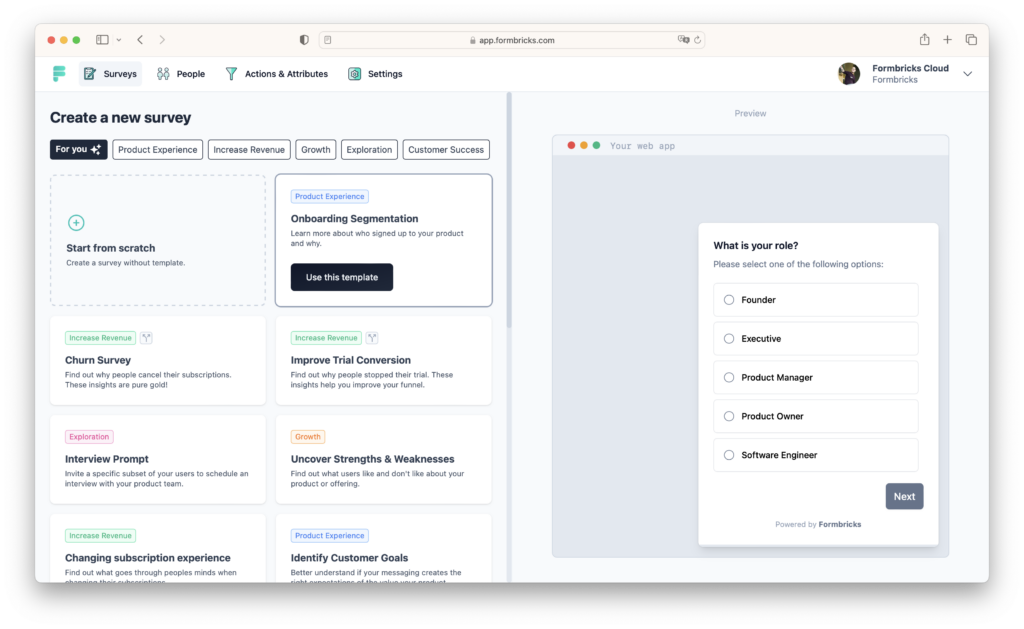
Formbricks is a self-hosted alternative to TypeForm designed to gather user feedback across multiple channels while maintaining complete data sovereignty. Built for modern teams, it combines powerful survey capabilities with privacy-first architecture.
Here’s what makes Formbricks stand out:
| Feature | What It Offers |
|---|---|
| Multi-Channel Deployment | Deploy surveys on websites, in-app, email, and link distribution |
| Unlimited Everything | Free forever plan with unlimited forms, responses, and team members |
| Conditional Logic | Jump questions based on previous answers for higher completion rates |
| Granular Targeting | Combine usage data with custom attributes for fine-grained targeting |
| Privacy-First Architecture | Self-hosting ensures GDPR compliance and complete data control |
These features make Formbricks a strong choice for organizations seeking comprehensive feedback tools without compromising data security.
Formbricks has become one of the fastest-growing open-source survey platforms in 2025, with a thriving community on GitHub actively contributing to its development. The platform’s intuitive interface allows teams to create sophisticated surveys in minutes, while its analytics dashboard provides actionable insights presented in an easy-to-understand format.
The core source code is licensed under AGPLv3 and freely available on GitHub, ensuring transparency and community-driven development. For teams needing advanced features like advanced targeting and custom branding, Enterprise options are available with dedicated support.
System Requirements for Self-Hosting
Formbricks has modest system requirements, making it accessible for most VPS setups:
| Resource | Minimum Requirement |
|---|---|
| CPU | 1 vCore |
| RAM | 2 GB |
| Storage | 8 GB SSD |
| Other | HTTPS certificate required |
These requirements align well with entry-level VPS plans, allowing you to start small and scale as your feedback collection needs grow. Formbricks can run alongside other self-hosted applications without performance issues.
Integration and Analytics Features
Formbricks offers extensive integration capabilities:
- SDKs and APIs: Connect with your existing tech stack using comprehensive SDKs and open APIs
- Native Integrations: Pre-built connectors for popular tools and platforms
- Real-Time Analytics: Gain actionable insights through aggregated survey results
- Multi-Language Support: Create surveys in multiple languages for global reach
- Custom Attributes: Use device information and user properties for precise targeting
2. OpnForm: AI-Powered No-Code Form Builder
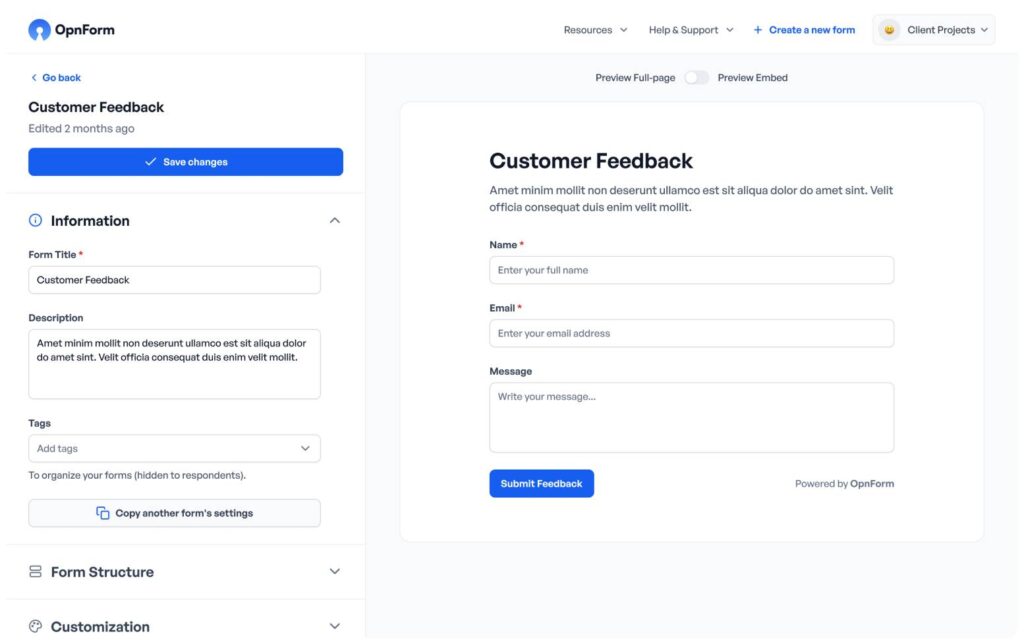
OpnForm is a modern, open-source form builder that combines simplicity with powerful features. Its standout feature is the AI-powered form generator that can create fully working forms in seconds, dramatically reducing setup time.
Core Features
| Feature Category | Capabilities |
|---|---|
| Form Creation | 10+ input types, images, conditional logic, AI generation |
| Advanced Logic | Conditional logic, URL pre-fill, hidden fields, form passwords |
| Data Management | Email notifications, CSV exports, submission analytics |
| Automation | Webhooks, custom code, closing dates, unique submission IDs |
| Analytics | Completion funnel, device/browser breakdown, drop-off tracking |
OpnForm is built on a modern tech stack with Laravel + PostgreSQL for the backend and Nuxt 3 for the frontend. Everything is containerized with Docker, making deployment straightforward. The platform can be self-hosted in just two commands, and importantly, both cloud and self-hosted versions share the same codebase, allowing seamless migration between hosting options.
Self-Hosting Advantages
Self-hosting OpnForm provides several key benefits:
- Full Data Control: All form submissions remain on your infrastructure
- Easy Deployment: Self-host using Docker in two commands
- Generous Free Plan: Unlimited forms, fields, and submissions even on self-hosted
- Flexible Migration: Start on cloud, migrate to self-host later with same codebase
- Custom Branding: Complete control over appearance and user experience
OpnForm is released under the GNU Affero General Public License Version 3 (AGPLv3), ensuring it remains open-source and community-driven.
Resource Requirements
| Resource | Recommended Minimum |
|---|---|
| CPU | 1 vCore |
| RAM | 1 GB |
| Storage | 10 GB |
| Software | Docker and Docker Compose |
3. Typebot: Conversational Chatbot Builder
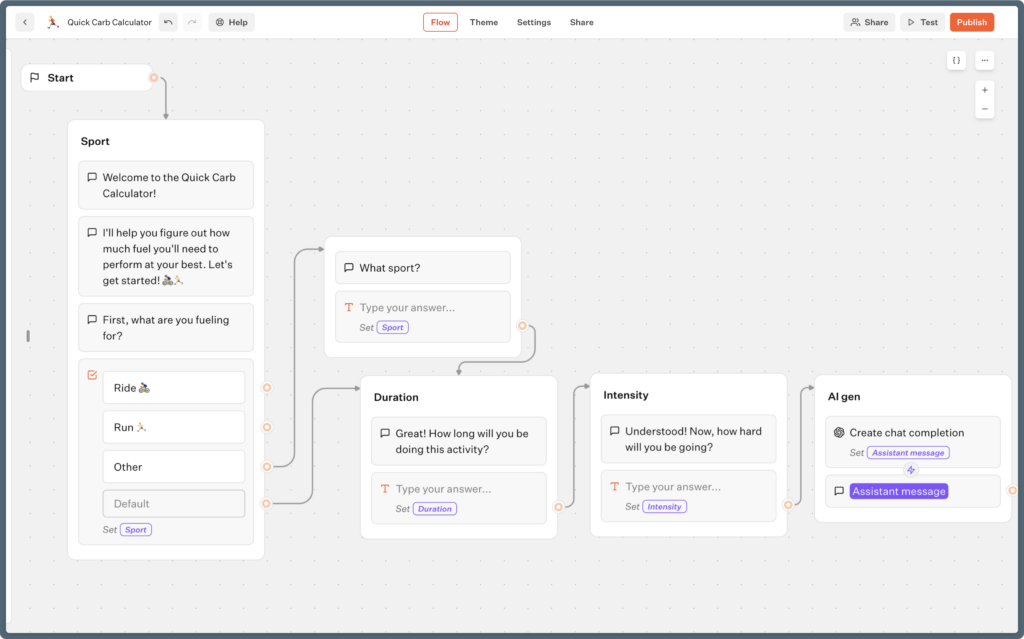
Typebot takes a unique approach to form building by creating conversational, chatbot-style experiences. This makes forms feel more engaging and interactive, often leading to higher completion rates compared to traditional forms.
Core Architecture
Typebot is 100% open-source and designed for self-hosting. The platform uses Docker for deployment and includes:
| Component | Description |
|---|---|
| Typebot Builder | Visual editor where chatbot flows are created |
| Typebot Viewer | Serves the published bots to end users |
| PostgreSQL Database | Stores all application data and responses |
| Reverse Proxy | Caddy recommended for auto-generated TLS certificates |
Key Features
Typebot offers comprehensive capabilities for creating engaging conversational forms:
- Visual Builder: Drag-and-drop interface requiring no coding knowledge
- 30+ Building Blocks: Text bubbles, date pickers, file uploads, payment gateways (Stripe)
- Rich Integrations: OpenAI (ChatGPT), Google Sheets, Zapier, Make.com, Chatwoot
- Full Customization: Multi-language support, custom themes, user authentication
- Rich Media: Support for images, videos, and embedded content
The self-hosted version receives monthly updates after features have been thoroughly tested on the cloud version, providing a stable, production-ready experience.
System Requirements
| Resource | Minimum Requirement |
|---|---|
| Operating System | Ubuntu 20.04+ recommended |
| RAM | 2 GB |
| Storage | 20 GB |
| Software | Docker & Docker Compose |
| Other | Domain name for HTTPS setup |
Deployment Considerations
By default, Typebot runs on unencrypted HTTP, but this should only be used for testing. For production deployments, use a reverse proxy like Caddy or Nginx with SSL certificates. The Docker setup is straightforward and well-documented, with the official documentation available at the Typebot website.
4. HeyForm: Conversational Form Builder
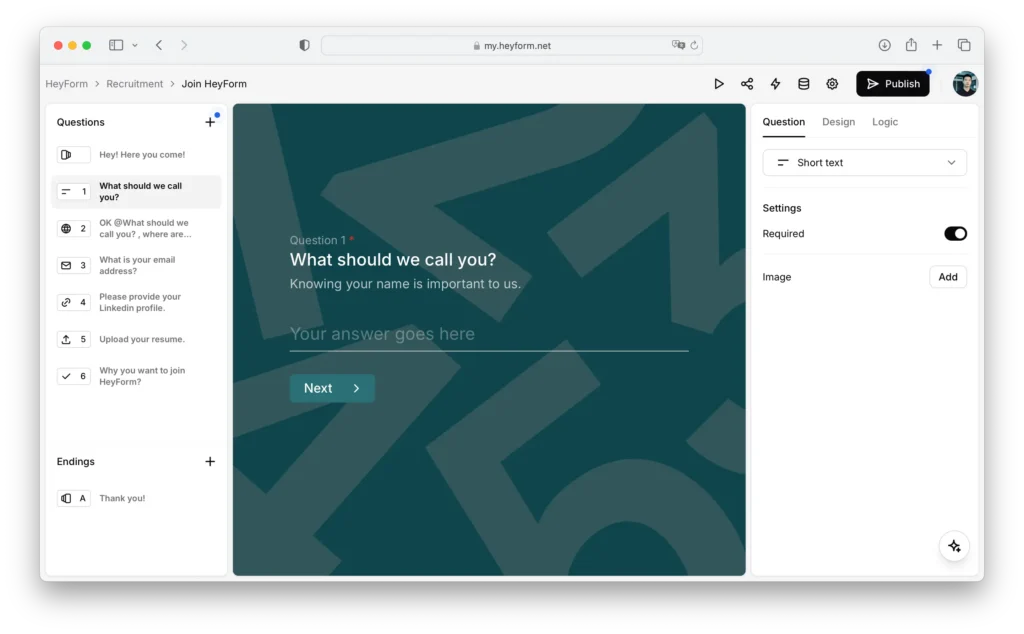
HeyForm is an open-source form builder designed to create engaging conversational forms for surveys, questionnaires, quizzes, and polls. It requires no coding skills and focuses on user-friendly design with powerful customization options.
Enterprise Features
HeyForm provides a comprehensive feature set built around three main areas:
| Feature Category | Key Components |
|---|---|
| Input Types | Text, email, phone, picture choices, date pickers, file uploads |
| Smart Logic | Conditional logic, URL redirections, multi-page forms |
| Integrations | Webhooks, analytics, Zapier, Make.com, marketing platforms |
Advanced Customization
HeyForm stands out for its extensive customization capabilities:
- Brand Consistency: Customize fonts, colors, logos, and backgrounds
- AI Copilot: Accelerate form creation with AI assistance
- Template Library: Start with customizable templates for common use cases
- Drag-and-Drop Interface: Intuitive visual builder for quick form creation
- Multi-Page Support: Create complex, multi-step forms with ease
Self-Hosting Options
HeyForm offers multiple deployment methods to suit different technical requirements:
- Docker Installation: Standard deployment using Docker Compose
- One-Click Platforms: Deploy quickly on Zeabur and Railway with free credits
- Technical Stack: Uses MongoDB and KeyDB (multithreaded Redis alternative)
Resource Requirements
| Resource | Recommended Specification |
|---|---|
| RAM | 2 GB |
| Storage | 15 GB |
| Software | Docker & Docker Compose |
| Database | MongoDB |
| Cache | KeyDB (Redis alternative) |
Official self-hosting documentation is available on the HeyForm website, providing step-by-step instructions for various deployment scenarios.
5. LimeSurvey: Enterprise Survey Platform
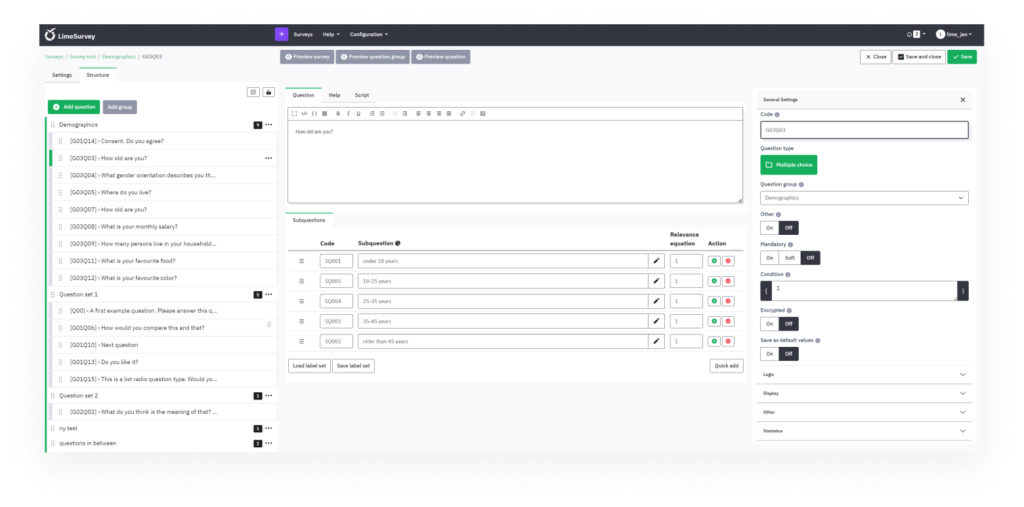
LimeSurvey is a mature, enterprise-grade survey platform that has been refined over many years. It’s particularly well-suited for academic research, market research, and large-scale data collection requiring advanced statistical analysis.
Enterprise Features
LimeSurvey offers professional-grade capabilities designed for serious research:
| Feature Category | Key Components |
|---|---|
| Question Types | 28+ question types including arrays, ranking, file uploads |
| Survey Logic | Advanced branching, quotas, assessment rules, randomization |
| Data Management | Multi-format export, SPSS integration, real-time statistics |
| Access Control | Token-based access, user permissions, survey quotas |
| Internationalization | 80+ languages, RTL support, multi-language surveys |
System Requirements
LimeSurvey Community Edition (CE) requires more robust infrastructure than lighter alternatives:
| Resource | Minimum Requirement |
|---|---|
| PHP | 7.4.x or newer with PDO driver |
| RAM | 2 GB recommended |
| Storage | 250 MB minimum |
| Database | MariaDB 10.3.38+, MySQL 8+, PostgreSQL 14+, or MS SQL Server 2019+ |
| Web Server | Apache or Nginx with proper directory permissions |
Installation Requirements
LimeSurvey requires specific directory permissions for proper operation:
- /limesurvey/tmp – Read & Write permissions for temporary files
- /limesurvey/upload/ – Read & Write for uploaded files
- /limesurvey/application/config/ – Read & Write for configuration
Optional but Recommended Extensions
- GD-Library: For captchas, charts, and image uploads via HTML editor
- IMAP: For email bounce tracking system
- cURL: For remote data fetching and integrations
Browser Requirements
LimeSurvey supports modern browsers including Edge, Firefox, Chrome, and Opera with JavaScript enabled. The administration interface requires a minimum screen resolution of 1280px × 1024px.
Self-Hosted vs Cloud
LimeSurvey offers both cloud-based services (with fees) and an open-source Community Edition (CE) for self-hosting. If you have existing server infrastructure and want to integrate survey capabilities, the Community Edition provides all core features at no cost.
Feature Comparison
Here’s a detailed comparison of how these self-hosted TypeForm alternatives stack up across key dimensions:
| Feature | Formbricks | OpnForm | Typebot | HeyForm | LimeSurvey |
|---|---|---|---|---|---|
| Core Approach | Experience management platform | No-code form builder | Conversational chatbot builder | Conversational form builder | Enterprise survey platform |
| AI Assistance | Yes – Analytics insights | Yes – Form generation | Yes – OpenAI integration | Yes – AI copilot | – |
| Deployment Ease | Docker, one-click script | Docker (2 commands) | Docker Compose | Docker, one-click platforms | Manual LAMP/LEMP setup |
| Free Tier Features | Unlimited everything | Unlimited forms/submissions | Full features | Full features | Full CE features |
| Best Use Case | User feedback & product research | Business forms & lead generation | Interactive experiences & chatbots | Surveys, quizzes, questionnaires | Academic & market research |
| Learning Curve | Low | Very Low | Moderate | Low | Moderate to High |
This comparison highlights each platform’s unique strengths. Formbricks excels in feedback collection and user research, while OpnForm offers the quickest path to creating beautiful forms with AI assistance. Typebot is ideal when you want engaging, conversational experiences, and LimeSurvey remains the gold standard for serious research requiring advanced statistical capabilities.
By self-hosting any of these platforms, you gain complete control over your data while reducing long-term costs. Most of these solutions can run on a single VPS alongside other applications, making them cost-effective for small teams and enterprises alike.
Step-by-Step Formbricks Setup Guide on VPS

This guide walks you through setting up Formbricks on your VPS, giving you complete control over your feedback collection platform while maintaining security and cost-effectiveness.
System Requirements
Before beginning, ensure your VPS meets these requirements:
- Memory: At least 2 GB RAM
- Storage: 8 GB of available SSD space
- Software: Docker and Docker Compose installed
- Operating System: Ubuntu 20.04 LTS or newer
- Domain: A domain name with DNS configured
- SSL: HTTPS certificate (Let’s Encrypt recommended)
Installation Steps
1. Update Your System
Run these commands to update your system and install Docker:
sudo apt update && sudo apt upgrade -y
sudo apt install docker.io docker-compose -y
sudo systemctl enable docker
sudo systemctl start docker
2. Create Formbricks Directory
Set up a dedicated directory for Formbricks:
mkdir -p ~/formbricks && cd ~/formbricks
3. Create Docker Compose Configuration
Create a docker-compose.yml file:
nano docker-compose.yml
Paste this configuration:
version: '3.8'

services:
  postgres:
    image: postgres:16-alpine
    restart: unless-stopped
    environment:
      POSTGRES_PASSWORD: your_secure_password
      POSTGRES_DB: formbricks
    volumes:
      - postgres_data:/var/lib/postgresql/data

  formbricks:
    image: formbricks/formbricks:latest
    restart: unless-stopped
    depends_on:
      - postgres
    ports:
      - "3000:3000"
    environment:
      DATABASE_URL: postgresql://postgres:your_secure_password@postgres:5432/formbricks
      NEXTAUTH_SECRET: your_nextauth_secret_key_here
      NEXTAUTH_URL: https://your-domain.com
      ENCRYPTION_KEY: your_encryption_key_here
    volumes:
      - uploads:/app/uploads

volumes:
  postgres_data:
  uploads:
Important: Replace the following placeholders:
your_secure_password– Strong PostgreSQL passwordyour_nextauth_secret_key_here– Generate with:openssl rand -base64 32your_encryption_key_here– Generate with:openssl rand -base64 32your-domain.com– Your actual domain name
Save and close the file (Ctrl+X, then Y, then Enter).
4. Start Formbricks
Launch Formbricks using Docker Compose:
docker-compose up -d
Check if the containers are running:
docker-compose ps
Post-Installation Configuration
Set Up Reverse Proxy with Nginx
For production use, configure Nginx as a reverse proxy with SSL:
sudo apt install nginx certbot python3-certbot-nginx -y
Create Nginx configuration:
sudo nano /etc/nginx/sites-available/formbricks
Add this configuration:
server {
    listen 80;
    server_name your-domain.com;

    location / {
        proxy_pass http://localhost:3000;
        proxy_http_version 1.1;
        proxy_set_header Upgrade $http_upgrade;
        proxy_set_header Connection 'upgrade';
        proxy_set_header Host $host;
        proxy_cache_bypass $http_upgrade;
        proxy_set_header X-Real-IP $remote_addr;
        proxy_set_header X-Forwarded-For $proxy_add_x_forwarded_for;
        proxy_set_header X-Forwarded-Proto $scheme;
    }
}
Enable the site and obtain SSL certificate:
sudo ln -s /etc/nginx/sites-available/formbricks /etc/nginx/sites-enabled/
sudo nginx -t
sudo systemctl reload nginx
sudo certbot --nginx -d your-domain.com
Resource Management
Here’s typical resource usage for Formbricks on a basic VPS:
| Metric | Typical Usage |
|---|---|
| Memory | 300–500 MB under normal load |
| Storage | 1–2 GB after installation (grows with responses) |
| CPU | 5–15% during normal operation |
Monitor resources with:
docker stats
Backup Strategy
Protect your data with regular backups of the PostgreSQL database and uploads:
# Create backup script
cat > backup-formbricks.sh << 'EOF'
#!/bin/bash
BACKUP_DIR="/backup/formbricks"
DATE=$(date +%Y%m%d_%H%M%S)

mkdir -p $BACKUP_DIR

# Backup PostgreSQL database
docker-compose exec -T postgres pg_dump -U postgres formbricks > $BACKUP_DIR/db_backup_$DATE.sql

# Backup uploads directory
docker cp $(docker-compose ps -q formbricks):/app/uploads $BACKUP_DIR/uploads_$DATE

# Compress backup
tar -czf $BACKUP_DIR/formbricks_backup_$DATE.tar.gz $BACKUP_DIR/db_backup_$DATE.sql $BACKUP_DIR/uploads_$DATE

# Clean up temporary files
rm -rf $BACKUP_DIR/db_backup_$DATE.sql $BACKUP_DIR/uploads_$DATE

# Keep only last 7 days of backups
find $BACKUP_DIR -name "formbricks_backup_*.tar.gz" -mtime +7 -delete

echo "Backup completed: formbricks_backup_$DATE.tar.gz"
EOF

chmod +x backup-formbricks.sh
Schedule automated backups with cron:
crontab -e
Add this line for daily backups at 2 AM:
0 2 * * * /root/formbricks/backup-formbricks.sh
Troubleshooting Tips
If you encounter issues, these commands can help diagnose problems:
# View logs
docker-compose logs -f formbricks

# View PostgreSQL logs
docker-compose logs -f postgres

# Restart services
docker-compose restart

# Rebuild containers
docker-compose down
docker-compose up -d --build

# Check container status
docker-compose ps

# Access Formbricks container shell
docker-compose exec formbricks sh
Common Issues and Solutions
- Port 3000 already in use: Change the port mapping in docker-compose.yml to
"3001:3000" - Database connection errors: Verify DATABASE_URL environment variable and PostgreSQL container status
- HTTPS errors: Ensure NEXTAUTH_URL uses https:// and matches your domain exactly
- Login issues: Clear browser cache or regenerate NEXTAUTH_SECRET
This setup ensures a reliable and secure Formbricks installation. Once deployed, access your instance at https://your-domain.com and complete the initial setup wizard to create your admin account.
Summary and Recommendations
Here’s a comprehensive overview of the best self-hosted TypeForm alternatives and guidance on choosing the right solution for your needs.
Formbricks emerges as a top choice for teams and businesses seeking comprehensive feedback collection tools. Its unlimited free tier, combined with multi-channel deployment capabilities and GDPR-compliant architecture, makes it ideal for organizations prioritizing both functionality and data privacy. The active open-source community and straightforward Docker deployment further strengthen its position as a leading alternative.
Feature-Based Recommendations
| Use Case | Recommended Solution | Key Features |
|---|---|---|
| User Feedback & Product Research | Formbricks | Multi-channel deployment, unlimited responses, granular targeting |
| Quick Business Forms | OpnForm | AI generation, 2-command deployment, unlimited submissions |
| Interactive Experiences | Typebot | Conversational flows, ChatGPT integration, visual builder |
| Surveys & Quizzes | HeyForm | Conversational forms, AI copilot, extensive customization |
| Academic & Market Research | LimeSurvey | 28+ question types, advanced statistics, quota management |
| Startups & Small Teams | OpnForm or Formbricks | Low resource requirements, generous free tiers |
Cost Considerations
Self-hosting provides significant cost advantages over SaaS alternatives:
- Entry-Level VPS ($10–15/month): 1 vCore, 2 GB RAM – Sufficient for Formbricks, OpnForm, or HeyForm with moderate traffic
- Mid-Tier VPS ($20–30/month): 2 vCores, 4 GB RAM – Handles Typebot or LimeSurvey with multiple concurrent surveys
- High-Performance VPS ($50+/month): 4+ vCores, 8+ GB RAM – Supports enterprise LimeSurvey deployments with high response volumes
Most platforms can coexist on the same VPS alongside other self-hosted applications, further reducing infrastructure costs.
Deployment Ease Ranking
From easiest to most complex:
- OpnForm: Self-host in two Docker commands
- Formbricks: One-click script or simple Docker Compose
- Typebot: Docker Compose with straightforward configuration
- HeyForm: Docker setup with MongoDB and KeyDB
- LimeSurvey: Traditional LAMP/LEMP stack with manual configuration
Final Thoughts
Self-hosted form builders are increasingly popular among privacy-conscious organizations and cost-sensitive businesses. Each platform in this comparison serves distinct needs:
- Choose Formbricks for comprehensive user feedback and product research
- Choose OpnForm for rapid deployment and AI-powered form creation
- Choose Typebot for engaging, conversational user experiences
- Choose HeyForm for beautiful, customizable surveys and quizzes
- Choose LimeSurvey for serious research requiring advanced statistical capabilities
All five platforms offer robust self-hosting options that put you in complete control of your data while eliminating recurring SaaS fees. For most teams getting started, Formbricks or OpnForm provide the optimal balance of features, ease of deployment, and ongoing maintenance requirements.
With basic VPS infrastructure costing as little as $10 per month, self-hosting these TypeForm alternatives can save thousands annually while providing superior data privacy and customization capabilities.

