

The best self-hosted Asana alternatives are OpenProject (full planning with Gantt and Agile boards), Plane (modern and Docker-native) and Focalboard (lightweight Trello-style boards) – all open-source and free to run on your own VPS. Asana itself has no self-hosted edition, and its per-seat pricing, cloud-only data storage and limited customization are exactly why teams look elsewhere. Self-hosting swaps the subscription for a flat server bill and puts your project data on infrastructure you control – the reason teams in regulated fields make the switch. This guide covers the options, the VPS each one needs, the cost math and how to choose.
What is a Self-Hosted Asana Alternative?

Before diving into specific platforms, it’s important to understand what a self-hosted Asana alternative actually means. These are project management tools that can be installed on servers you own or rent, such as a VPS or dedicated machine. Unlike SaaS solutions, where the provider controls infrastructure and data, self-hosting allows you to take ownership of both.
Key differences make self-hosting attractive:
Data control
You determine exactly where your information is stored, ensuring compliance with regulations and protecting sensitive data. This level of ownership is especially valuable for organizations handling confidential client information or operating under strict industry standards.
Customization
Self-hosted software allows for deeper changes to workflows, fields, and even source code, letting the tool adapt to your needs. Teams can shape the platform to match unique processes instead of being limited by predefined structures.
Integration flexibility
Third-party integrations or internal systems can be tied in without restrictions. This makes it easier to connect with existing tools in your ecosystem and maintain seamless operations.
Long-term cost efficiency
While setup takes resources, eliminating per-seat fees reduces expenses as teams grow. Over time, this can significantly lower operational costs compared to cloud-based subscription models.
Key Features to Look for in a Self-Hosted Project Management Tool
Not all project management software is created equal. Evaluating platforms requires knowing which features will have the most impact on productivity and collaboration.
The most important features include:
- Task and project tracking – A strong system should provide task assignments, milestones, deadlines, and dependency management. Visual tools like Gantt charts or task boards help track progress.
- Team collaboration – Built-in messaging, file sharing, and real-time notifications prevent miscommunication and reduce reliance on scattered emails.
- Time tracking and reporting – Logs, summaries, and detailed reports allow managers to monitor workloads and evaluate team efficiency.
- Workflow automation and integrations – Automated processes and connections to tools like Git, Slack, or cloud storage make work smoother and reduce manual effort.
- Security and access controls – Permissions, authentication, and encryption protect company information from unauthorized access.
- Scalability – The platform should grow alongside your team, supporting additional projects and users without major disruptions.
- Mobile access – Remote and mobile-friendly tools keep teams connected and productive regardless of location.
Best Self-Hosted Asana Alternatives
Several platforms serve as strong replacements for Asana. Each has unique strengths that make it suitable for different types of teams and organizations.
At a Glance: Options and VPS Sizing
Rule of thumb: 1 GB RAM runs a lightweight board for a small team; step to 4 GB (KVM4) once you run OpenProject, Plane or Phabricator with their database and a few dozen users on the same server. If you also track engineering work, our guide to self-hosted Jira alternatives covers that side.
| Tool | Best for | Recommended VPS |
|---|---|---|
| OpenProject (Community) | Full planning: Gantt, Agile boards, time tracking, wiki | KVM4 (4 vCores / 4 GB) for a team; KVM2 to trial |
| Plane | Modern, developer-friendly, Docker-native, no per-seat fee | KVM4 (4 GB) – multi-container stack |
| Focalboard | Lightweight Trello / Notion / Asana-style boards | KVM1-KVM2 (1-2 GB) for small teams |
| Redmine | Mature, plugin-rich issue and project tracking | KVM2 (2 GB) |
| Taiga | Agile-first: Scrum and Kanban for dev teams | KVM2 (2 GB) |
| Phabricator / Phorge | Technical teams: code review, repos and tasks in one | KVM4 (4 GB) |
| Wekan / Kanboard | Minimal Kanban, quickest to set up | KVM1 (1 GB) |
OpenProject

OpenProject is known for its comprehensive features and enterprise-level reliability. It offers tools for planning, tracking, and collaboration in one platform.
- Features – It supports agile boards, Gantt charts, timelines, bug tracking, budgeting, and reporting. Teams can monitor risks, costs, and milestones effectively.
- Collaboration – Shared calendars, forums, and integrated document management help centralize team communication and keep everyone aligned.
- Security – With role-based access, audit logs, and compliance standards, OpenProject ensures safe data management.
- Use cases – Ideal for organizations that need advanced project planning, especially in industries like IT, engineering, or construction.
Redmine
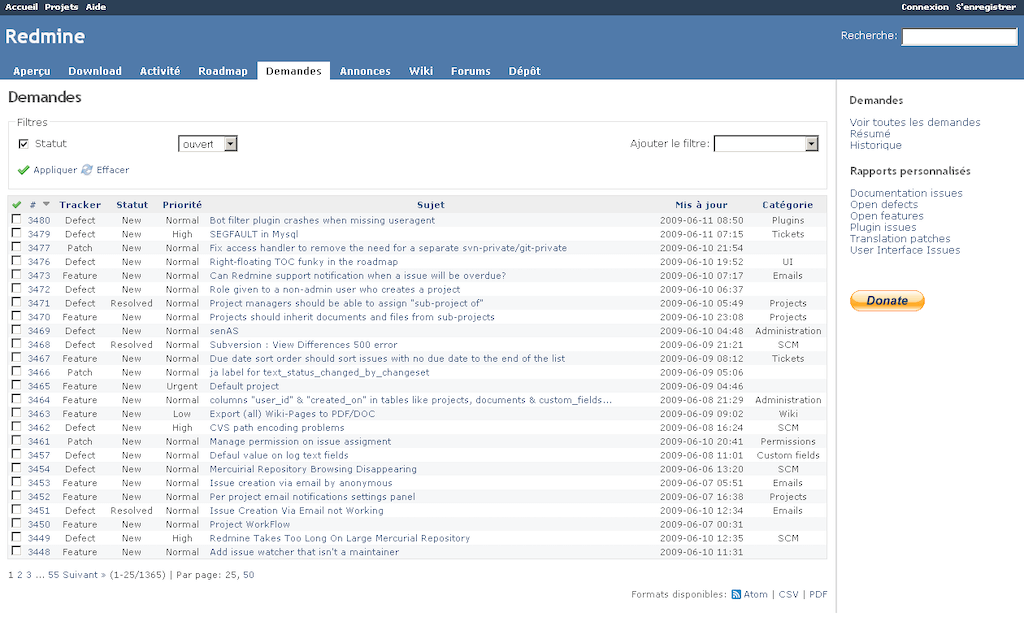
Redmine is a long-standing project management tool valued for its stability and adaptability. It has been adopted widely across industries thanks to its plugin support and flexibility.
- Features – It includes issue tracking, multi-project support, wikis, time logging, and customizable workflows to suit different business models.
- Plugins – Thousands of plugins expand functionality with agile boards, CRM modules, advanced reports, and more.
- Collaboration – Internal forums and email notifications enable smooth communication, while attachments allow file sharing within tasks.
- Use cases – Perfect for businesses seeking a proven, reliable system with extensive customization options.
Taiga

Taiga was built specifically for agile teams, making it a popular choice for developers and startups. Its clean and intuitive interface is easy to adopt.
- Features – Scrum boards, sprint management, story points, burndown charts, and Kanban boards help manage agile workflows.
- Integrations – It integrates with GitHub, GitLab, Bitbucket, and other developer tools, bridging project management with coding.
- Flexibility – Teams can choose between the free open-source version or premium paid editions for additional features.
- Use cases – Best suited for agile teams in software development or creative industries that prioritize adaptability and speed.
Phabricator (and forks like Phorge)

Phabricator is more than a project tracker—it is a full collaboration suite for technical teams.
- Features – Offers bug tracking, project management boards, code review, repository hosting, and wiki documentation.
- Integrations – Works with multiple version control systems, including Git, Mercurial, and Subversion. APIs extend its usability further.
- Strengths – Combines project management and development tools in one environment.
- Use cases – Tailored for software companies and engineering teams that want coding and management features together.
Other Notable Options
Not all teams need advanced systems. Lightweight platforms provide straightforward alternatives for small businesses and individuals.
- Wekan – A Trello-style Kanban system with swimlanes, drag-and-drop functionality, and card assignments. It’s open-source and easy to install with Docker.
- Kanboard – A simple, minimalist Kanban board that supports plugins for features like analytics, authentication, and file uploads.
- Use cases – Ideal for freelancers, small businesses, or personal use cases where simplicity is valued over advanced features.
How to Choose the Right Self-Hosted Asana Alternative
Selecting the right tool requires aligning features with your team’s structure, budget, and technical expertise. A thoughtful approach avoids wasted effort and ensures adoption.
Key considerations include:
Workflow style
Agile teams benefit from Taiga or Wekan. On the other hand, organizations needing structured planning may prefer OpenProject or Redmine.
Ease of deployment
Lightweight tools like Kanboard are quick to set up. However, OpenProject offers more advanced capabilities but requires more resources.
Integration requirements
If your team works with repositories or CI/CD pipelines, Phabricator may be the best fit. Non-technical teams may choose something simpler.
Budget and resources
Consider both software and infrastructure costs. Some tools require minimal hosting power, while others need dedicated resources.
Put numbers on it. Asana bills per user per month – roughly $11-25 per seat on its paid tiers (check current pricing) – so a 10-person team pays around $110-250 a month, and the bill rises with every hire. The same team self-hosted runs on one KVM4 at $40 a month, flat, with unlimited users; the break-even usually lands inside the first handful of seats. For regulated teams – healthcare, fintech, agencies handling client data – the bigger win is that the project data and its audit trail stay on infrastructure you control, in the region you choose (VPS.us runs 17 locations). The trade-off is maintenance: updates and backups are yours, which for a single Dockerised tool with unattended upgrades is a small, occasional task – see the top self-hostable tools for developers for the wider playbook.
Setting Up a Self-Hosted Project Management Tool
Once a platform is chosen, setup is the next step. Self-hosted tools vary in complexity, but most follow a common process.
The main steps involve:
- Server requirements – Identify hardware and software needs such as CPU, RAM, disk space, and supported operating systems. Some platforms are resource-light, while others require stronger servers.
- Dependencies – Install required components such as databases (PostgreSQL, MySQL), web servers (Apache, Nginx), or container tools like Docker.
- Security setup – Secure the environment with SSL certificates, firewalls, and role-based access to protect sensitive data.
- User management – Define user roles, permissions, and access levels to avoid confusion later.
- Backups and monitoring – Automate regular backups and use monitoring systems to track performance, uptime, and resource consumption.
Pros and Cons of Going Self-Hosted
While self-hosting offers strong benefits, it also comes with challenges that must be considered carefully.
Pros:
- Control over where and how data is stored, which enhances compliance and privacy.
- Ability to customize features and workflows to fit your team’s processes.
- Potential for long-term cost savings compared to ongoing SaaS subscription fees.
- Freedom from vendor lock-in, with no dependency on a third-party provider’s roadmap.
Cons:
- Requires technical expertise for setup, updates, and troubleshooting.
- Maintenance and security responsibilities fall on your team.
- Infrastructure may need scaling as your team or projects grow.
- Downtime risks exist if resources are insufficient or not managed properly.
Conclusion
Asana self-hosted alternatives empower teams with flexibility, independence, and control that cloud-based platforms cannot always provide. From full-featured solutions like OpenProject and Redmine to agile-oriented platforms like Taiga, and developer-focused options like Phabricator, there is a tool to fit nearly any workflow. Smaller teams can also benefit from lightweight Kanban boards like Wekan or Kanboard. Choosing the right option comes down to workflow style, integration needs, and the resources available for setup and maintenance.
Take the Next Step with VPS.us
To get the most from a self-hosted Asana alternative, you need a strong hosting foundation. At VPS.us, we provide KVM VPS plans that combine speed, uptime, and flexibility. Our KVM2-US plan includes 2 vCPU cores, 2 GB RAM, and 25 GB SSD storage—ideal for running project management platforms such as OpenProject, Redmine, or Taiga. With VPS.us, your team can confidently host tools on reliable infrastructure, giving you complete control over your project management system.
Frequently Asked Questions
Is there a self-hosted alternative to Asana?
Can Asana itself be self-hosted?
What VPS do I need to self-host a project management tool?
Is self-hosting cheaper than paying for Asana?
Which self-hosted Asana alternative suits regulated industries?

