n a world where nearly every aspect of work and personal life relies on digital data, cloud storage has become indispensable. People store documents, photos, projects, and even entire businesses in the cloud because it’s accessible and convenient. Services like Google Drive, Dropbox, and OneDrive dominate this space, offering easy synchronization across devices and quick sharing options. However, that convenience comes at a cost: your files reside on someone else’s infrastructure, governed by their policies and subject to their security measures.
For individuals and organizations that value privacy and full control over their information, self-hosting cloud storage provides a practical and sustainable alternative. It allows you to build and operate your own private cloud on your own server, ensuring your data never leaves your control. This approach provides both flexibility and independence, combining the best features of commercial cloud systems with the confidence of total ownership.
What Is Self-Hosted Cloud Storage?
Self-hosted cloud storage is a system where you deploy and manage the storage platform on your own infrastructure, whether that’s a VPS, dedicated server, or home network device. Unlike traditional cloud services, which rely on third-party providers to manage both the software and data, a self-hosted solution puts everything in your hands.
Ownership
You control the server, the software, and the data. Every file resides on hardware you manage, giving you full authority over backups, updates, and access policies. This autonomy ensures that no outside company can monitor, modify, or monetize your data.
Data control
Because your files are stored locally or within your hosting environment, you decide who can access them, where they are stored, and how long they are retained. This is especially valuable for businesses that must comply with data protection laws like GDPR.
Customization
Self-hosted cloud platforms are typically open-source and can be adapted to your needs. You can modify configurations, install plugins, and integrate additional tools such as calendars, mail servers, or collaborative editing applications.
Many of these systems rely on open standards such as WebDAV, CalDAV, and CardDAV, allowing seamless compatibility with desktop, mobile, and web clients. This makes it easy to use self-hosted storage without losing any of the convenience of commercial solutions.
How Self-Hosted Cloud Storage Works

The foundation of self-host cloud storage lies in combining your own hardware with open-source or enterprise-grade software that provides file-management and synchronization capabilities.
- Server setup – The first step is provisioning a server environment, either virtual or physical, where the storage platform will run. A VPS (Virtual Private Server) is often the most balanced option for cost and reliability. It offers guaranteed resources, easy scalability, and consistent uptime.
- Software layer – Once your server is ready, you install a self-hosted storage platform such as Nextcloud or Seafile. This software handles file synchronization, sharing, version control, and access management, similar to how commercial platforms operate.
- Protocols and communication – The system uses standardized protocols like WebDAV or SFTP for communication between clients and the server. These protocols ensure secure data transfers and compatibility across operating systems and devices.
- Access methods – Users can access the cloud through multiple interfaces: a browser dashboard for everyday use, desktop sync clients for automatic file updates, and mobile apps for on-the-go access. This creates a unified ecosystem across all your devices.
With the right configuration, the result is a private cloud system that mirrors the experience of Dropbox or Google Drive, without relying on external providers.
Benefits of Hosting Your Own Cloud Storage
Running your own cloud environment offers several key advantages that appeal to individuals, developers, and businesses alike.
Privacy and security
Since the data resides on your own server, you eliminate the risks associated with third-party access. Your information isn’t scanned for analytics, shared with advertisers, or exposed to unknown data retention policies. You can also implement your own encryption standards, firewall rules, and authentication mechanisms to protect sensitive content.
Cost efficiency
While setting up your system requires an initial investment, it saves significant costs in the long run. Commercial providers charge monthly or yearly fees that increase as you add storage or users. With a self-hosted setup, you only pay for your server resources, which can scale gradually as needed.
Scalability and flexibility
Self-hosting lets you expand resources at will. Need more space? Simply upgrade your disk or attach a new volume. Want to add new services like collaborative editing or chat integration? Many platforms offer extensions or modules that integrate seamlessly.
Integration
You can connect your cloud with other applications. For instance, Nextcloud integrates calendars, contacts, and document collaboration tools, while Seafile supports linking to databases or authentication systems. This flexibility turns your server into a complete productivity suite rather than just file storage.
Self-hosting cloud storage may demand more involvement, but the payoff is a secure, personalized, and fully controllable storage ecosystem that reflects your priorities, not someone else’s.
Challenges and Considerations
Despite the benefits, self-hosting does introduce certain responsibilities. Understanding these beforehand ensures smoother deployment and fewer surprises.
- Initial setup complexity – Installing and configuring the software can be challenging if you’re new to server management. It involves setting up the web server, database, and SSL certificates, along with optimizing storage and network performance.
- Maintenance and updates – Unlike managed cloud services, self-hosted solutions require periodic updates and system monitoring. You’ll need to keep the OS, web services, and storage platform patched to maintain security and stability.
- Security responsibilities – You’re the one ensuring the system is protected against attacks. This includes configuring firewalls, monitoring logs, limiting open ports, and regularly reviewing access permissions.
- Backup and redundancy – Hardware failures, user errors, or accidental deletions can occur at any time. You must establish reliable backup routines, both local and offsite, to guarantee data recovery when needed.
These challenges shouldn’t discourage you; they simply highlight the importance of preparation and awareness when transitioning to self-hosted cloud storage.
Best Self-Hosted Cloud Storage Solutions
Several platforms stand out among the best self-hosted cloud storage solutions, each catering to specific user needs and technical expertise levels.
Nextcloud
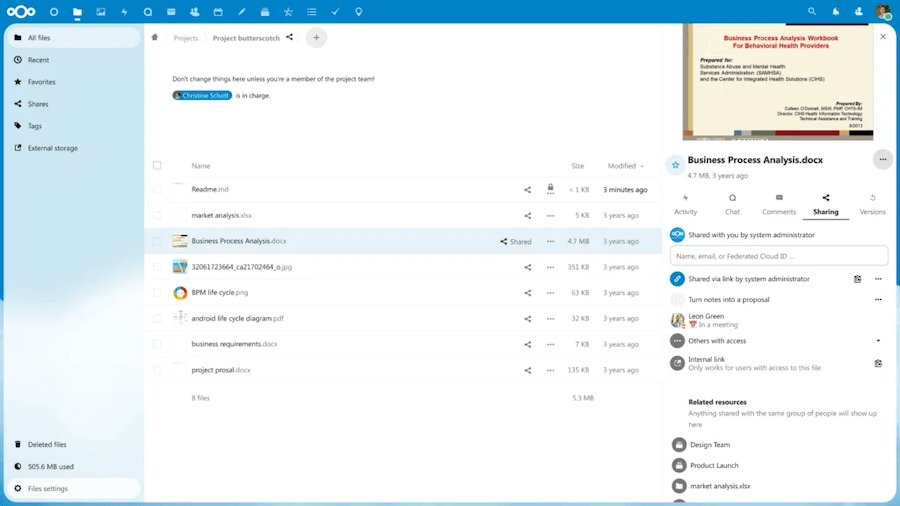
Widely regarded as the top open-source cloud solution, Nextcloud offers not just file storage but also collaboration tools like calendars, task lists, and document editing. Its active community and rich plugin library make it an excellent choice for individuals, teams, and enterprises alike.
ownCloud

A mature and enterprise-friendly option, ownCloud provides robust file synchronization, version control, and user-management features. It’s ideal for larger organizations that prioritize compliance, reliability, and fine-grained access control.
Seafile

Focused on performance, Seafile excels at fast synchronization using block-level transfers, meaning only changed portions of files are uploaded. This makes it perfect for high-volume or technical users handling frequent file changes.
Pydio

A modern solution designed for professional environments, Pydio offers intuitive web interfaces, detailed audit logs, and secure file-sharing capabilities. It’s well-suited for organizations requiring centralized data management with user access policies.
FileRun

Simpler and lightweight, FileRun is a great entry-level platform for personal use or small teams. It provides an elegant interface, efficient file previewing, and easy setup for anyone seeking straightforward private cloud functionality.
Each of these options brings something unique to the table, so the best choice depends on your specific goals: personal privacy, team collaboration, or corporate compliance.
Setting Up Your Self-Hosted Cloud Storage
Deploying your own cloud environment can be summarized into several key steps, though each platform’s specifics may vary.
- Choose your hosting type – A Virtual Private Server (VPS) is the most balanced choice for performance and control. Dedicated servers offer more power but come at a higher cost, while home NAS setups may lack consistent availability.
- Install your chosen software – Follow installation guides provided by your selected platform. Many offer easy scripts or Docker containers for simplified deployment.
- Configure your environment – Set up your domain, enable HTTPS using Let’s Encrypt, and define storage directories and database connections. Proper SSL setup ensures all traffic is encrypted.
- Create users and permissions – Assign accounts with defined privileges, controlling who can upload, delete, or share files. This helps maintain data organization and security.
- Enable backups and monitoring – Regular automated backups, along with tools like UptimeRobot or Zabbix, help detect failures early and prevent data loss.
Following these steps ensures a reliable, private, and secure system capable of replacing third-party cloud storage entirely.
Security Best Practices
Security is at the heart of self-hosting, and implementing a layered defense strategy protects your environment from internal and external risks.
- Regular updates – Always keep your operating system and cloud software up to date. Updates patch vulnerabilities that attackers could exploit.
- Strong authentication – Use long, unique passwords and, where supported, enable two-factor authentication (2FA). SSH keys are recommended for remote server access.
- Encrypted connections – Always use HTTPS with valid SSL certificates. This ensures all file transfers and logins are encrypted end-to-end.
- Network protection – Deploy firewalls to limit open ports and tools like fail2ban to block repeated login attempts. Keeping unnecessary services disabled reduces your attack surface.
- Backups and redundancy – Regularly back up both the data and configuration files. Store backups offsite or on a separate server to ensure quick recovery after data loss or system corruption.
With these precautions, you can maintain enterprise-grade security standards, even as an individual user or small business.
Ideal Use Cases
Self-hosted cloud storage is a flexible solution adaptable to a variety of real-world needs.
For individuals, it’s perfect for safely storing personal files, photos, or backups without depending on external providers. It offers the same ease of access as mainstream cloud services but with complete privacy.
For freelancers and small businesses, it provides a professional platform for secure document exchange, project collaboration, and file versioning. Sharing links with clients or team members becomes effortless while ensuring compliance with confidentiality requirements.
For larger organizations, self-hosting allows centralized control, integration with internal authentication systems, and compliance with strict data governance policies.
Additionally, it’s excellent for media archiving and backups, whether storing large photo libraries, creative assets, or even encrypted database dumps. You decide the capacity, retention policy, and backup strategy, all without third-party interference.
Final Words
Self-host cloud storage represents more than a technical choice; it’s a statement about ownership and trust. By building your own storage system, you reclaim authority over your files and ensure that your privacy is never compromised by external entities. While it requires some technical investment and maintenance, the rewards are substantial: freedom, flexibility, and long-term savings.
As digital ecosystems evolve and privacy laws tighten, having a self-hosted solution ensures your data remains secure, accessible, and fully yours.
Build Your Private Cloud with VPSus
At VPS.us, we empower users to take control of their digital infrastructure. Our VPS hosting solutions are ideal for setting up self-hosted cloud storage platforms like Nextcloud, Seafile, or ownCloud, combining reliability, performance, and full root access in one package. With SSD storage, KVM virtualization, and robust network uptime, you can easily create a secure environment tailored to your exact storage needs.
If you’re ready to host your own private cloud, our KVM2-US plan is the perfect starting point. It includes 2 vCPU cores, 2 GB RAM, and 25 GB of SSD storage, which is ideal for launching a personal or small business cloud system that’s both fast and private. At VPS.us, we make it simple to take back control of your data, your way.