

A self-hosted headless CMS gives you control of your content service, but it also makes you responsible for the frontend integration, updates and recovery. The useful choice between Ghost, Strapi and Payload starts with the work your team needs to do: publish articles and newsletters, model related content visually, or keep content management inside an application codebase.
This guide compares those three approaches, shows the actual administration interfaces, and separates documented server requirements from measurements you still need to make. There is no controlled performance benchmark behind this comparison, so it does not rank the products by invented response times or hosting savings. If you are still deciding whether to operate your own services, start with the complete guide to self-hosting.
Why Separate Content From the Frontend
In a headless setup, the CMS stores content and provides an API. A separate website or application decides how that content appears. Your frontend might fetch published content when a static site is built, read through a cache, or request it at runtime. These choices change how much traffic reaches the CMS and what happens when it is unavailable.
A static frontend can keep serving its last successful build while the CMS is down, although editors cannot publish new changes until the pipeline recovers. A frontend that requests content on every page load needs a deliberate caching and failure strategy. Neither approach is automatically faster: query shape, media delivery, cache misses and the database all affect the result.
Separating the layers can make one content source useful to several websites or applications. It also creates integration work. Preview links, redirects, search, authentication and cache invalidation do not implement themselves. Features that work in a CMS’s bundled theme may need custom frontend work or may not be supported in headless mode at all. Check those requirements before treating a headless rebuild as a simple theme replacement.
Self-hosting gives you infrastructure control, not automatic recovery or security. A snapshot can help with rollback, but recovery depends on consistent data, retained media, working credentials and a restore process you have tested. Do not choose a CMS on a promise that an accidental deletion will always take a fixed number of minutes to reverse.
Choose Around Your Content and Editorial Workflow

Write down one representative publishing journey before comparing feature lists. For example: an editor drafts a product guide, links its author and product record, requests review, previews the unpublished page and schedules release. Build that journey with realistic content rather than a single empty blog post. A technically flexible system can still be a poor fit if daily editing requires developer intervention.
- Content shape: decide whether posts, pages, tags and authors cover the job, or whether you need custom entities, reusable blocks and relationships.
- Editorial permissions: list who can draft, review, publish and change the model. Check which features belong to the free core and which require a paid edition.
- Frontend responsibilities: identify the API client, previews, redirects, login flow and cache invalidation. Keep administrative credentials out of browser code.
- Development workflow: decide whether schema changes should be designed visually and committed, or written directly in TypeScript alongside application code.
- Operations: include runtime updates, database maintenance, media storage, backup tests, email delivery and incident response in the cost of self-hosting.
Evaluate plugins against the exact CMS major version and their maintenance history. A long plugin catalogue does not prove that the particular integration you need is compatible, secure or supported. Equally, built-in functionality can reduce integration work without proving that one product is cheaper for every deployment.
Compare Ghost, Strapi and Payload
The screenshots below are official documentation examples with sample content. Ghost’s example shows an older Posts interface retained in its help documentation; it is not a claim that every screen matches the current release. The comparison focuses on documented product behavior, rather than the sample statistics visible in the images.
Ghost: Publishing and Newsletters
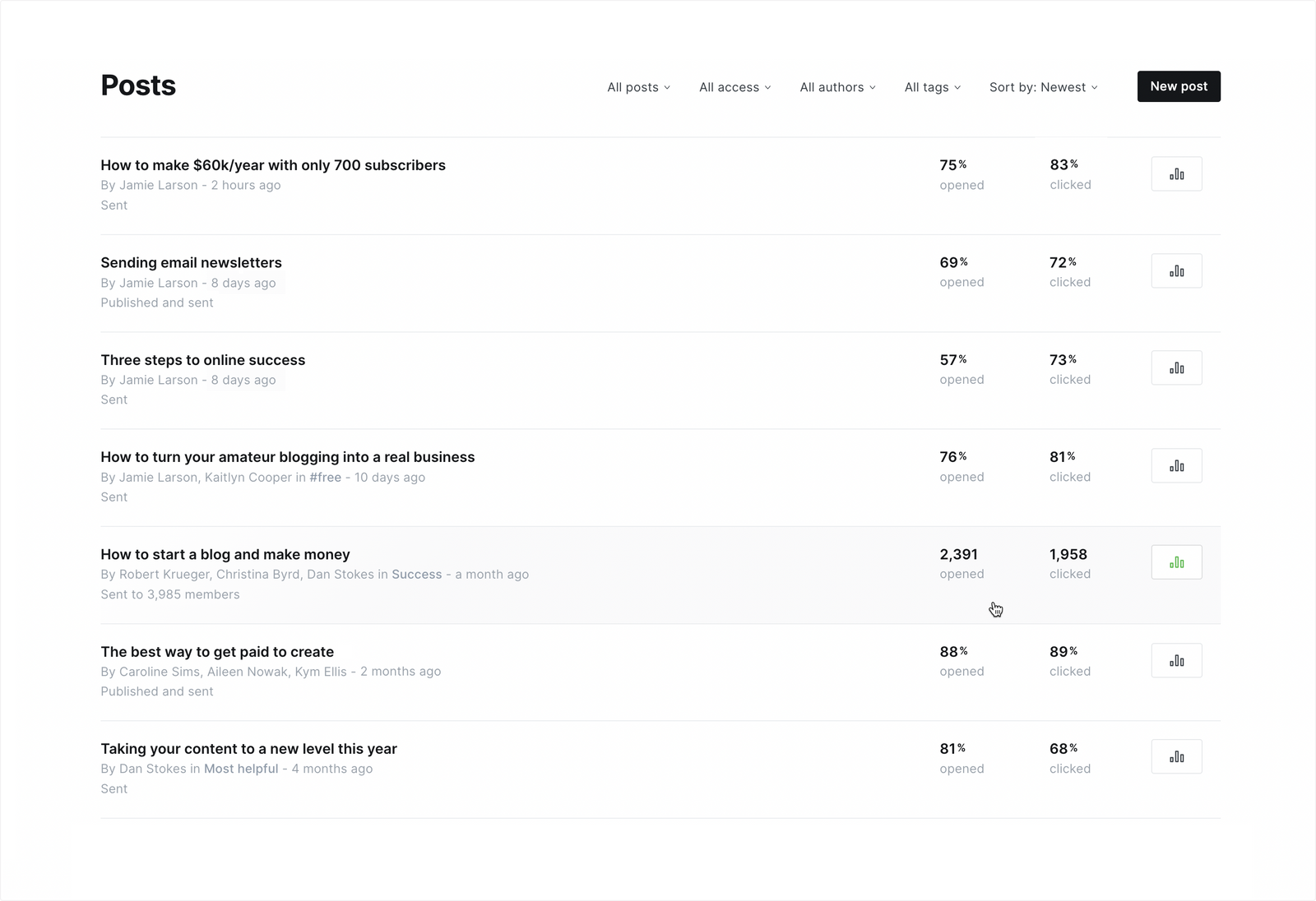
Ghost is a good shortlist candidate when the core content is articles, pages, authors and tags, and the team wants a publishing-focused editor. It supplies a Content API for published content and a separate authenticated Admin API. Its established content model is a benefit when it matches the site, but it is not a general visual builder for arbitrary relational schemas.
The most consequential headless limitation concerns memberships. Ghost’s headless documentation says its membership features are incompatible with a headless setup. If paid member access, account flows or the integrated subscription experience are central to the site, examine the supported Ghost frontend before committing to a separate one. A custom article frontend should not be sold as preserving the entire bundled membership experience automatically.
Newsletters introduce another operational dependency. Verify the current supported bulk-email setup, DNS authentication and delivery arrangement for your installation. Having a mail server that can send a password reset does not by itself establish reliable newsletter delivery. Our self-hosted Ghost guide provides additional publishing context; use Ghost’s current installation documentation for version-specific prerequisites.
Ghost’s core is MIT-licensed. That does not remove the costs of hosting, email delivery, custom frontend development or support. Choose it because its publishing model fits, rather than because an unsourced table labels it the lowest-cost or lowest-memory option.
Strapi: Visual Content Modeling
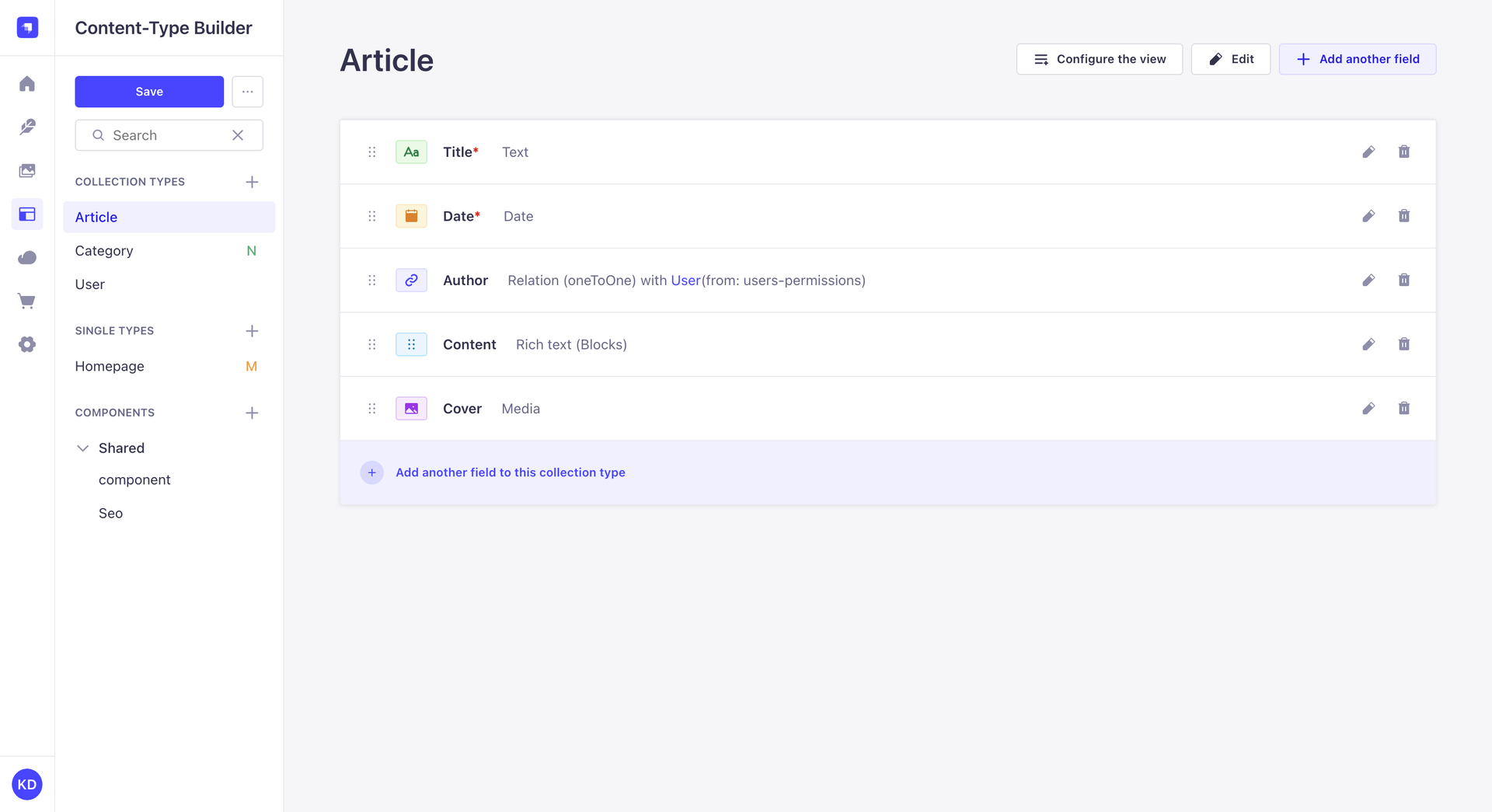
Strapi suits teams that need custom content types, fields, components and relationships with a visual modeling interface. Editors then manage entries through the Content Manager. Its Content-Type Builder works in the development environment; production is not the place to improvise schema changes through that interface. Develop the model, keep the generated project changes under version control and deploy a reviewed build.
Strapi provides a REST API, with GraphQL available through its plugin. Content exposure and authentication need explicit configuration: a model’s existence is not an instruction to make all of its fields or operations public. Test anonymous, authenticated and administrator access separately, especially when adding relations or custom endpoints.
The Community core is MIT-licensed, while commercial offerings include additional capabilities. Check the current self-hosted plan and feature matrix for requirements such as enterprise identity and editorial governance. A shared core licence does not mean every workflow feature is included on identical terms.
Strapi is a strong candidate when developers can own schema deployment while editors need a visual content interface. It is less attractive if nobody can maintain the application, its database and the extensions the project depends on.
Payload: CMS Configuration in Your Application
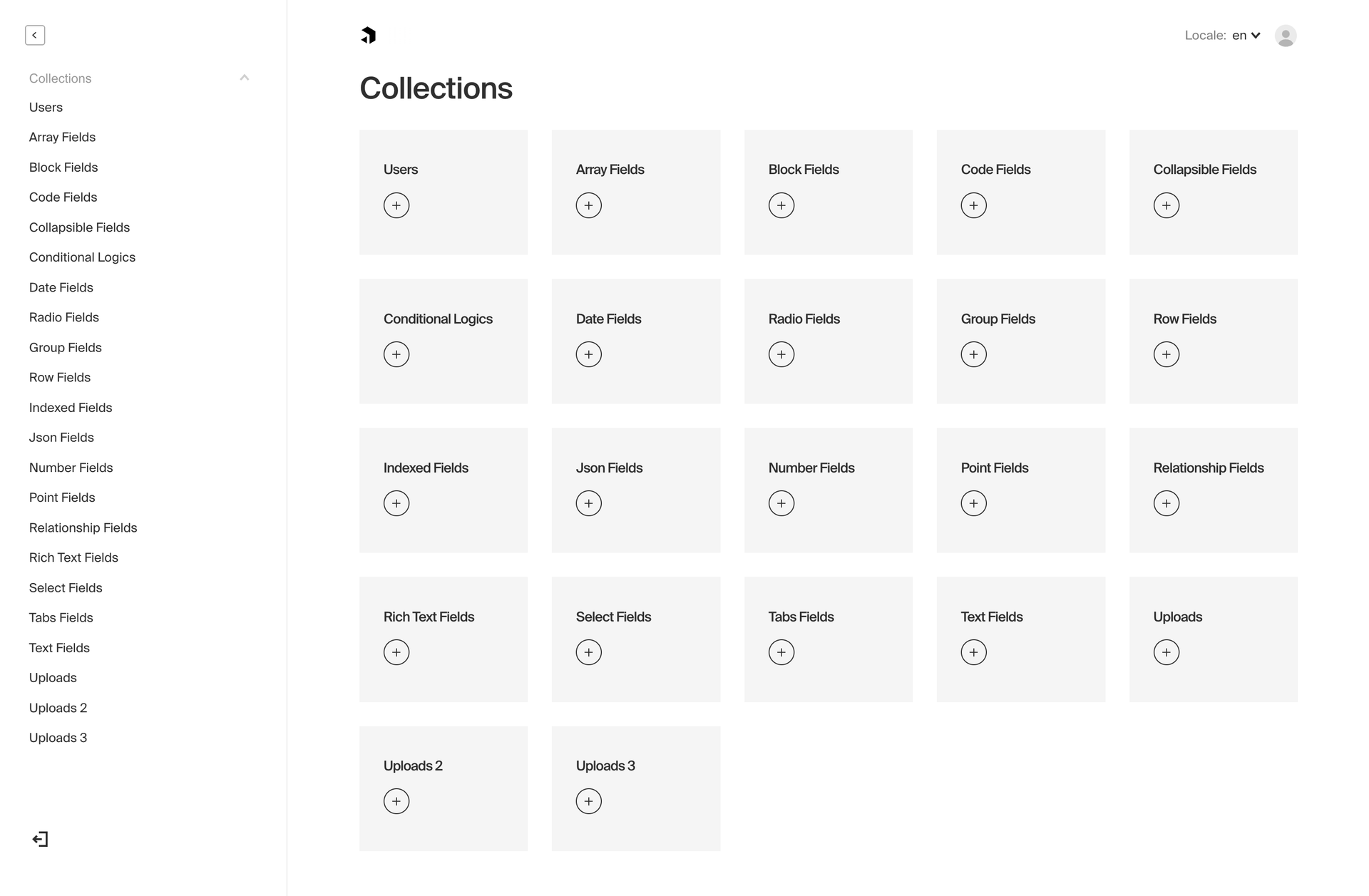
Payload takes a code-first approach: collections, fields, hooks and access rules live in configuration maintained with the application. Payload 3 installs into a Next.js application and provides an administration interface plus REST, GraphQL and Local APIs. That can suit a team already working in that stack, but it is a development commitment rather than a way to avoid application maintenance.
Its database adapters cover supported PostgreSQL, MongoDB and SQLite integrations. Choose an adapter early and validate migrations and production behavior with your actual data. Do not assume that changing databases later is a cost-free configuration switch.
Pay particular attention to the Local API: it bypasses access control by default. Where an operation must enforce a user’s permissions, follow the documented pattern using overrideAccess: false and the relevant user context. Server-side execution is not, on its own, proof that a request is allowed to read private content.
Payload’s core is MIT-licensed and can be self-hosted. The practical tradeoff is ownership: your team controls the schema and behavior, and must also review custom code, permissions, updates and deployment. It fits application teams that want CMS logic in their repository; it is a harder fit when editors need to change the schema independently of a developer release.
Compare the Work You Will Own
| Decision | Ghost | Strapi | Payload |
|---|---|---|---|
| Content model | Publishing model: posts, pages, tags and authors | Custom types, components and relationships | Collections and fields defined in code |
| Model changes | Work within Ghost’s supported publishing structure | Use the development builder, version and deploy changes | Review and deploy configuration with the application |
| Content integration | Content API; separate Admin API | REST; optional GraphQL plugin | REST, GraphQL and Local API |
| Key caveat | Headless setup does not preserve Ghost membership features | Check production permissions and paid feature boundaries | Local API access enforcement needs explicit attention |
| Best starting fit | Publishing-focused sites | Teams needing visually modeled structured content | Developers integrating a CMS with a Next.js application |
This is a workflow comparison, not a speed ranking. Test the same representative editorial journey in your shortlist before deciding.
Size the VPS From Documented Requirements
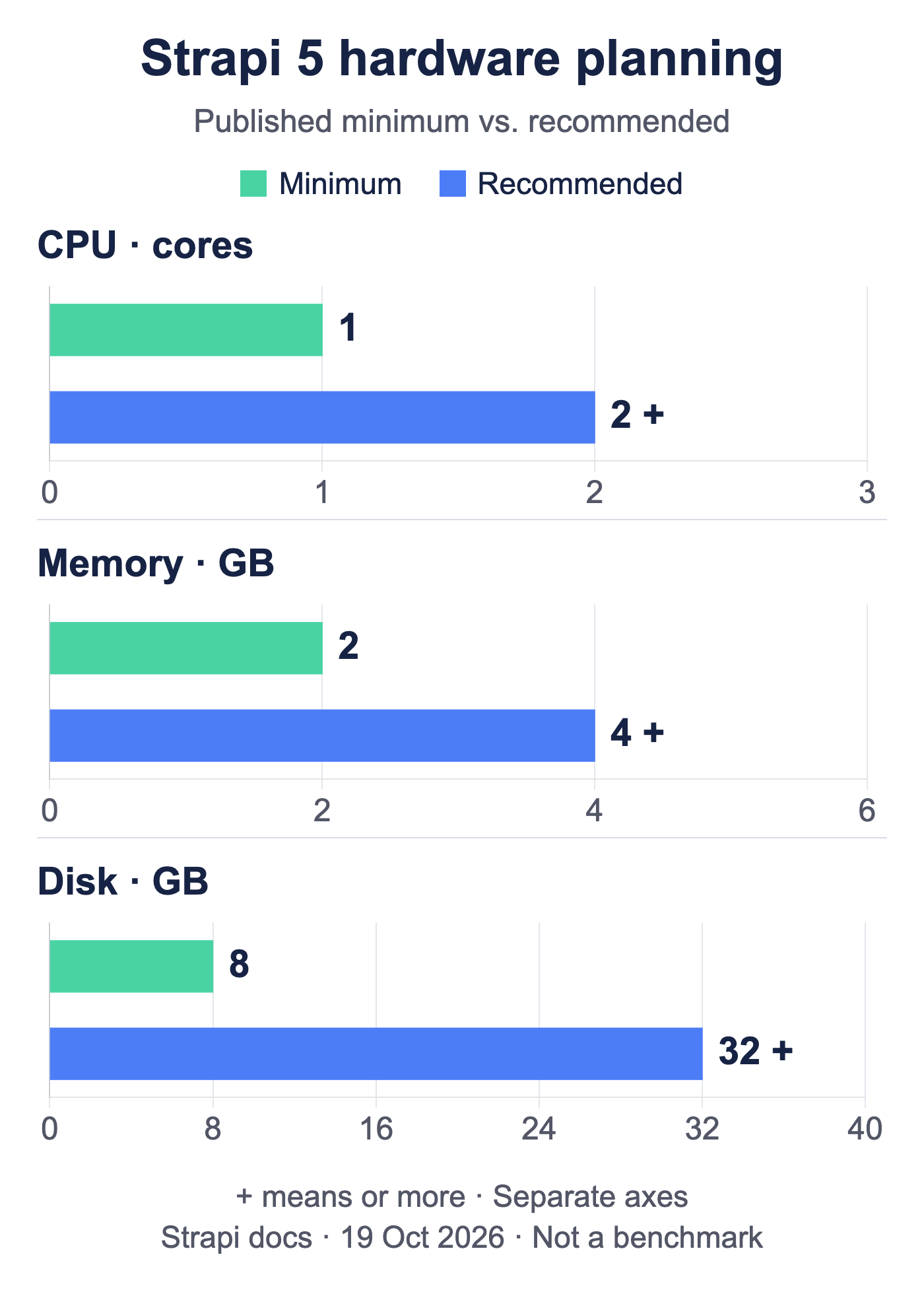
Source: Strapi 5 deployment documentation, checked October 19, 2026. CPU is in cores; memory and disk are in GB. The + labels mean or more. Each panel uses its own zero-based axis. These are publisher requirements, not measured consumption, traffic capacity or a guarantee for every production stack.
| Hardware | Minimum | Recommended |
|---|---|---|
| CPU | 1 core | 2 cores or more |
| Memory | 2 GB | 4 GB or more |
| Disk | 8 GB | 32 GB or more |
The chart separates Strapi’s installation minimums from its recommended lower bounds. Its recommended disk allowance is substantially larger than the minimum, but none of these figures tells you how many visitors your project will support.
Ghost’s Ubuntu installation guide lists at least 1 GB of memory as an installation prerequisite. Payload’s deployment guidance does not supply an equivalent universal RAM or CPU floor. Those different scopes do not support a fair three-product resource ranking. Follow the supported runtime and database versions in each project’s current documentation.
Keep application runtime memory separate from build-time needs. A VPS that serves cached content comfortably can still struggle when it compiles an administration bundle, processes a large image or performs a database migration. If builds run elsewhere, document that topology when sizing the production host. If the application and database share a VPS, allow for both; do not assume the publisher guidance accounts for your complete deployment.
Disk planning includes database growth, uploaded files, logs, temporary build output and retained local backups. Store a recoverable backup outside the server as well; free space on the live filesystem is not an independent recovery copy. For public media, consider whether local persistent storage or an external object-storage adapter better fits your deployment and restore plan.
There is no reliable conversion from visits per day to a universal VPS size. A mostly static site and an uncached API with complex relational queries can generate very different backend loads at the same visitor count. Start with the supported software requirements, test the workload, and increase resources when measurements show the relevant bottleneck. Do not extrapolate a monthly price or percentage saving from unrelated server configurations.
Measure Performance With Your Own Workload
Use a staging environment populated with representative documents, relationships and media. Keep database size, API fields, authentication, cache behavior and server allocation visible in the test record. If you compare products, request equivalent work: a cached public article response is not comparable to a personalized query that joins several collections.
| Exercise | Record | What it helps decide |
|---|---|---|
| Normal content reads | Request rate, response-time distribution, errors and cache state | Whether the API meets the frontend’s delivery needs |
| Editorial work | Save, preview, publish and upload behavior with concurrent editors | Whether day-to-day publishing remains usable |
| Builds and imports | Peak memory, CPU, duration and database load | Whether background work needs separation or additional headroom |
| Restore rehearsal | Recovered content/media, missing changes and elapsed recovery time | Whether the actual backup process meets your recovery needs |
Report median and tail latency together with the error rate and throughput. A p95 latency is the response-time threshold at or below which 95% of the recorded requests fall; it is not the average of the slowest requests. Choose acceptance criteria from your application’s requirements rather than a supposed universal 100 ms failure threshold.
Test warm and cold caches separately and avoid interpreting averages as guarantees during bursts. Run load tests only against systems you own or are authorized to test, with bounded traffic and a rollback plan. Save the product versions, configuration and test time alongside the results so a later update can be compared meaningfully. Publish comparative results only after the measurements exist, with enough context for another team to interpret or reproduce them.
Deploy, Update and Test Recovery

Use the project’s current deployment path and pin the versions you have reviewed. A generic Docker command is not a complete production recipe: the runtime, database, uploads, secrets, reverse proxy and update process must agree with the chosen release. Keep the database on a private interface, expose only the intended web service, and ensure that container port mappings do not accidentally expose an administrative or database port.
Follow Each Product’s Deployment Model
For Ghost, begin with the official Ubuntu installation guide and its supported runtime, database and proxy requirements. If you use containers, verify the current supported deployment instructions and how the content directory and database persist across upgrades. Decide whether you need the bundled frontend before building a separate one.
For Strapi, follow the production deployment documentation. Create and review schema changes in development, configure production secrets and the database, build the administration application, and start the production service. Keep uploaded media persistent or use a supported storage provider. Review database changes and plugin compatibility before changing major versions.
For Payload, follow the production deployment guide for the Next.js application, database adapter and storage. Plan database migrations as part of release management. An application-container rollback does not automatically undo a database migration; rehearse a compatible recovery path before the release.
Verify the Published Site and Private Boundaries
Check HTTPS, ordinary pages, previews and authenticated editing after deployment. Confirm that anonymous visitors cannot read unpublished documents or write content, and that public responses do not leak private fields. Test an upload and its subsequent retrieval, not just the homepage. Inspect logs for failures while these checks run.
On a typical Linux VPS, these read-only checks can help inspect the public response, memory and filesystem space. Replace the example hostname with your own. They are basic observations, not a benchmark or a complete security test.
curl --head --location https://cms.example.com
free -h
df -h
For containerized deployments, inspect limits and storage from the relevant container and database as well. Host-level free memory does not show whether a container is constrained, and an HTTP redirect alone does not prove the page behind it renders correctly.
Keep Database, Media and Configuration Recoverable
Back up the database, persistent media, application configuration and the securely stored secrets needed for restoration. Coordinate the backup so content records and their referenced files agree. Keep an independent copy, restrict access to it and periodically restore into an isolated environment. For a fuller operational checklist, see the self-hosted backup guide.
A useful restore rehearsal checks more than service startup: compare a sample of documents, relationships, permissions, media and redirects, then verify that an editor can publish. Record what changes would be lost and how long the tested recovery actually took. Only those observations support a recovery-time claim for your own setup. Review the plan again after changes to the database, storage adapter, application version or authentication model.
Make the Final Choice
Shortlist Ghost when publishing is the central job and its supported frontend and membership boundaries fit. Shortlist Strapi when a visual model builder and structured relationships match the team’s development process. Shortlist Payload when developers want CMS configuration and permissions in the Next.js application repository.
Before committing, prove one realistic publishing journey, one restricted-access case and one full restore. Combine that evidence with supported requirements and workload measurements to choose the VPS. This gives you a decision you can explain and maintain without relying on unverified winners, click counts or promises of automatic savings.
FAQ
Q: What is a self-hosted headless CMS?
A: It is a CMS you operate yourself that exposes content to a separately built frontend through an API. You manage the service and its data, while the frontend implements the user-facing experience.
Q: Can Ghost run with a separate frontend?
A: Yes, its Content API can supply published content to a custom frontend. Ghost documents that its membership features are incompatible with a headless setup, so confirm that limitation before choosing it for a membership site.
Q: Can I edit Strapi content types on the production server?
A: The Content-Type Builder is available in development. Make model changes there, keep them in version control and deploy them through your release process; editors manage content entries separately.
Q: How much RAM does a self-hosted CMS need?
A: Start with the exact publisher requirements for your release, then account for the database, uploads, build work and workload. Strapi currently documents 2 GB minimum RAM and 4 GB or more recommended; those figures are deployment guidance, not measured demand or a guaranteed traffic capacity.
Q: Does an open-source CMS make self-hosting free?
A: No. Hosting, backups, email, operational work, development and any paid features still need a budget. Compare the features and responsibilities you actually require instead of treating a free core licence as a complete cost estimate.

