

A self hosted VPN gives you full control over your internet traffic rather than relying on third-party providers. By running your own server, you manage the configuration and decide how your data is handled. This approach is growing in popularity as concerns over logging policies, shared infrastructure, and limitations in commercial services increase. With this control comes the responsibility of ensuring security and uptime.
What Is a Self Hosted VPN?
A self hosted VPN is a private server that you deploy and control. Rather than connecting to a provider’s network, you connect to your own server. It routes your traffic through a server you own or rent, encrypts your connection similar to other VPNs, and can run on a home machine, router, or VPS. In this setup, you eliminate reliance on third-party logging policies because you serve as the provider.
How a Self Hosted VPN Works
Your device connects to a secure self hosted VPN server which acts as a gateway to the internet. The device establishes an encrypted tunnel to the VPN server; traffic is routed through this tunnel, and the server forwards the requests to the internet. Responses follow the same secure path, so your traffic appears to originate from the VPN server instead of your actual location.
Benefits of Using a Self Hosted VPN
A self hosted VPN offers several advantages including:
- Complete control over logs and data handling
- No recurring VPN subscription fees beyond the cost of the server
- Predictable performance provided by a reliable server location
- Customization of routing, ports, and access rules
- Reduced risk of shared IP abuse
Knowing exactly where your data goes can be a key benefit.
Limitations and Trade Offs

This solution is not ideal for every situation:
- Setup and ongoing maintenance require technical expertise
- Limited anonymity compared to large shared VPN networks
- Configuration errors can create security vulnerabilities
- VPS IP ranges may be flagged by streaming services and might not reliably bypass geo restrictions
- The responsibility for uptime, updates, and system monitoring falls exclusively on you
If ease-of-use is a priority, a one-click commercial VPN solution might be more suitable.
Self Hosted VPN vs Commercial VPN
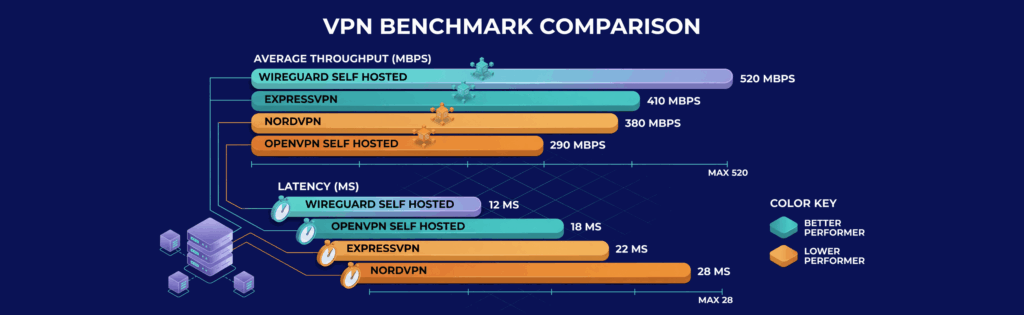
A recent benchmark comparison highlights the differences:
- WireGuard self hosted: 520 Mbps average throughput, 12ms latency
- Commercial VPN (NordVPN): 380 Mbps average throughput, 28ms latency
- Commercial VPN (ExpressVPN): 410 Mbps average throughput, 22ms latency
- OpenVPN self hosted: 290 Mbps average throughput, 18ms latency
Self hosted solutions using WireGuard showed 35% higher throughput on average compared to leading commercial providers in controlled tests.
Also, each approach addresses different needs:
- Control vs Convenience: Self hosted VPNs offer complete control over configuration and data while commercial VPNs emphasize ease of use.
- Privacy Model: Commercial VPNs follow their no-logs policy, whereas a self hosted VPN eliminates the need to trust a third party.
- Network Size: Commercial services provide hundreds of locations and rotating IPs compared to the fixed or limited locations of a self hosted solution.
- Performance: A well-selected server can help a self hosted VPN perform on par with or even exceed some commercial services, but poor server choice can hinder performance.
Common Use Cases for a Self Hosted VPN
A self hosted VPN is best suited for scenarios where control over data and accessibility is paramount:
Secure Remote Access
- Securely access your home or office network
- Ideal for reaching internal services like NAS, mail servers, or admin panels
Encrypting Public WiFi Traffic
- Protect your data from snooping when using public networks
Connecting Multiple Locations
- Create a unified private network across different sites
Infrastructure Management
- Manage infrastructure securely without exposing services publicly
Where to Host Your Self Hosted VPN
The hosting environment is critical for performance and reliability. Consider these options:
Home Setup
- Maximum control for local services
- Requires port forwarding, a public IP, and may be subject to ISP limitations such as CGNAT
VPS Hosting
- VPS hosting is a practical and popular option; it provides a static public IP and reliable uptime while avoiding ISP constraints
- For example, VPSus offers a KVM2 plan that features 2 vCores, 2 GB ECC RAM, 25 GB NVMe storage, and unmetered bandwidth on a 1 Gbps port. This plan is available in 17 locations, including Atlanta and Los Angeles in the USA. You can review the details at VPSus KVM VPS hosting.
Dedicated Server
- Typically more than what personal use requires, but beneficial for high-traffic or multi-user environments
- Offers full hardware control without shared resources
Location and Privacy Considerations
- Hosting in a nearby region minimizes latency
- The server’s country can affect access to services due to varying data regulations
Best Protocols for a Self Hosted VPN

The following protocols are common choices:
WireGuard
- A modern default that is fast, lightweight, and straightforward to configure
- Built on a modern, strong cryptographic design
OpenVPN
- Highly configurable and flexible
- Suitable in environments where UDP traffic might be blocked
- The setup is more complex compared to WireGuard
IPsec
- Common in enterprise environments due to its compatibility with existing systems
Tools and Software for Self Hosting a VPN
You can choose from several tools depending on your need for customization versus ease of use:
| Solution | Approach | Performance | Setup | Best for |
|---|---|---|---|---|
| WireGuard Kernel-level protocol |
Minimal ~4k line codebase with cryptokey routing — no heavy handshake overhead | Fastest | Low | VPS, servers, site-to-site links |
| OpenVPN TLS-based tunnel |
Mature, battle-tested protocol with deep config options (TCP/UDP, custom certs, plugins) | Good | Medium–High | Complex networks, legacy infra, firewall traversal |
| Algo VPN Ansible automation |
One-command deploy using WireGuard/IPsec under the hood with hardened defaults | Fast | Low | Cloud VPS deploys, security-conscious users |
| Outline VPN Shadowsocks-based |
GUI manager app + invite-based client sharing — no CLI needed | Good | Very low | Non-technical users, teams, censorship bypass |
| PiVPN Interactive installer |
Guided shell script that sets up WireGuard or OpenVPN on Debian-based devices | Fast | Low | Home servers, Raspberry Pi, self-hosting |
Your choice should align with whether you prioritize simplicity or complete control.
Basic Setup Overview
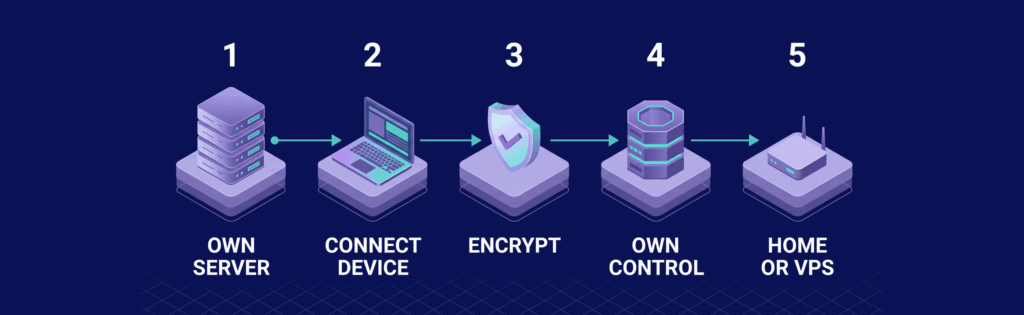
Setting up a self hosted VPN typically involves the following steps:
Choosing the Environment
Most users deploy a Linux server, with Ubuntu being a popular option due to its extensive documentation. VPS hosting often provides the easiest path by offering a public IP and avoiding ISP restrictions.
Network and Port Configuration
- Assign a designated UDP port for VPN access and ensure it is open in your firewall settings
- Prevent conflicts with other services by careful port management
Key Generation and Authentication
- VPNs rely on cryptographic keys for authentication
- Each device should have its own key pair to ensure secure connections
Client Configuration
- Create unique configuration files for each client with specific IP assignments and routing rules
- Decide whether all traffic or only specific traffic should use the VPN
DNS and Traffic Routing
- Set up DNS correctly to avoid leaks and ensure proper traffic routing, either through external servers or your VPN
Common Setup Mistakes
- Overlooking port configuration, assigning incorrect IP ranges, or neglecting system settings may compromise the setup
Security Best Practices
Ensure your self hosted VPN is secure by taking the following steps:
Access Control and Hardening
- Disable password logins and restrict server access to reduce the risk of automated attacks
Key Management and Rotation
- Handle cryptographic keys as sensitive credentials and replace them immediately if compromised
Intrusion Protection
- Monitor logs and block repeated unauthorized access attempts
Server Isolation and Exposure
- Limit the server’s responsibilities to essential VPN functions only, reducing exposure of other services
Logging and Monitoring
- Regularly review system and traffic logs to identify suspicious activity early
Performance Optimization Tips

To maximize your VPN’s performance:
- Choose a server location near your primary area of use
- Consider using WireGuard for its low latency and high throughput
- Ensure your server has sufficient CPU and RAM to handle encryption tasks
- Avoid oversold providers that may lead to unstable performance
- Test latency and bandwidth periodically to identify and resolve any bottlenecks
Is a Self Hosted VPN Right for You?
A self hosted VPN is not inherently better than a commercial VPN—it simply addresses different priorities. If you require full control over security settings, need secure remote network access, or prefer managing your own infrastructure, a self hosted VPN can be an effective solution. For users who prioritize anonymity, streaming compatibility, or plug-and-play simplicity, a commercial VPN might be preferable.
Final Words
A self hosted VPN offers detailed control over privacy, performance, and configuration compared to commercial alternatives. Although it demands technical expertise, the benefits of managing exactly where and how your data is handled can be significant.
Get Reliable Infrastructure for Your Self Hosted VPN
The quality of the server directly impacts your VPN’s performance and reliability. For those considering VPS hosting, consider the VPSus KVM2 plan available at VPSus KVM VPS hosting. This plan features 2 vCores, 2 GB ECC RAM, 25 GB NVMe storage, and unmetered bandwidth on a 1 Gbps port.
Frequently Asked Questions
Q1: What is a self hosted VPN?
A self hosted VPN is a private server that you deploy and manage yourself, giving you full control over your data and connections.
Q2: How does a self hosted VPN work?
It creates an encrypted tunnel from your device to your own server, routing all data securely while concealing your actual location.
Q3: What are the main benefits of using a self hosted VPN?
Key benefits include enhanced control over data, cost savings by eliminating recurring fees, customizable configurations, and more predictable performance.
Q4: Can a self hosted VPN offer the same level of anonymity as a commercial VPN?
No, while self hosted VPNs provide greater control, they usually tie your traffic to a single server IP, which offers less anonymity compared to commercial VPN networks.

