

This guide from VPSus provides a vetted list of self-hosted apps with deployment details you need: authentication, backups, storage, updates, and exposure control. For further insights on managing your digital environment, check out Mastering self-hosting insights.
What Makes Self-Hosting Essential for Privacy Enthusiasts
Privacy in 2026 is less about hiding and more about reducing the blast radius when a service is breached, sold, or forced to share data. In 2025, IBM’s Cost of a Data Breach report noted that the average cost of a data breach reached $4.88 million globally. Cloud software incidents continue to emphasize that if your files, messages, or metadata live in someone else’s infrastructure, your exposure increases with theirs.
Self-hosting changes the control plane. Your documents sit on your disk, your authentication logs remain on your server, and your backups follow your retention policy instead of a vendor’s default. While this does not make you invisible nor eliminate the need for patching and monitoring, it means fewer third parties can inspect, profile, mine, or lose your data. Think of relying on a SaaS provider like storing your house keys in a hotel safe: convenient, but still dependent on someone else’s premises.
Hosted platforms may provide quick setup and mobile-friendly sync, but self-hosting offers improved data sovereignty and audit capability along with predictable management of sensitive information. Privacy is a top reason to switch to self-hosted tools—often alongside cost control and customization.
A Framework for Evaluating Self-Hosted Applications
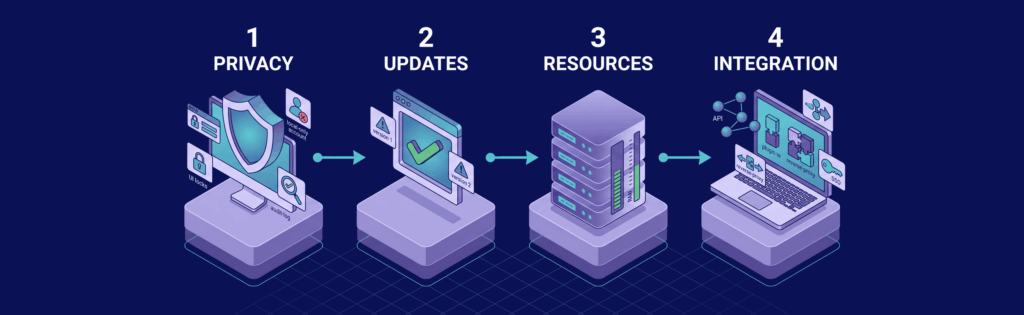
A privacy-first application is only a good choice if it is continually patched, fits within your hardware resources, and integrates smoothly with your existing stack. Consider scoring each app on these factors:
- Privacy Controls: What restrictions, encryption, logging, and isolation does the app offer? Look for features like local-only accounts, LDAP or SSO integration, end-to-end encryption, granular sharing permissions, audit logs, and metadata safeguards.
- Update Cadence: How quickly does the project ship fixes? Regular releases, active issue triage, and up-to-date documentation (for example, with Nextcloud and Syncthing) reduce security risks.
- Resource Footprint: Consider the app’s RAM, CPU, disk IOPS, or database demands. For instance, a file-sync daemon might run on 256–512 MB RAM, while a full collaboration platform may require 2–4 GB RAM.
- Integration Ecosystem: Evaluate client availability, APIs, plugins, backup friendliness, and compatibility with reverse proxies or external authentication systems to prevent operational sprawl.
This framework helps convert vague impressions into clear, defendable decisions. For example, if you need private file sync with minimal metadata exposure, Syncthing is an excellent option. However, if you require a full cloud experience with sharing, calendars, and admin controls, Nextcloud, despite its heavier resource demands, is the better choice.
Top Self-Hosted Apps by Use Case
For significant privacy benefits with minimal setup, focus on apps that can replace data-hungry services such as password managers, file sync tools, media servers, network filters, and home automation hubs. The shortlist below highlights projects that:
- Keep your data local
- Remain maintainable on modest hardware
- Benefit from active community support
| Use Case | App | Primary Benefit | Community Activity Level |
|---|---|---|---|
| Password manager | Vaultwarden | Bitwarden-compatible vault with end-to-end encryption and low RAM usage | High: active releases and a large GitHub community |
| Media streaming | Jellyfin | No-telemetry media server featuring local authentication and a strong plugin ecosystem | High: active development with a large contributor base |
| File sync | Syncthing | Direct device-to-device sync without requiring a central cloud account | High: steady releases and an established community |
| Personal cloud | Nextcloud | Full browser-accessible cloud including sharing, calendars, contacts, and collaboration | Very High: extensive app marketplace with frequent releases |
| Home automation | Home Assistant | Local-first control with support for thousands of integrations | Very High: rapid release cycle backed by a huge integration library |
| Network ad blocking | Pi-hole | Lightweight DNS sinkhole that offers detailed visibility into blocked domains | High: mature project with frequent updates |
| Network ad blocking | AdGuard Home | DNS filtering with advanced policy controls and built-in filtering features | High: active development with regular releases |
Password & Security Tools

For managing credentials, Vaultwarden is ideal if you want Bitwarden-style compatibility without the overhead of the full official stack. Written in Rust, it maintains low memory usage (typically 100–300 MB RAM for a small family setup) and ensures that your vault items remain encrypted. Note that while Vaultwarden is excellent for browser autofill, mobile sync, TOTP storage, and secure sharing, it differs from tools designed for rotating database credentials in application deployments.
Media & Entertainment

If you’re looking to stream your own media, Jellyfin stands out by avoiding telemetry and vendor accounts. Keeping media consumption data local ensures your viewing habits remain private. Note that transcoding can be resource intensive, so direct play is preferable on compatible devices. Jellyfin offers advanced options for managing authentication and metadata over many cloud-based media platforms.
Files, Automation, and Network Privacy

For cloud storage requirements, the choice often narrows down to Nextcloud versus Syncthing. Syncthing is more resource-friendly, focusing on secure device-to-device synchronization without the overhead of a full web stack. Nextcloud, however, provides a comprehensive web interface with shared links, calendars, and collaboration features, though it does require careful configuration and higher resource allocation.
In home automation, Home Assistant excels with its local-first design, ensuring dependable operations even during cloud outages. For network ad blocking needs, decide between the simpler, lighter Pi-hole and the more feature-rich AdGuard Home based on your priority between granular control and ease of use.
Sizing for Document Management with Paperless-ngx
Paperless-ngx can be resource intensive due to OCR and indexing. Properly sizing your VPS based on peak ingest rates is crucial. Consider your VPS specifications (vCPU, RAM, and storage type) to ensure efficient performance. Disk speed typically acts as the primary bottleneck, followed by memory; CPU demand escalates only during large batch scans.
Below is a typical VPS tier guide for running Paperless-ngx:
| VPS tier | vCPU | RAM | Storage type | Typical random IOPS | Benchmark: pages/min indexed |
|---|---|---|---|---|---|
| Small | 2 | 2 GB | SATA SSD / low-tier SSD | 3,000–8,000 | WRITER |
| Medium | 2 | 4 GB | NVMe | 20,000–60,000 | WRITER |
| Large | 4 | 8 GB | NVMe | 60,000–150,000 | WRITER |
A properly sized VPS ensures that OCR, temporary file handling, and database updates occur without long delays. If your import queue clears quickly during peak hours, your configuration is optimal.
The following Compose file demonstrates a common setup for Paperless-ngx:
version: "3.8"

services:
  broker:
    image: redis:7-alpine
    restart: unless-stopped

  db:
    image: postgres:16-alpine
    restart: unless-stopped
    environment:
      POSTGRES_DB: paperless
      POSTGRES_USER: paperless
      POSTGRES_PASSWORD: change-me
    volumes:
      - ./data/postgres:/var/lib/postgresql/data

  paperless:
    image: ghcr.io/paperless-ngx/paperless-ngx:latest
    restart: unless-stopped
    depends_on:
      - db
      - broker
    ports:
      - "8000:8000"
    environment:
      PAPERLESS_REDIS: redis://broker:6379
      PAPERLESS_DBHOST: db
      PAPERLESS_DBNAME: paperless
      PAPERLESS_DBUSER: paperless
      PAPERLESS_DBPASS: change-me
      PAPERLESS_CONSUMER_POLLING: "10"
      PAPERLESS_OCR_LANGUAGE: eng
      PAPERLESS_TIME_ZONE: UTC
    volumes:
      - ./data/data:/usr/src/paperless/data
      - ./data/media:/usr/src/paperless/media
      - ./data/export:/usr/src/paperless/export
      - ./data/consume:/usr/src/paperless/consume
Run `docker compose up -d` to start the stack, then check health with `docker compose ps` and inspect logs using `docker compose logs -f paperless`.
Securing Remote Access with Privacy-First VPNs

When exposing services such as Paperless-ngx, Vaultwarden, or Nextcloud, it is advisable to keep them hidden behind a private network. For privacy-sensitive setups in 2026, consider the following solutions:
- WireGuard: Offers fast performance with a latency increase of only 2–8 ms and works best when you control both network endpoints.
- Tailscale: Built on WireGuard, it simplifies identity management and NAT traversal, typically adding 5–15 ms latency in peer-to-peer mode.
- RustDesk: Suitable for remote desktop needs; while not a complete VPN replacement, it delivers secure remote access when self-hosted appropriately.
For more details on deploying secure remote access solutions, explore the resources on self-hosted remote desktop software.
Latency and network control are critical. With a VPS located in the right region, private network traffic can achieve low latency even when routed through encrypted tunnels.
Automating SSL and Load Balancing with Reverse Proxies
After securing your apps behind a private network, a reverse proxy can help manage certificate updates and port organization. A reverse proxy terminates TLS, directs subdomains (for example, `paperless.example.com`) to the appropriate container, and can load balance across instances.
For deployment, consider these options:
- Traefik: Ideal for dynamic environments with frequently changing containers. It integrates with Docker using labels for automatic routing and TLS configuration.
- Nginx Proxy Manager (NPM): More suited for relatively static environments where a user-friendly interface is preferred.
If you need assistance with container setups, review Docker VPS hosting for strategies on efficient container management.
A sample Traefik configuration is provided below:
version: "3.8"

services:
  traefik:
    image: traefik:v3.1
    command:
      - --api.dashboard=true
      - --providers.docker=true
      - --entrypoints.web.address=:80
      - --entrypoints.websecure.address=:443
      - --certificatesresolvers.le.acme.email=admin@example.com
      - --certificatesresolvers.le.acme.storage=/letsencrypt/acme.json
      - --certificatesresolvers.le.acme.httpchallenge.entrypoint=web
    ports:
      - "80:80"
      - "443:443"
    volumes:
      - /var/run/docker.sock:/var/run/docker.sock:ro
      - ./letsencrypt:/letsencrypt

  paperless:
    image: ghcr.io/paperless-ngx/paperless-ngx:latest
    labels:
      - traefik.enable=true
      - traefik.http.routers.paperless.rule=Host(`docs.example.com`)
      - traefik.http.routers.paperless.entrypoints=websecure
      - traefik.http.routers.paperless.tls.certresolver=le
      - traefik.http.services.paperless.loadbalancer.server.port=8000
Test the setup by running `docker compose logs -f traefik` and verifying the HTTP response with `curl -I https://docs.example.com`.
The Rise of Self-Hosted AI and LLMs

Local AI inference represents the next frontier in self-hosting. In 2026, running models like Llama 3 through platforms such as Ollama allows tasks like note summarization, drafting responses, or answering questions using private data.
For lightweight local applications, quantized models running on a CPU may be sufficient, though larger models might require a GPU for quicker responses. This mixed strategy—using local inference for sensitive data and cloud resources for heavier tasks—ensures predictable costs and better privacy.
A simple installation for Ollama involves:
curl -fsSL https://ollama.com/install.sh | sh
ollama run llama3
Verify the installation by checking the tags with `curl http://127.0.0.1:11434/api/tags`, which should return a JSON response.
Frequently Asked Questions
What is self-hosting and why is it important for privacy?
How do I choose the right self-hosted app for my needs?
What factors should I consider when sizing a server for self-hosted applications?
How can I secure remote access to my self-hosted services?
What benefits do self-hosted AI models offer over cloud / main stream solutions?

