

Email remains one of the most important communications tools in business and personal use. Even though hosted email services run by large providers are convenient, many people and organizations want more control over their email than an outside provider allows. If you self host email server infrastructure, you gain ownership of your data, full control over configuration, and the ability to enforce your own privacy and security standards. At the same time, running your own email server comes with responsibilities most people underestimate. This article explains what self hosting email means today, how it works, when it makes sense, and what challenges you should expect.
What a Self Hosted Email Server Involves
Running your own email server means taking responsibility for a service that is both mission-critical and unforgiving. Unlike websites, email depends heavily on trust between servers, long-term reputation, and strict protocol compliance. Understanding what you are actually signing up for prevents most beginner mistakes.
What “Self Hosted” Means in Practice
Self hosting email means you control the server, the software, the data, and the policies that govern how mail is sent and received. There is no external provider absorbing mistakes or smoothing over configuration errors. If something breaks, mail stops flowing until you fix it.
This also means you control retention, encryption, logging, and access rules. For some organizations, that control is the entire point, even if it comes with extra work.
Responsibilities You Cannot Avoid
A self hosted mail server requires ongoing attention. You are responsible for keeping software updated, monitoring queues, responding to abuse reports, and maintaining deliverability. These tasks are not optional, and skipping them eventually results in blocked mail or data loss.
You also become the point of contact for issues other providers would normally handle. That includes troubleshooting why messages are delayed, rejected, or silently filtered by remote servers.
Why Email Is Different From Hosting Websites
Email is not just another application running on a server. It is part of a global trust network where reputation matters more than raw performance. A perfectly configured server can still fail if its IP or domain is not trusted.
Unlike websites, email failures are often silent. Messages disappear into spam folders or are dropped without clear errors, which makes diagnosing problems harder and more time-consuming.
When Self Hosting Email Makes Sense and When It Does Not
Self hosting email is not right for everyone. What qualifies as the best self hosted email server depends heavily on the operator’s goals, technical skill, and tolerance for ongoing maintenance. It can make sense for organizations that require strict data privacy, developers who need custom workflows, or businesses that want to integrate mail tightly with their systems. If you need full control over compliance, retention policies, or encryption keys, self hosting gives you those options without relying on third-party policies. At the same time, this approach is only worth the effort if you have the time and technical ability to support it. Many small businesses and individuals find that managed email services offer a better balance of reliability and ease of use. Managed solutions often handle deliverability, spam filtering, and backups for you, making them more cost effective when you do not need absolute control.
Core Components of a Self Hosted Email Stack

There are several core components every self hosted email server needs. Understanding these parts helps you plan and operate the server without surprises.
Here are the key pieces:
- Mail Transfer Agent (MTA) handles sending and receiving email on the internet. This is the engine that talks to other mail servers and transfers messages.
- Mail Delivery Agent (MDA) stores incoming email in user mailboxes and delivers messages to the correct account.
- Mailbox storage keeps the messages accessible to clients. Different formats and storage engines affect performance and scalability.
- Authentication and access layers such as IMAP or POP3 servers allow users to connect with mail clients.
- Supporting services like DNS records, secure certificates, and logging help ensure the server works correctly and remains reliable.
Each of these parts needs configuration and testing before your server can handle real mail safely.
Hosting, Network, and DNS Requirements
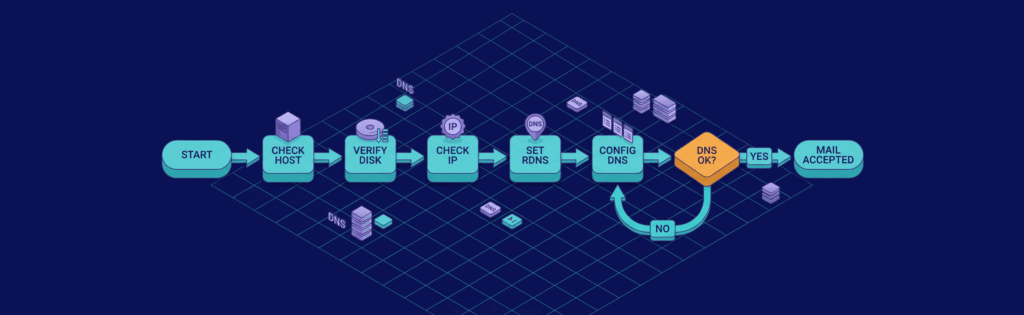
The quality of your hosting and network setup directly affects whether your mail is accepted or rejected. Email servers are sensitive to networking details that are irrelevant for most other workloads.
Before diving into configuration, it helps to understand what actually matters.
- Server resources and stability: Email does not usually require massive CPU power, but it does benefit from stable performance and fast disk I/O. Mail queues, spam filtering, and logging generate constant small writes, so unreliable storage quickly becomes a bottleneck. A stable VPS with dedicated resources is usually sufficient if it is not oversold.
- IP reputation and reverse DNS: Your server’s IP address is your identity to the outside world. If it has a poor history or lacks proper reverse DNS, other mail servers may distrust or reject your messages. Reverse DNS must match your mail hostname, and this needs to be set correctly at the provider level.
- DNS configuration fundamentals: Email relies heavily on DNS, more than most services. MX records determine where mail is delivered, while SPF, DKIM, and DMARC prove that your server is authorized to send mail for your domain. Missing or misconfigured records are one of the most common causes of delivery problems.
Security, Spam, and Deliverability
Security and deliverability are tightly connected in email. A secure server that is poorly trusted still fails, and a trusted server that is poorly secured becomes an abuse risk.
Breaking this into parts makes it easier to reason about.
Transport Security and Authentication
TLS encryption protects messages as they travel between servers. Most modern mail servers expect TLS to be available, and failing to offer it can lower trust or block delivery. Certificates must be valid, renewed, and correctly configured.
Authentication mechanisms like SPF, DKIM, and DMARC are no longer optional. They prove that your server is allowed to send mail and that messages were not altered in transit. Without them, your mail will increasingly be treated as suspicious.
Spam Filtering and Abuse Prevention
Inbound spam filtering protects your users from junk mail and phishing. Outbound abuse prevention is just as important, because a single compromised account can damage your entire server’s reputation.
Rate limits, outbound filtering, and alerting help you catch problems early. Once your server is flagged for abuse, recovering trust can take weeks or months.
Deliverability and Reputation Management
Deliverability is about whether your messages land in inboxes instead of spam folders. This depends on consistent behavior, low complaint rates, and clean sending patterns over time.
New servers must warm up gradually, sending small volumes at first. Sudden spikes in traffic or inconsistent behavior often trigger filtering, even if everything is technically correct.
Operations, Monitoring, and Maintenance
After initial setup, most of the real work begins. Email servers reward boring, consistent maintenance and punish neglect.
A structured approach helps keep this manageable.
- Regular monitoring: Mail queues, logs, and error rates should be checked frequently. Growing queues or repeated connection errors are early warning signs that something is wrong. Catching these early prevents mail loss and user complaints.
- Reputation and blacklist checks: IPs and domains should be monitored for blacklist listings. Even careful operators can end up listed due to misdirected spam or inherited IP reputation. Early detection makes remediation much easier.
- Backups and recovery planning: Mailboxes and configuration files must be backed up regularly. Email data is often more sensitive than website data, and restoring it incorrectly can cause permanent loss. Recovery should be tested, not assumed.
- Ongoing updates and reviews: Mail software, spam rules, and security settings evolve. Periodic reviews ensure your server stays compatible with changing standards and expectations from other mail providers.
Common Pitfalls and Safer Alternatives
There are some common mistakes people make when self hosting email. Many of these issues arise when people chase the idea of the best self hosted email server without fully understanding the operational trade-offs involved. One frequent issue is underestimating the importance of deliverability and authentication. Many servers work technically but cannot reach inboxes because they lack proper records or reputation. Another pitfall is assuming hosting is a one-time setup without ongoing maintenance.
If self hosting feels too heavy or you cannot commit the time it requires, there are hybrid options. For example, you can use a hosted SMTP relay for outbound mail while still storing mail on your own server, or you can use a managed email service while retaining privacy controls through encryption and forwarding rules.
Final Words
A self hosted email server gives you maximum control over your mail system. It is ideal for organizations and individuals who require custom workflows, strict privacy, and full ownership of their data. However, control comes with responsibility. You must handle security, deliverability, maintenance, and networking yourself. For many users, the extra work is worth it for the benefits, but it is important to understand the commitment before you begin. If you value control and are willing to manage the associated tasks, choosing to self host email server infrastructure can be a powerful part of your overall stack.
If you are ready to host your own email server, you also need a strong hosting foundation that will support mail, DNS, and related services without performance constraints.
Hosting for Your Self Hosted Email Server
When you self host email, the underlying server and network quality directly affect performance and deliverability. You need a provider that gives you dedicated resources, reliable network throughput, and the ability to configure the software stack you choose without restrictions. VPS hosting is a common choice for this workload because it provides isolated compute resources and full control of the server environment.
The KVM4-US plan from VPS.us is a solid option for running a self hosted email server or similar infrastructure. It includes 4 CPU cores, 4 GB of RAM, 40 GB of fast NVMe storage, unmetered transfer, and a 1 Gbps network connection, giving you the performance and stability needed for mail queues, authentication services, and reporting tools. The environment is fully controllable, allowing you to install and configure mail server software and security tooling exactly as needed.
With this plan, you get a dependable platform that can handle mail delivery, filtering, DNS management, and monitoring without fighting resource limits that degrade performance. If you anticipate higher traffic or larger user bases, higher-tier plans with additional CPU and RAM are also available for greater capacity.

