

n8n webhooks are powerful tools for automation but can pose risks if left unsecured. Without proper measures like HTTPS and rate-limiting, your workflows are vulnerable to exploitation, data breaches, and costly abuse. For instance, a developer faced a $300 surge in OpenAI costs due to an unsecured webhook being spammed by bots. This guide covers simple yet effective ways to secure your n8n instance and avoid such pitfalls.
Key Takeaways:
- HTTPS: Encrypts data transmission to protect sensitive information.
- Rate-Limiting: Prevents bots and attackers from overloading your server.
- Authentication: Adds an extra layer of security to webhook access.
- IP Allowlists & Payload Controls: Block untrusted sources and limit oversized requests.
By following steps like setting up a reverse proxy (e.g., Nginx or Caddy), enforcing HTTPS, and configuring rate limits, you can safeguard your workflows from abuse and unexpected costs. These measures are especially useful for self-hosted setups on platforms like VPS.us, where you can also leverage features like NVMe storage and global data centers for better performance.
Risks of Exposed n8n Webhooks
Unauthorized Access and Data Breaches
When data is transmitted without HTTPS, it’s like sending a postcard – anyone intercepting the network traffic can read it. This leaves sensitive information, like customer names, payment details, API keys, and authentication tokens, vulnerable to prying eyes. A particularly severe example of this risk was the exploitation of CVE-2026-21858, also known as Ni8mare. This vulnerability, rated with the highest severity score of 10.0 on the CVSS scale, allowed attackers to exploit Content-Type confusion in n8n webhooks. Through this flaw, they could access critical files such as /etc/passwd and the n8n SQLite database, which contains user password hashes.
With access to these files, attackers could go further – extracting encryption keys and configuration data to forge admin session cookies. This essentially handed over full control of the system.
The scale of this issue was immense, with an estimated 100,000 self-hosted n8n instances left vulnerable to remote code execution. Once inside, attackers could run shell commands, move laterally to other systems, and establish long-term access. For businesses managing sensitive customer or payment data, such breaches don’t just threaten operations – they trigger mandatory disclosures under regulations like GDPR, leading to hefty fines, legal expenses, and a surge in incident response costs. Recognizing these risks emphasizes the importance of implementing HTTPS and rate-limiting, which will be explored further.
DDoS and Abuse Risks
Exposed n8n webhooks face more than just data breaches – uncontrolled traffic can cripple system performance and rack up costs. Without built-in rate-limiting, the n8n API and webhook endpoints are vulnerable to abuse. Attackers can overwhelm your system with thousands of requests per second, exhausting resources like CPU, memory, and database connections. This can lead to a denial-of-service, where workflow queues overflow, database connections max out, and legitimate events from trusted partners fail to process.
| Threat | Impact on n8n |
|---|---|
| Brute-force attacks | Overloads login endpoints, locking out legitimate users |
| Workflow floods | Overwhelms CPU and database, causing backlogs |
| Webhook abuse | Blocks legitimate traffic by saturating inbound handlers |
| Data scraping | Drains database resources with heavy read-only queries |
The financial impact of these attacks can escalate rapidly. For example, unsecured webhooks linked to third-party APIs can drain your monthly quotas in just a couple of hours. If your workflows trigger costly API calls, attackers could cause thousands of dollars in losses before you even detect the issue.
Measuring the Impact
The numbers paint a grim picture. A sudden increase of over 200% in unauthenticated calls within five minutes is a red flag for an active attack. If your n8n instance is hosted on a service like VPS.us, such traffic spikes can inflate your monthly hosting bill by $500 or more due to resource overages. And that’s just the start – downtime caused by these attacks means missed business events, failed integrations, and lost revenue. On top of that, non-compliance with data protection regulations can result in steep fines, legal battles, and a tarnished reputation. These risks make it clear why robust security measures are non-negotiable.
Solution 1: Setting Up HTTPS for Secure Connections
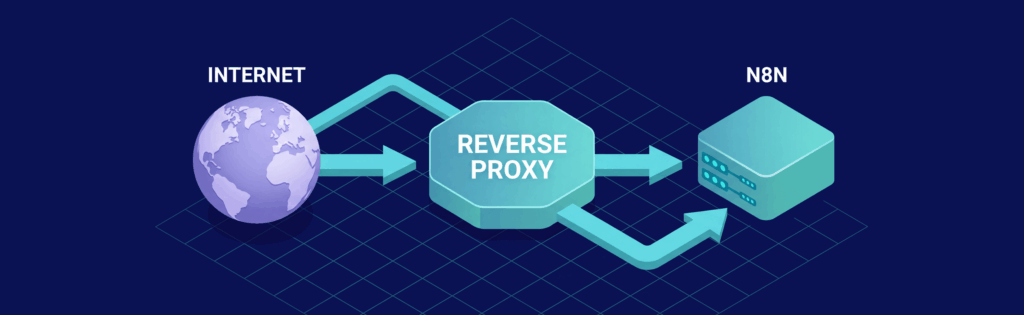
Running n8n without HTTPS is risky – your data can be intercepted. By encrypting traffic and enforcing secure connections, you address the vulnerabilities and DDoS risks mentioned earlier. The best way to do this is by using a reverse proxy like Nginx or Caddy. A reverse proxy sits between the internet and your n8n instance, handling encryption and decryption before forwarding traffic to n8n’s internal port (5678).
Installing a Reverse Proxy with Free SSL
Setting up HTTPS doesn’t have to be expensive or complicated. With Let’s Encrypt, you can get SSL certificates for free, and tools like Certbot make the process seamless, from issuing certificates to automatic renewals every 90 days.
If you’re using Nginx on VPS.us servers, here’s how to get started:
- Install the required packages:
sudo apt install nginx certbot python3-certbot-nginx - Create a configuration file at
/etc/nginx/sites-available/n8nand include headers for accurate requests and WebSocket support. Afterward, enable the configuration by creating a symbolic link in thesites-enableddirectory. Test the setup with:sudo nginx -t - Reload Nginx:
sudo systemctl reload nginx - Run Certbot to configure SSL and enforce HTTP-to-HTTPS redirection:
sudo certbot --nginx -d yourdomain.com
Alternatively, Caddy offers a simpler solution, as it automatically handles SSL certificates without requiring external tools like Certbot. Its straightforward configuration makes it perfect for smaller teams or projects without dedicated DevOps resources. However, for production environments requiring more granular control, Nginx remains the preferred choice.
| Feature | Nginx | Caddy |
|---|---|---|
| SSL Management | Requires Certbot for automation | Native, automatic SSL by default |
| Configuration | Complex but highly customizable | Simple, concise “Caddyfile” |
| Performance | High; widely used in production | High; modern and efficient |
| Ease of Use | Moderate (manual setup needed) | High (great for beginners) |
Configuring n8n for HTTPS
To ensure n8n works seamlessly with HTTPS, set the following environment variables:
WEBHOOK_URL: Usehttps://yourdomain.com/to generate secure URLs for external services.N8N_PROXY_HOPS: Set to1so n8n trusts headers passed by the reverse proxy.N8N_SECURE_COOKIE: Set totrueto limit session cookies to HTTPS-only transmission.
These variables improve webhook security by enforcing HTTPS and ensuring accurate header handling.
For production setups, adjust your Nginx configuration to handle larger payloads and long-running workflows. Increase client_max_body_size to at least 50M to avoid webhook failures with large JSON data or file uploads. Also, extend proxy_read_timeout and proxy_send_timeout to 3,600 seconds to prevent disconnections during lengthy automation processes.
Forcing All Traffic to HTTPS
Setting up SSL isn’t enough – you also need to block unsecured HTTP access. Modern browsers warn users or block non-HTTPS sites, which can disrupt automation triggers and erode trust. To avoid this, configure your Nginx server block to listen on port 80 and redirect all traffic to HTTPS:
return 301 https://$host$request_uri;
This ensures all requests are upgraded to HTTPS before reaching n8n. The 301 status code tells browsers and search engines to permanently use the secure endpoint.
Solution 2: Adding Rate-Limiting to Prevent Abuse
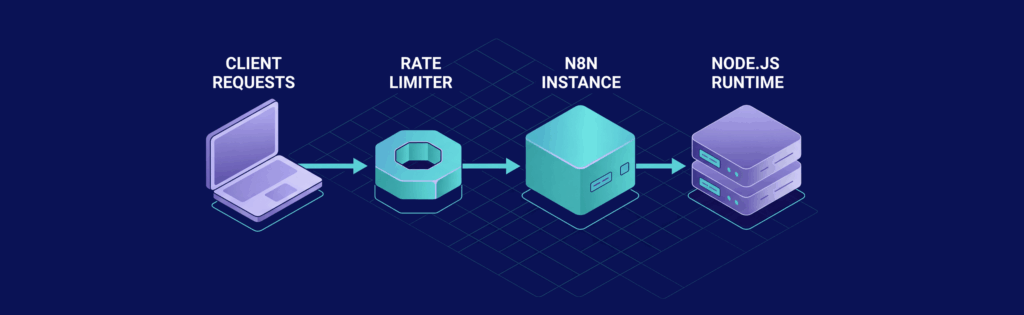
Once you’ve secured connections with HTTPS, the next step is to manage the flow of requests to protect your server from being overwhelmed. While HTTPS ensures data security, it doesn’t stop traffic overload. If rate-limiting isn’t in place, n8n processes webhooks concurrently, which can strain the Node.js event loop and exhaust server resources. This can result in execution delays of over 90 seconds, “Internal Server Error” messages for production webhooks, and disrupted automation workflows.
Rate-limiting helps by controlling how many requests reach your n8n instance within a set time. Using Nginx’s leaky bucket algorithm, requests are processed at a steady pace, preventing resource exhaustion and ensuring legitimate triggers aren’t lost in the flood.
Configuring Rate-Limiting with Nginx
To set up rate-limiting in Nginx, you’ll need to define a shared memory zone for tracking IP addresses and apply the limit to your n8n webhook location.
Add the following to your Nginx http block:
limit_req_zone $binary_remote_addr zone=n8n_limit:10m rate=100r/m;
limit_req_status 429;
This configuration creates a zone named n8n_limit, allowing up to 100 requests per minute per IP address. The limit_req_status 429 directive ensures that Nginx responds with an HTTP 429 (“Too Many Requests”) error, which is more meaningful for API users than the default 503 error.
Then, apply this limit to your n8n location block:
location / {
    limit_req zone=n8n_limit burst=20 nodelay;
    proxy_pass http://localhost:5678;
}
The burst=20 parameter provides a buffer for handling small traffic spikes, while nodelay ensures that requests within this buffer are processed immediately.
For additional protection, integrate Fail2ban to block persistent offenders for 24 hours.
Rate-Limiting Inside n8n Workflows
While Nginx safeguards your server, you’ll also want to manage traffic to downstream services. This complements HTTPS by ensuring that only controlled, legitimate traffic reaches your workflows.
Here’s how to implement rate-limiting within n8n:
- Use the HTTP Request node’s “Batching” option under “Options.” Set a “Batch Interval (ms)” (e.g., 1,000ms) to introduce a one-second delay between outgoing API calls. This prevents exceeding third-party rate limits.
- Add a Wait node after webhook triggers to delay expensive operations.
- For custom logic, use Redis to track and limit requests. For example, combine the IP address with the current minute (e.g.,
192.168.1.1:2026-02-25T14:30) as a key, and use a Redis “Increment” node to count requests. If the count exceeds a set threshold (e.g., 5 requests per minute per IP), reject the execution with a custom error message. - Enable “Retry On Fail” in node settings, setting a “Wait Between Tries” value that aligns with the target API’s rate limits. This ensures n8n waits before retrying if a 429 error is received.
Cost and Performance Comparison
Rate-limiting can dramatically improve how your server handles traffic. For example, in November 2025, a fintech startup managed by Basanta Sapkota faced a crisis when their GitHub Enterprise server generated about 45,000 webhook events per minute during major releases. Their unprotected Node.js server couldn’t keep up, leading to timeouts, retries, and failed deployments. By implementing Nginx rate limits (1,000 requests per second with a 2,000 burst), an n8n auto-scaler, and a BullMQ/Redis queue, they managed to handle a peak of 52,000 events per minute with a 99.96% success rate and no visible delays for developers.
| Metric | No Rate-Limiting | With Rate-Limiting (Nginx/Redis) |
|---|---|---|
| Requests Handled | Uncapped; vulnerable to flood attacks | Capped at safe thresholds (e.g., 100 requests per minute per IP) |
| CPU Usage | Spikes to 100% during bursts, causing crashes | Stable; excess traffic rejected at proxy level |
| Execution Delay | Can exceed 90 seconds | Consistent processing time for accepted requests |
| Reliability | High risk of 502/503 errors and lost events | 99.96% success rate even during 50k+ event spikes |
| Incident Reduction | Frequent DoS and database exhaustion | Major reduction in abuse-related downtime |
With VPS.us servers equipped with NVMe storage and 1–10 Gbps connectivity, rate-limiting overhead is minimal. The leaky bucket algorithm uses simple arithmetic and O(1) access for shared memory zones, ensuring your server can handle 2,000–3,000 requests per second without sacrificing performance.
Next, we’ll explore additional layers to enhance webhook security.
Solution 3: Additional Security Layers for n8n Webhooks

Securing n8n webhooks goes beyond HTTPS and rate-limiting. Adding layers like authentication, access restrictions, and payload controls ensures both sender identity verification and data integrity.
Authentication and API Key Usage
While HTTPS protects data in transit and rate-limiting controls traffic, authenticating requests is key to preventing unauthorized access. n8n Webhook nodes support three main authentication methods: Header Auth, Basic Auth, and JWT Auth.
- Header Auth: This method uses API keys or Bearer tokens. You can configure it in the Webhook node settings by specifying the required header (e.g.,
X-API-KEYorAuthorization). If a request lacks the expected header, n8n automatically rejects it. - HMAC Authentication: For added security, use HMAC (Hash-based Message Authentication Code) to validate both the sender’s identity and the payload’s integrity. This method is widely used by platforms like Stripe and GitHub to prevent tampering and replay attacks. It’s ideal for scenarios involving financial transactions or sensitive data.
- JWT Auth: This method provides structured access control with features like expiration and custom claims. However, n8n doesn’t enforce the
exp(expiration) claim by default, so you’ll need to manually validate it using a Code or IF node. If the external service doesn’t support custom headers, you can validate a query parameter (e.g.,?secret=my-token) at the start of your workflow.
Here’s a quick comparison of the different authentication methods:
| Method | Security Level | Implementation Complexity | Best Use Case |
|---|---|---|---|
| Basic Auth | Low | Simple | Internal tools or low-risk scenarios |
| API Keys | Medium | Simple | General business applications |
| JWT Tokens | High | Moderate | Access control with expiration claims |
| HMAC Signature | High | Moderate | Financial transactions or sensitive data |
| mTLS | Highest | Complex | High-security environments (e.g., banking, healthcare) |
Restricting Access with CORS and IP Allowlists
IP allowlisting is best handled at the reverse proxy or firewall level, ensuring only trusted IPs can reach your n8n instance. For example, in Nginx, you can configure allow and deny directives to restrict access. If you’re using a reverse proxy, set the N8N_PROXY_HOPS environment variable to 1 so n8n can correctly read the client’s IP from the X-Forwarded-For header.
For browser-based interactions, configure CORS (Cross-Origin Resource Sharing) headers. Update the “CORS Allowed Origins” setting from the default * to specific trusted domains (e.g., https://app.yourdomain.com). However, keep in mind that CORS doesn’t protect against bots or scripts that bypass browser rules. For third-party services with dynamic IPs, HMAC signatures can serve as an effective alternative to IP-based restrictions.
If needed, you can also validate source IPs or specific headers using an IF node in your workflow for added control.
Payload Size Limits and Firewall Protection
By default, n8n webhooks accept payloads up to 16 MB. However, unsecured webhooks can be exploited to send oversized payloads or trigger costly API calls repeatedly. To mitigate this:
- Adjust the
N8N_PAYLOAD_SIZE_MAXenvironment variable to set a stricter limit if your workflows don’t require large payloads. For example, if you only process JSON payloads under 1 MB, setting a smaller limit can block oversized requests. - For form-data payloads, modify
N8N_FORMDATA_FILE_SIZE_MAXas needed.
If you’re hosting n8n on VPS.us, take advantage of their built-in firewall features. These can block malicious traffic and restrict access from unwanted regions before it even reaches your server. Additionally, enabling the Webhook node’s “Ignore Bots” setting can filter out requests from web crawlers or link previewers.
For further protection, consider disabling the public REST API if it’s not in use. This reduces your attack surface significantly. Combined with HTTPS and rate-limiting, these measures create a strong security framework for your n8n workflows.
Step-by-Step: Securing n8n Webhooks on VPS.us
Setting Up an n8n VPS on VPS.us
Start by selecting a VPS plan that matches your needs. For testing or small workflows, the KVM1-US plan is a solid choice at $10/month. It includes 1 vCore, 1 GB RAM, 20 GB NVMe storage, and unmetered 1 Gbps traffic. If you’re running multiple workflows in a production environment, consider upgrading to KVM2-US ($20/month) or KVM4-US($40/month) for more power and reliability. VPS.us deploys servers quickly, with options across 18 global locations, including Atlanta and Los Angeles for U.S. users.
🚀 Launch Your First n8n Automation in Under 5 Minutes
Your quick start checklist
Once your server is ready, connect via SSH and install Docker to host n8n in a container. Set a strong, random string for N8N_ENCRYPTION_KEY to secure any credentials stored in your database. Immediately enable N8N_BASIC_AUTH_ACTIVE=true to lock down the editor interface. For production setups, integrate Redis and configure EXECUTIONS_MODE=queue to handle workloads more efficiently and reduce the risk of single-point failures. After this, you’ll move on to setting up HTTPS, rate-limiting, and other security measures.
Configuring Security Features
To fully secure your n8n setup, you’ll need to implement HTTPS and rate-limiting. Here’s how to get started:
Run the following command to update your server and install the necessary tools:
sudo apt update && sudo apt install nginx certbot python3-certbot-nginx -y
Next, create a new Nginx configuration file at /etc/nginx/sites-available/n8n, including a rate-limiting zone and applying it to your n8n location block. Obtain an SSL certificate from Let’s Encrypt by running:
sudo certbot --nginx -d n8n.yourdomain.com
Make sure N8N_PROTOCOL=https is set so that n8n generates secure links. Adjust N8N_PROXY_HOPS=1 to ensure n8n accurately reads client IPs from the X-Forwarded-For header. This step is critical for rate-limiting and logging. For added security, enable Header or Basic Auth in your webhook nodes, and if your workflows don’t need the default 16 MB payload limit, adjust N8N_PAYLOAD_SIZE_MAX to a more suitable size.
Testing and Monitoring Webhook Security
Once you’ve configured your security settings, it’s important to test and monitor them to ensure everything is working as expected.
First, verify that HTTPS is active by checking for the lock icon in your browser when accessing your n8n URL. Test your rate-limiting setup by running the following loop with curl:
for i in {1..30}; do curl -s -o /dev/null -w "%{http_code} " https://n8n.yourdomain.com/webhook/test; done
You should see 200 responses until the rate limit triggers a 429 error. To ensure your SSL certificates renew automatically, test the process with:
sudo certbot renew --dry-run
Use VPS.us’s AlwaysOn monitoring feature to keep an eye on uptime and get alerts for any downtime. Additionally, monitor Nginx logs with:
tail -f /var/log/nginx/access.log
This will help you spot unusual traffic patterns, such as spikes from specific IPs. For a more advanced setup, deploy Prometheus and Grafana to track metrics like rate(http_requests_total{code="429"}[1m]) > 100. This can help you identify potential brute-force attacks. Finally, always run nginx -t before reloading Nginx to catch any configuration errors that could disrupt your webhook services.
Results and Benefits of Securing n8n Webhooks
Time and Cost Savings
Protecting your n8n webhooks does more than just shield your data – it streamlines operations and avoids unnecessary expenses. Without proper safeguards, attackers can exploit vulnerabilities, causing workflow delays and forcing you to spend valuable time restoring service. For instance, by setting a baseline of 10 requests per second with Nginx, you can stop malicious traffic before it even reaches your application, ensuring resources are reserved for legitimate users.
The financial savings are equally important. Unsecured webhooks can inadvertently trigger workflows that rely on paid APIs, such as OpenAI or OpenRouter, leading to unexpected bills that could quickly escalate into thousands of dollars. By adding rate-limiting and authentication, you prevent abuse and keep costs predictable. For example, on VPS.us, a $10/month KVM1-US plan is sufficient for small workflows when properly secured. Without these protections, you might be forced to upgrade to a more expensive plan just to handle the strain from malicious traffic.
Improved Security and Compliance
Adding HTTPS, rate-limiting, and authentication significantly reduces the risk of security breaches. Many organizations report fewer abuse incidents within just one month of implementing these measures. HTTPS ensures that data remains encrypted during transit, which is crucial for meeting GDPR and HIPAA requirements. Moreover, using JWT authentication allows for precise access control and tracking, making it easier to monitor which workflows are being triggered – an essential feature for regulatory compliance.
Additional tools like IP allowlists and CORS restrictions block traffic from untrusted sources, while HMAC signatures ensure the integrity of your data. These layers are especially important for protecting sensitive integrations with CRMs, databases, and internal systems, keeping unauthorized users from accessing or extracting critical information.
Long-Term Scalability
The benefits of securing your n8n webhooks extend far beyond immediate savings and compliance. These measures lay the groundwork for sustainable growth. Using HTTPS, rate-limiting, and authentication ensures your workflows remain stable and efficient as demand increases. Servers are constantly under threat from scanning bots and failed login attempts, but automated defenses like Fail2Ban and reverse proxy rate-limiting help filter out harmful traffic without requiring manual intervention. This reduces maintenance time and allows you to focus on building and improving workflows.
Features like secret rotation and versioning further enhance scalability by enabling you to update credentials without disrupting your automation. This capability, which only 8.5% of webhook implementations currently offer, gives VPS.us users a clear advantage. Whether you scale from the $10 KVM1-US plan to the more robust KVM4-US plan or beyond, these security practices ensure consistent performance, manageable costs, and a reliable foundation for growth.
Conclusion: Protecting Your Automation Workflows
Securing your n8n webhooks is not just a good idea – it’s absolutely essential for keeping your automation workflows safe and reliable. Without safeguards like HTTPS, rate-limiting, and authentication, your system could be left open to data breaches, resource overuse, and unexpected costs. Even a single poorly configured webhook can leave your infrastructure exposed. The upside? Putting these protections in place takes just a few minutes and is a cost-effective way to shield your workflows from harm.
Practical examples show how even simple measures can make a big difference. For instance, implementing basic rate-limiting – such as capping requests at 10 per second per IP – can effectively block malicious traffic before it even reaches your application. This helps protect your CPU, memory, and database from being overwhelmed, keeping your workflows running efficiently.
To build a strong defense, take these steps: activate N8N_BASIC_AUTH_ACTIVE=true with a secure password, set up SSL termination on your reverse proxy, and apply rate-limiting rules at the Nginx layer. These measures create a multi-layered defense that stops threats early, conserves system resources, and ensures a smooth experience for legitimate users. With VPS.us providing reliable infrastructure and 24/7 support, you can focus on creating impactful workflows instead of worrying about security breaches.

