

When your n8n workflows start slowing down – laggy editor, webhook timeouts, or intensive tasks causing delays – it’s time to move beyond single-process mode. n8n Queue Mode solves this by splitting tasks across a main process (UI and triggers), worker processes (workflow execution), and Redis (job queue). For small setups, a single VPS with Queue Mode improves performance. For larger workloads, multi-VPS clusters distribute tasks across servers, improving speed, reducing latency, and ensuring failover protection.
Key Takeaways:
- Queue Mode Basics: Main process handles UI and triggers; workers execute workflows; Redis manages the queue.
- Single-VPS Setup: Ideal for small workloads, with all components (Main, Redis, PostgreSQL, Workers) on one server.
- Scaling to Multi-VPS: Distribute workers across servers for higher capacity and regional efficiency.
- Worker Placement: Position workers near APIs or databases to reduce latency (e.g., U.S.-based workers for U.S. APIs).
- Cost-Effective Scaling: Start with a $20/month VPS for the main process and add $20–$40/month worker nodes as needed.
For businesses handling 200+ workflows daily or managing complex tasks like AI/ML pipelines, multi-VPS clusters are essential for maintaining smooth operations. This guide explains how to set up and scale your n8n system efficiently.
How n8n Queue Mode Works
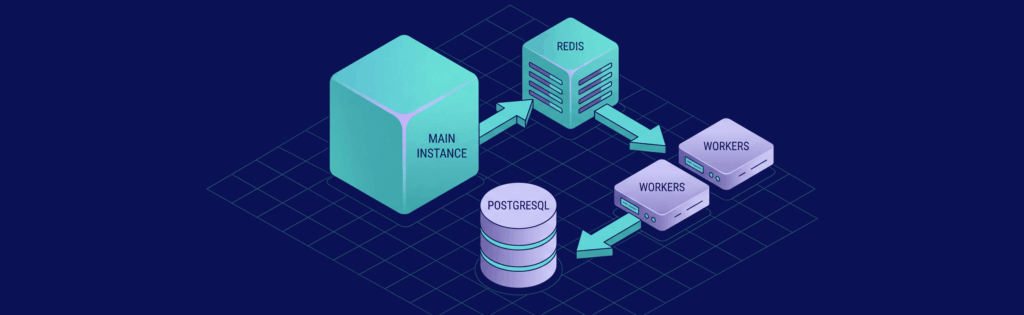
Queue Mode in n8n splits its operations into four key parts: the Main Instance, Redis, Worker Instances, and PostgreSQL. Each component has a specific role to ensure smooth workflow execution. Here’s how it works:
- The Main Instance takes care of the user interface, REST API, and triggers. When a workflow needs to run, it generates an execution ID but doesn’t handle the actual processing. Instead, it sends job IDs to Redis.
- Redis acts as a message broker, maintaining a “to-do list” of jobs waiting to be executed.
- Worker Instances – separate Node.js processes – pick up job IDs from Redis, fetch workflow details from PostgreSQL, execute the tasks, and update the database with the results.
- PostgreSQL serves as the central hub, storing workflow definitions, encrypted credentials, and execution logs.
This setup avoids bottlenecks. In the default mode, a single Node.js process manages everything, including UI, triggers, and execution. This can lead to issues – like one workflow processing thousands of spreadsheet rows and freezing the editor or causing webhook timeouts. Queue Mode solves this by delegating execution tasks to workers, keeping the Main Instance responsive.
Here’s a closer look at how each component contributes to maintaining responsiveness and scalability.
Queue Mode Components
- The Main Instance logs triggers and queues job IDs in Redis.
- Redis stores these job IDs, dispatches them to available workers, and notifies the Main Instance once a job is complete.
- Workers pull jobs from Redis, retrieve workflow details from PostgreSQL, execute the tasks, and write results back to the database.
- PostgreSQL acts as the shared data repository, storing workflows, credentials, and logs.
Each worker can handle up to 10 executions by default, although a concurrency setting of 5 or more is recommended to avoid overloading database connections. Workers typically use 200–500 MB of RAM depending on the complexity of workflows, while Redis requires just 128 MB for queue data. PostgreSQL’s default connection limit is 100, and a typical setup with one Main Instance and four workers uses 15–25 active connections.
A crucial configuration is the N8N_ENCRYPTION_KEY, which must be the same across the Main Instance and all workers. If they don’t match, workers won’t be able to decrypt credentials, causing silent workflow failures. Additionally, the N8N_DISABLE_PRODUCTION_MAIN_PROCESS=true setting should be enabled on the Main Instance to ensure it doesn’t execute workflows, avoiding potential bottlenecks during high traffic.
Why Use Queue Mode
Queue Mode offers a practical solution for scaling n8n. Instead of upgrading a single server, you can add more workers to increase capacity. This horizontal scaling ensures that long-running workflows, like AI/LLM calls, don’t block simpler tasks like sending a Slack notification. Redis acts as a buffer, queuing incoming requests during traffic spikes and processing them as workers become available.
For CPU-intensive tasks, the general rule is one worker per vCPU core. For workflows that are I/O-heavy, such as those waiting on API responses, you can configure higher concurrency (10–20) with fewer workers. Hosting providers like VPS.us offer options to suit different needs:
- $9.58/month: 2 vCPU and 4 GB RAM, suitable for 1–2 workers.
- $19.16/month: 4 vCPU and 8 GB RAM, supporting 2–4 workers.
- $38.32/month: 8 vCPU and 16 GB RAM, capable of running 4–8 workers.
This flexibility allows you to scale your workflow execution without needing to rewrite workflows or make significant configuration changes.
Running n8n Queue Mode on a Single VPS

Running Queue Mode on a single VPS is an efficient way to separate the n8n editor from execution tasks without breaking the bank. This setup is ideal for starting out and provides a solid foundation before scaling to multi-VPS clusters for higher demands. Here, all four key components – Main Instance, Redis, PostgreSQL, and Workers – are hosted on the same server, each within its own container. This design ensures that even during heavy workflow executions, the UI remains responsive and webhooks process without delays.
Single VPS Queue Mode Setup
To configure this setup, use Docker Compose to define four services in your docker-compose.yml file:
- An editor service running the command
n8n - A worker service running
n8n worker - A Redis container (
redis:7-alpine) - A PostgreSQL container (
postgres:16-alpine)
You’ll need to set these critical environment variables for the system to function properly:
EXECUTIONS_MODE=queueQUEUE_BULL_REDIS_HOST=redisDB_TYPE=postgresdb
Keep in mind that SQLite is not compatible with Queue Mode because it can’t handle concurrent writes from multiple processes. Also, ensure that the N8N_ENCRYPTION_KEY is the same across all services. To keep the UI responsive, set N8N_DISABLE_PRODUCTION_MAIN_PROCESS=true.
If you need to scale the workers dynamically, you can run the following command:
docker compose up -d --scale worker=2
Each worker typically consumes between 200–500 MB of RAM. For CPU-intensive tasks, assign one worker per vCPU core. For I/O-heavy workflows, you can increase concurrency without adding more workers. For example, on a VPS with 4 GB of RAM, you can support 1–2 workers after reserving about 2.5 GB for the Main Instance, PostgreSQL, Redis, and the operating system. If you’re using an 8 GB VPS, you can scale up to 2–4 workers comfortably.
This setup is designed to handle moderate workloads on a single VPS until resource limits indicate the need to scale further.
Performance and Scaling Limits
Keep a close eye on resource usage to know when it’s time to move beyond a single VPS. Generally, you’ll hit the limits of this setup when:
- CPU usage consistently exceeds 90%
- Available RAM drops below 500 MB
At this point, adding more workers can lead to issues like CPU contention and database connection pool exhaustion. PostgreSQL, for instance, has a default limit of 100 connections, and a typical setup with one Main Instance and four workers uses 15–25 active connections.
Once you reach the point where adding workers causes instability, it’s time to consider scaling out to a multi-VPS cluster. For most users, this happens at around 200+ workflow executions per day or when complex workflows, like those involving AI/ML, start experiencing noticeable delays. Until then, a single VPS, such as the KVM4-US plan from VPS.us (offering 4 vCores and 4 GB of RAM for $40.00 per month), should suffice for standard production needs.
Building Multi-VPS n8n Clusters

Once you’ve optimized a single VPS setup, the logical next step is scaling up with multi-VPS clusters.
When a single VPS starts to hit its limits – CPU usage consistently above 90%, RAM dropping below 500 MB, and workers competing for resources – it’s time to distribute the workload. A practical approach is to deploy the Main Instance, Redis, and PostgreSQL on one server while offloading worker processes to additional VPS instances. This setup eliminates bottlenecks tied to a single machine and paves the way for horizontal scaling.
Multi-VPS Setup with VPS.us
🚀 Launch Your First n8n Automation in Under 5 Minutes
Your quick start checklist
To configure a multi-VPS cluster, designate one VPS as your control plane, hosting the Main Instance, Redis, and PostgreSQL. Then, spin up additional VPS instances dedicated solely to worker processes. For example, you could deploy a KVM4-US control plane ($40.00/month, 4 vCores, 4 GB RAM) in Atlanta and add two KVM2-US workers ($20.00/month each, 2 vCores, 2 GB RAM) in Los Angeles and Frankfurt. These instances should connect over a secure private network or VPN to ensure low-latency communication and efficiency.
Keep in mind the following key configurations:
- All nodes must use the same
N8N_ENCRYPTION_KEY. - Set
EXECUTIONS_MODE=queueon the Main Instance. - Enable
N8N_DISABLE_PRODUCTION_MAIN_PROCESS=trueto offload execution to the workers. - For binary data, switch to S3-compatible storage or a shared network volume, as local storage won’t work across multiple nodes.
Multi-Region Deployment and Geo-Redundancy
Distributing workers across multiple regions can significantly reduce latency. For instance, if your workflows frequently interact with EU-based APIs, placing a worker in Frankfurt ensures requests are processed in milliseconds. Meanwhile, a worker in Atlanta would incur the delay of transatlantic round trips. VPS.us offers data centers in Atlanta, Los Angeles, Frankfurt, Amsterdam, Paris, Singapore, Mumbai, and Tokyo, making it easy to deploy workers closer to your data sources.
For high availability, deploy workers in at least two regions. This ensures that if one data center goes offline, the remaining workers can continue processing jobs. However, achieving true geo-redundancy requires more than just worker distribution. You’ll need a leader-follower PostgreSQL cluster (tools like repmgr can help) and a Redis Sentinel or cluster setup to ensure both your database and message broker can withstand regional outages. Without these, a single-region database becomes a critical point of failure.
Cost and Performance Balance
A good starting point is a KVM4-US control plane paired with one or two KVM2-US workers. Monitor metrics like CPU usage and queue depth to decide when to scale. If jobs are piling up, add another worker. On the other hand, if CPU usage stays below 50%, you might be overprovisioned. Each worker typically uses 200–500 MB of RAM and can handle 10 simultaneous jobs by default, meaning a 2 GB worker can comfortably run one worker process with room for the operating system.
For I/O-heavy workflows (like API calls or webhooks), you can increase N8N_WORKER_CONCURRENCY to 10–20 without adding more VPS instances. For CPU-intensive tasks (such as data transformations or AI/ML processes), keep concurrency lower (1–5) and scale horizontally by adding more workers. A balanced setup might look like this:
- One KVM4-US ($40.00/month) for the control plane
- Two KVM2-US ($20.00/month each) for general workers
- One KVM8-US ($80.00/month) for demanding AI/ML workflows
This configuration totals $160.00/month for a globally distributed and efficient cluster, capable of handling diverse workloads effectively.
Worker Management and Routing Logic

When using a multi-VPS setup, n8n’s Named Queues offer the control needed for efficient worker management. With your cluster in place, you can direct tasks to specific workers and scale operations during traffic spikes. This method ensures jobs are assigned to the right workers, setting the stage for region-specific job distribution.
Regional Worker Tags and Job Distribution
To optimize workflow execution, assign workflows to specific queues like us_east_region, eu_central_region, or asia_pacific_regionunder Workflow Settings > Queue. Then, start workers with the corresponding QUEUES environment variable. For example, a worker in Atlanta would use QUEUES=us_east_region, while one in Frankfurt would use QUEUES=eu_central_region.
This system enhances performance by reducing intercontinental latency. For instance, if a workflow interacts with a CRM API hosted in us-east-1, routing the job to a local worker in Atlanta can deliver sub-second response times. Meanwhile, workflows that rely on EU-based services can be processed by a Frankfurt worker for faster execution. Workers can also handle multiple queues by setting QUEUES=us_east_region,eu_central_region, offering flexibility to adapt to shifting traffic patterns.
Scaling Workers During High Traffic
Scaling up worker capacity is essential during traffic surges. To handle increased demand, you can add more worker replicas. For Docker users, the command docker compose up -d --scale n8n-worker=X quickly spins up additional instances. For VPS deployments, you can provision a new KVM2-US instance ($20.00/month) or a KVM4-US instance ($40.00/month), ensuring it shares the same N8N_ENCRYPTION_KEY and queue configurations.
Keep an eye on Redis queue depth, particularly bull:n8n:jobs:wait. A backlog here indicates that your workers are overwhelmed. You can monitor this through n8n’s /healthz and /metrics endpoints, integrating the data with tools like Prometheus or Grafana to automate scaling decisions.
For workflows that are I/O-intensive, increase the N8N_WORKER_CONCURRENCY setting to 10–20. For CPU-heavy tasks, keep concurrency between 1–5 and scale horizontally. When scaling down, use the N8N_GRACEFUL_SHUTDOWN_TIMEOUTsetting (default is 30 seconds) to let workers finish their tasks before shutting down, avoiding incomplete jobs or data loss.
For sudden traffic spikes, consider VPS.us Unmetered VPS plans, starting at $25.00/month with 10 Gbps ports. These plans are ideal for scenarios like flash sales or scheduled data syncs, where job volumes can skyrocket in minutes.
Multi-VPS n8n Cluster Use Cases

Expanding on the earlier discussion about routing logic and worker scaling, these examples highlight how multi-VPS clusters can solve real-world challenges across various industries. When your automation workload exceeds 200 workflow executions daily, you might notice UI lag or webhook timeouts – clear indicators that it’s time to distribute the load. Here’s how multi-VPS clusters can improve efficiency in different scenarios.
E-commerce Order Processing
Flash sales can push a single n8n instance to its limits. For instance, when a Shopify webhook fires during a product launch, immediate processing is critical. A multi-VPS setup splits the workload, with webhook processors and execution workers handling tasks separately. This ensures smooth order processing, even under heavy traffic from payment gateways like Stripe or PayPal.
Imagine deploying a KVM2-US instance ($20/month) in Atlanta to handle US-based payment webhooks, while a worker in Frankfurt processes EU transactions. Using named queues like us_east_region and eu_central_region directs workflows to the closest worker, keeping checkout processes fast and reliable.
During high-traffic events like Black Friday, you can scale horizontally by adding KVM4-US instances ($40/month) or choosing VPS.us Unmetered VPS plans starting at $25/month with 10 Gbps ports. Keep an eye on queue depth (e.g., bull:n8n:jobs:wait), and spin up extra workers as needed to prevent delays. This setup maintains performance during surges while staying cost-effective during regular operations.
AI/ML Workflow Pipelines
Tasks like preprocessing datasets or running inference models can bog down a single-instance n8n setup. Multi-VPS clusters solve this by isolating resource-heavy jobs on dedicated workers, while smaller, cost-efficient instances handle lightweight API calls.
To avoid overloading, set N8N_WORKER_CONCURRENCY=5 for CPU-intensive tasks and scale horizontally by adding more GPU-equipped instances as demand grows. Meanwhile, simpler tasks like data transformations or API calls can run on a KVM2-US instance to keep costs manageable.
Since n8n queue mode doesn’t support filesystem-based binary storage, configure S3-compatible external storage for large datasets and model outputs. Enable Prometheus metrics (N8N_METRICS=true) to track queue depth and worker performance, so you can scale proactively during spikes in AI job volume. Also, ensure all workers share the same N8N_ENCRYPTION_KEY to decrypt credentials stored in PostgreSQL. This separation of tasks ensures efficient resource use while controlling expenses.
Enterprise Data Synchronization
Global enterprises often face challenges with latency and throughput when synchronizing data across continents. A single centralized cluster can become a bottleneck during network instability or high-traffic periods. Multi-VPS clusters distribute workloads, allowing regional workers to handle local API calls, reducing delays and improving reliability.
Using a leader-follower configuration, as outlined in earlier multi-region deployment strategies, ensures high availability. If the leader fails, a follower automatically takes over timers and pollers, maintaining uptime for critical synchronization workflows. Redis serves as a message broker, enabling regional workers to pick up tasks efficiently.
For example, a company with offices in New York, London, and Singapore could deploy workers in VPS.us data centers in Atlanta, Frankfurt, and Tokyo. By tagging workflows with queues like us_east_region, eu_central_region, or asia_pacific_regionand assigning workers to these queues, tasks such as CRM updates, database syncs, and API integrations can execute locally. This minimizes latency and ensures smooth operations across global teams. The combination of geographic distribution and failover mechanisms creates a robust, scalable automation setup that grows with the business.
Conclusion
Queue Mode turns n8n into a powerful, scalable automation tool. By separating the main process from worker execution, it eliminates UI slowdowns and webhook timeouts. Taking it a step further, multi-VPS clusters distribute workers across regions, reducing latency and adding redundancy to keep your automations running smoothly, even if individual nodes fail.
For example, you could deploy a KVM2-US instance at $20/month for the main process and add workers as needed, based on queue depth. Each worker uses about 200–500 MB of RAM. Keeping an eye on bull:n8n:jobs:wait ensures you scale workers only when necessary, avoiding wasteful spending. This approach works especially well for businesses handling seasonal traffic spikes, like e-commerce flash sales or AI batch jobs, as it balances performance and cost effectively.
Worker placement also plays a big role in performance. Positioning workers near region-specific APIs or databases minimizes round-trip times, which is crucial for workflows involving global operations. For instance, a company syncing CRM data between New York and Singapore could deploy workers in Atlanta and Tokyo. This setup speeds up local API calls while maintaining failover support, thanks to VPS.us’s 18 global data centers.
One technical detail to remember: synchronize the N8N_ENCRYPTION_KEY across all instances. If the keys don’t match, credentials won’t decrypt properly, causing silent failures. Also, as you scale, monitor database connections. A typical setup with one main process and four workers might use 15–25 active PostgreSQL connections, so you may need to increase the default max_connections from 100.
Whether you’re running AI pipelines on GPU-powered LLM VPS plans (starting at $49/month) or ensuring uptime for global data workflows, multi-VPS clusters offer the scalability and reliability that single-instance setups simply can’t match. With VPS.us hosting, you get NVMe storage, unmetered traffic, and instant provisioning – everything you need to build an automation system that grows with your business.

