

The cPanel vs DirectAdmin debate shapes hosting decisions for thousands of VPS owners annually. While cPanel dominates with 94.25% market share, DirectAdmin’s 35% year-over-year growth reveals a compelling alternative: exceptional cost savings, lighter resource footprints, and a unified control panel that works equally well for small VPS and complex multi-server setups. This comparison reveals where each control panel excels—and why budget-conscious developers and SMBs are increasingly choosing DirectAdmin for their VPS infrastructure.
2026 Pricing Comparison: cPanel vs DirectAdmin
License costs are the most visible difference between these control panels. Both offer monthly and annual pricing, but DirectAdmin’s cost structure fundamentally changes the economics of VPS hosting.
| Panel Type | cPanel License | DirectAdmin License |
|---|---|---|
| Single Dedicated Server | $26–32/mo (yearly: ~$308) | $8–10/mo (yearly: ~$100) |
| Unlimited Accounts | Included standard | Included in all plans |
| Reseller License (cPanel) / Reseller Admin (DirectAdmin) | $18–22/mo (additional) | No separate fee; merged into Admin |
| Email Accounts | Unlimited | Unlimited |
| Estimated Annual Cost (Single Server) | $308–384 | $96–120 |
The bottom line: DirectAdmin costs 2–3x less annually, with no hidden fees for reseller functionality. On a VPS costing $30–50/mo, DirectAdmin reduces control panel overhead from 50%+ of cost to just 12–15%.
Key Differences:
- Pricing: cPanel is subscription-based; DirectAdmin has a one-time fee.
- Resource Usage: cPanel is resource-heavy; DirectAdmin is lightweight.
- OS Compatibility: cPanel supports CentOS, CloudLinux, and RedHat; DirectAdmin supports more, including Debian and Ubuntu.
- Security: cPanel has frequent updates; DirectAdmin prioritizes simplicity with stable updates.
Quick Comparison
| Feature | cPanel | DirectAdmin |
|---|---|---|
| Pricing | $14.99–65.99 USD/month | $5–29 USD/month |
| Resource Usage | Higher | Lower |
| OS Support | CentOS, CloudLinux, RedHat | CentOS, Debian, Ubuntu |
| Security Updates | Frequent | Less frequent |
| Email Tools | Advanced management | Basic tools |
| Backup Systems | Advanced, automated | Basic |
In Summary: Choose cPanel for advanced features and scalability or DirectAdmin for simplicity, efficiency, and cost savings. The right choice depends on your VPS hosting needs and budget.
Core Features Comparison
When it comes to managing VPS tasks, cPanel and DirectAdmin take different approaches. Here’s a breakdown to help you decide which control panel fits your VPS hosting needs.
What cPanel Offers

cPanel, combined with Web Host Manager (WHM), provides a wide range of tools:
- Advanced Email Management
- Email filtering and auto-responders
- Built-in webmail options
- Database Administration
- phpMyAdmin integration
- Support for PostgreSQL
- Security Features
- External DNS synchronization
- Secure remote assistance
These tools, paired with WHM’s hierarchy, make cPanel ideal for managing multiple sites, especially for larger hosting providers.
What DirectAdmin Offers
DirectAdmin focuses on simplicity and performance, offering:
- Core Server Management Tools
- Easy-to-use file manager
- Basic email management
- DNS zone controls
- Database management
- Performance-Oriented Features
- Built-in crash recovery
- Minimal resource usage
- Security Features
- Two-factor authentication
DirectAdmin is a great choice for smaller VPS environments or developers looking for essential tools without extra complexity.
Side-by-Side Comparison
The table below highlights the key differences between cPanel and DirectAdmin:
| Feature Category | cPanel | DirectAdmin |
|---|---|---|
| Email Management | Advanced filtering, spam protection, auto-responders, webmail | Basic email tools, standard filtering |
| Database Support | MySQL, PostgreSQL, phpMyAdmin integration | MySQL, basic phpMyAdmin access |
| Security Tools | Secure remote assistance, external DNS sync | Two-factor authentication |
| Resource Impact | Higher system requirements | Lightweight footprint |
| Interface Type | Feature-rich, complex | Streamlined, easy to navigate |
cPanel is packed with features for enterprise-level hosting, while DirectAdmin stands out for its simplicity and resource efficiency.
Price Comparison

cPanel and DirectAdmin have different pricing structures, catering to various VPS hosting needs and budgets.
Here’s a quick look at their pricing models:
cPanel Costs
cPanel follows a subscription-based pricing system:
- cPanel Admin: $14.99/month – suitable for managing a few amount of accounts
- cPanel Pro/Ultimate: $65.99month – includes enterprise features and unlimited account management.
DirectAdmin Costs
DirectAdmin offers also a subscription-based model after sunsetting their one time license fee model:
- DirectAdmin Personal: $5/month – suitable for managing a few amount of accounts
- Unlimited account management.
- Access to all core features.
- Free updates and security patches.
Cost Comparison Over 24 Months
For VPS hosts, long-term costs matter. Here’s how the numbers stack up over two years:
| Control Panel | Number of Account / Domains | Monthly Fee | 24-Month Total Cost |
|---|---|---|---|
| DirectAdmin Personal Plus | 2 / 20 Domains | $5 | $120 |
| DirectAdmin Lite | 10 / 50 Domains | $15 | $360 |
| DirectAdmin Standard | Unlimited / Unlimited | $29 | $696 |
| cPanel Admin | 5/Unlimited | $32.99 | $791.76 |
| cPanel Pro | 30 / Unlimited | $46.99 | $1127.76 |
| cPanel Premier | 100 / Unlimited | $65.99 | $1583.76 |
In DirectAdmin and cPanel, the difference between accounts and addon domains is isolation and management:
• Accounts: Fully separate hosting environments with unique logins, files, emails, and databases. Managed at the admin/reseller level, ensuring security and resource isolation. Best for different owners or projects needing independence.
• Addon Domains: Additional websites under an existing account, sharing resources like files, databases, and emails. Managed within the same control panel. Best for a single owner hosting multiple sites under one plan.
This table clearly shows how DirectAdmin is a cost-effective option for long-term use. It’s especially appealing for small to mid-sized hosting businesses, budget-conscious VPS users, and developers working with smaller clients – provided its features meet their needs.
Resource Usage: cPanel vs DirectAdmin on a VPS
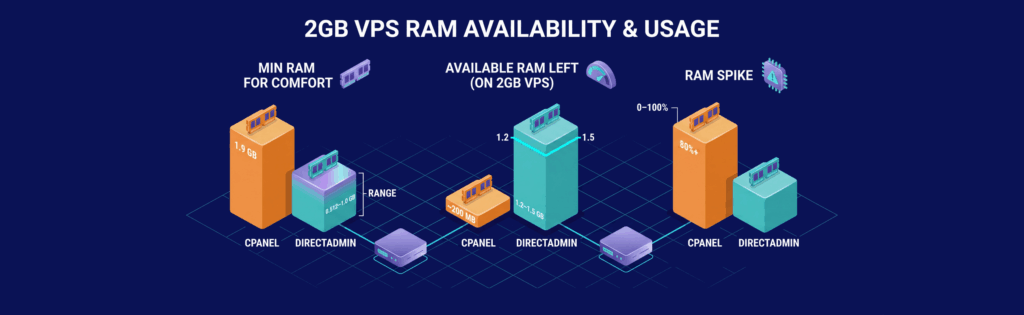
VPS environments demand efficient resource allocation. DirectAdmin’s lightweight footprint becomes critical when running low-spec servers.
Memory (RAM)
cPanel: Requires 1.9GB RAM minimum for comfortable operation. On a 2GB VPS, the OS and cPanel leave ~200MB for application workloads. Heavy cPanel processes (AutoFix, backups, stats) can spike RAM usage to 80%+.
DirectAdmin: Runs efficiently in 512MB–1GB RAM. A 2GB VPS provides 1.2–1.5GB available for websites, databases, and applications. Processes consume less memory overall, making DirectAdmin ideal for budget VPS tiers.
CPU Impact
cPanel: Background processes (update checks, statistics compilation, mail processing) consistently use 10–15% CPU on idle servers. Can spike during backups or account operations.
DirectAdmin: Minimal idle CPU footprint (~3–5%). Processes are single-threaded and event-driven, leaving more CPU headroom for your applications.
Disk Space
cPanel: Requires ~2–3GB disk footprint after installation. Database and log files grow quickly on busy servers.
DirectAdmin: Uses ~500MB–1GB, including all modules. More efficient logging and smaller database make it suitable for tight disk budgets.
Security Features

After evaluating performance, it’s clear that security is a key consideration for VPS hosting. Both cPanel and DirectAdmin take different paths in safeguarding your server and data.
cPanel Safety Features
cPanel, paired with WHM, offers a wide range of tools to keep your server secure. Here’s what it includes:
- Automated Security Updates: Regular patches to counter new threats.
- Advanced Access Control: Manage user roles with detailed permission settings.
- Built-in Security Tools: Features like SSL/TLS management, an IP blocker, and password-protected directories.
- Third-party Integrations: Works seamlessly with additional security apps and services.
cPanel also boosts its security with features like secure remote assistance, external DNS synchronization, and PostgreSQL support. These additions provide an extra layer of protection and control.
| Feature | Description |
|---|---|
| Update Frequency | Regular security patches |
| Support Level | 24/7 technical assistance |
| Documentation | Detailed security guides |
| Backup Systems | Automated and reliable backups |
DirectAdmin Safety Features
DirectAdmin takes a simpler approach, focusing on the essentials to maintain a stable and secure environment:
- Basic Security Tools: Offers straightforward, effective protection.
- Stable Update Cycle: Updates are less frequent but thoroughly tested.
- Low-Impact Protection: Secures your system without overloading resources.
- Core Security Functions: Includes basic backup and email security tools.
This streamlined approach minimizes complexity, which can help reduce potential vulnerabilities, though it lacks some of the advanced features found in cPanel.
| Feature | Description |
|---|---|
| Update Frequency | Less frequent, stable updates |
| Support Level | Standard technical support |
| Documentation | Basic security guidelines |
| Backup Systems | Essential backup tools |
Choosing between these two control panels depends on your specific needs. If you require a feature-rich environment with regular updates, cPanel is a solid option. On the other hand, if simplicity and stability are your priorities, DirectAdmin’s lean design might be a better fit. Both panels support SSL management and user access control, but cPanel’s broader integrations offer more flexibility, often requiring more system resources.
System Requirements

When comparing control panels, it’s important to check their supported operating systems and technical requirements.
cPanel OS Support
cPanel focuses exclusively on enterprise-level Linux distributions. It operates on:
- CentOS (versions 7.x and 8.x)
- RedHat Enterprise Linux (RHEL)
- CloudLinux
While this narrow focus allows for deeper integration with these systems, it does limit your options. This can affect how well it scales and integrates into different setups.
DirectAdmin OS Support
DirectAdmin supports a wider range of Linux distributions, offering more flexibility for diverse hosting setups. It works with:
- Debian (various versions)
- RedHat Enterprise Linux
- CentOS (versions 7.x and 8.x)
- FreeBSD
Its lightweight design makes it a great choice for VPS hosting, where resource efficiency is key. The differences in OS support can directly influence how well the control panel performs in VPS environments.
When deciding, consider your team’s familiarity with Linux and your specific hosting requirements. OS compatibility will directly affect how well your system handles scalability and management.
Feature Comparison Table
Here’s a quick side-by-side look at how cPanel and DirectAdmin stack up in key hosting management areas. This table breaks down the main differences, helping you decide which control panel fits your needs.
| Feature Category | cPanel | DirectAdmin |
|---|---|---|
| User Interface | Packed with features and options for a detailed experience | Simple, clean design for easy navigation |
| Resource Usage | Higher resource demand due to its extensive tools | Lightweight, designed for minimal system impact |
| Backup Systems | Built-in tools for backups and restores | Basic backup options; often relies on third-party tools |
| Security Features | Advanced tools with regular updates | Standard security with fewer updates |
| Third-Party Integration | Large plugin library and WHM integration | Fewer options but covers the basics |
| Technical Support | 24/7 expert support with detailed documentation | Community support with limited documentation |
| Customization | Offers many themes and plugins for personalization | Fewer customization options |
| DNS Management | Includes external synchronization and advanced tools | Basic DNS tools without external sync |
| Email Features | Full email management, including webmail clients | Standard email capabilities |
| Server Monitoring | Advanced monitoring via WHM | Basic stats and monitoring |
In short, cPanel offers a robust, feature-packed experience, ideal for users needing advanced tools and dedicated support. On the other hand, DirectAdmin focuses on simplicity and efficiency, making it a great fit for those prioritizing lightweight performance – especially in VPS hosting setups where resources matter.
When to Choose DirectAdmin Over cPanel
Both panels are production-ready. The choice depends on your infrastructure priorities.
Choose DirectAdmin If:
- Budget matters: You’re running 5+ VPS or reseller servers. The cumulative savings (2–3x less per server) are material.
- Low-spec VPS: Your server has 1–2GB RAM. DirectAdmin’s lightweight design maximizes available resources for applications.
- Unified admin role: You want Admin, Reseller, and User functions in one login instead of separate credentials.
- Automation-first: DirectAdmin’s API is simpler and more consistent. Automation teams prefer its predictable behavior.
- Indie hosting or SMB: You’re not locked into cPanel by legacy customers. DirectAdmin offers the same features at a fraction of the cost.
Choose cPanel If:
Complex migration: Moving existing cPanel infrastructure to DirectAdmin requires downtime and careful planning.
Established ecosystem: Your customers expect cPanel, or you rely on specific cPanel plugins/extensions.
High resource availability: You’re running well-provisioned dedicated servers with 8GB+ RAM where resource efficiency is irrelevant.
Support contracts: You need vendor-backed support and prefer the largest market share for compatibility.
Comparing cPanel and DirectAdmin: Key Takeaways
Our analysis highlights the main differences between cPanel and DirectAdmin, focusing on their design, features, and pricing. Here’s what stands out:
- cPanel is packed with advanced tools and works seamlessly with WHM, making it a great choice for managing multiple accounts. However, it uses more system resources and comes with recurring fees.
- DirectAdmin, on the other hand, provides essential features with a lighter system load, making it a solid option for VPS users. Its one-time payment model is also a major plus for those watching their budget.
Would you like to learn more about all the others cPanel alternatives?
Frequently Asked Questions
What is better, cPanel or DirectAdmin?
hat's the key difference between cPanel and DirectAdmin?
Can I migrate from cPanel to DirectAdmin?
Does DirectAdmin support unlimited accounts like cPanel?
How much RAM do I need for DirectAdmin on a VPS?
What about DirectAdmin license costs and auto-renewal?

