Productivity apps have become essential to how we manage work, creativity, and everyday life. Whether we’re tracking tasks, organizing meetings, or sharing files, most of these actions happen in the cloud. Platforms like Google Workspace, Notion, Trello, and Microsoft 365 dominate because they’re convenient and packed with features. However, they also come with limitations, such as subscription costs, data privacy concerns, and limited customization.
Self-hosted productivity apps flip this model. Instead of relying on third-party servers, you install and run software directly on your own hosting environment. This gives you complete control over your data, configurations, and integrations. The result is a private workspace that mirrors the flexibility of commercial tools while offering unmatched security and ownership.
The Shift Toward Digital Independence
In recent years, there’s been a strong shift from dependence on centralized SaaS platforms to self-managed solutions. Professionals and organizations are increasingly aware that “free” cloud services often mean sacrificing privacy and long-term autonomy. This awareness has fueled the rise of open-source, self-hosted alternatives that empower users to create their own digital ecosystems. Many of these changes are driven by the growing availability of open-source tools for productivity that combine flexibility, transparency, and cost savings.
Several factors drive this transformation:
- Data Privacy and Ownership: Companies are realizing that sensitive information stored on external servers is never entirely under their control. Self-hosting ensures that documents, communications, and records remain private.
- Freedom from Vendor Lock-In: With SaaS tools, companies risk losing access or facing feature removals when vendors change policies or pricing. Open-source apps let you host and modify the software as you see fit.
- Cost Management: Subscription fees can add up quickly, especially for teams. Self-hosted solutions usually require one-time setup and modest hosting costs.
- Technological Maturity: Modern open-source apps are polished, mobile-friendly, and actively maintained, making self-hosting easier than ever before.
Together, these factors represent a broader movement toward digital independence where users build the infrastructure they rely on instead of renting it.
Core Components of a Self-Hosted Productivity Stack
A productive workflow depends on the seamless interaction of multiple tools, and open-source productivity software now makes it easier to host those tools privately while maintaining full functionality. When self-hosting, each part of your stack serves a unique role but works best when interconnected:
Task and Workflow Organization
These tools help manage projects, assign responsibilities, and visualize progress. Kanban boards and agile workflows, for example, make it easier to track tasks collaboratively.
Notes and Documentation
A central knowledge base ensures that all information, ideas, technical notes, or procedures, is accessible and easy to maintain. Markdown support, tagging, and versioning make these tools ideal for long-term reference.
Scheduling and Communication
Self-hosted calendars, video conferencing, and chat platforms enable team coordination without exposing messages to third parties. Integration ensures deadlines and reminders sync automatically.
File Sharing and Collaboration
Private file servers provide the same functionality as Dropbox or Google Drive but store data securely on your infrastructure. They often include real-time editing, link sharing, and access control.
Building your self-hosted stack around these core components ensures balance, as each app fills a role while contributing to a connected, efficient workflow.
Choosing the Right Foundation
The foundation of your self-hosted productivity setup determines its reliability and scalability. Before choosing apps, you’ll need to decide where and how to host them:
- Virtual Private Servers (VPS): Ideal for most individuals and small teams. A VPS combines the flexibility of a dedicated environment with manageable costs. You can scale resources as your needs grow, install multiple services, and maintain uptime through a data center’s network infrastructure.
- Home Servers: Great for tech-savvy users who prefer complete local control. These require stable internet connections, sufficient bandwidth, and power backup, but they eliminate external dependencies entirely.
- Dedicated Servers: Best suited for larger teams or enterprise setups that demand high performance, extensive storage, and advanced configurations.
Security and performance depend on proper setup. You’ll want to:
- Configure SSL certificates to encrypt traffic and ensure safe access.
- Use containerization tools like Docker or Podman to simplify deployment and isolate applications.
- Schedule automated backups to protect against data loss.
- Keep your OS and software updated to close security vulnerabilities.
With the right foundation, you create a stable environment that can evolve into a complete productivity platform tailored to your workflow.
Top Self-Hosted Productivity Apps for Teams
The best self-hosted productivity apps combine ease of use with strong integration capabilities. Below are some standout options that cover most organizational needs. The following open-source tools for productivity are among the most trusted options for teams that value control and efficiency.
Nextcloud
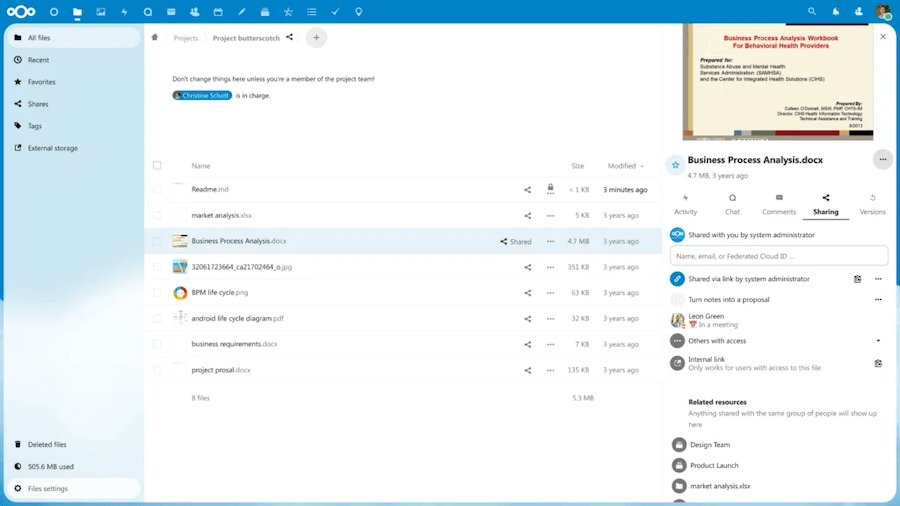
A cornerstone of self-hosted productivity, Nextcloud functions as a private cloud with file storage, calendars, contacts, tasks, and even document editing via OnlyOffice or Collabora. Its modular structure allows adding apps for password management, note-taking, or video chat, effectively replicating Google Workspace within your own environment. Its comprehensive feature set positions Nextcloud as one of the most capable open-source productivity suite options available today.
Joplin Server

Perfect for personal organization and collaborative notes, Joplin Server supports Markdown, synchronization across devices, and end-to-end encryption. It’s especially popular among developers, writers, and teams who prefer structured, privacy-respecting note-taking systems.
Wekan
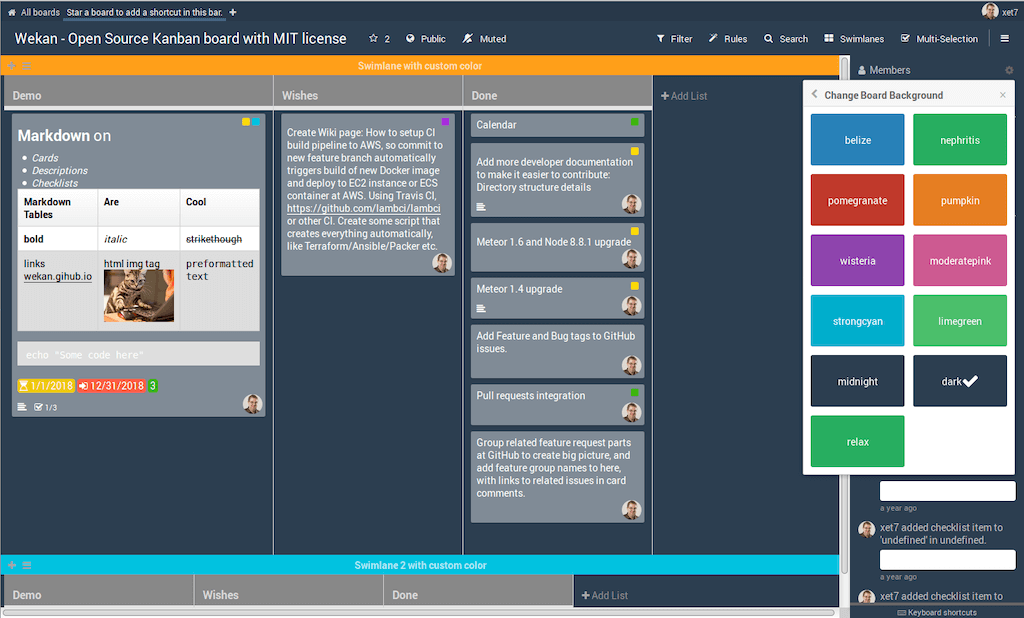
This Kanban-style project management app helps visualize tasks on boards and track workflow stages. Wekan supports multiple users, permissions, and integrations, making it suitable for agile teams that value transparency and clear task tracking.
Outline
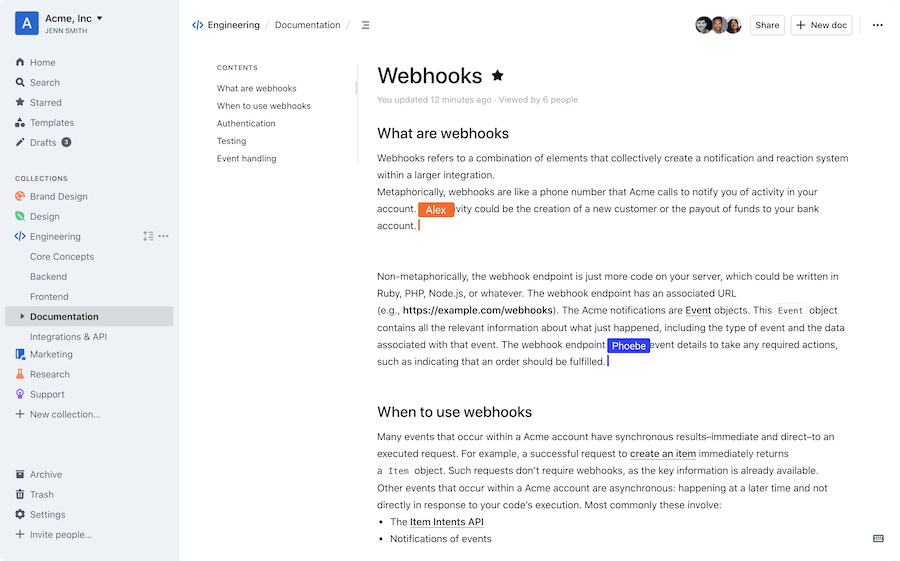
A beautiful and intuitive knowledge management platform, Outline allows teams to organize internal documentation, policies, and guides. It includes version control, team permissions, and easy linking to create interconnected knowledge hubs.
Mattermost
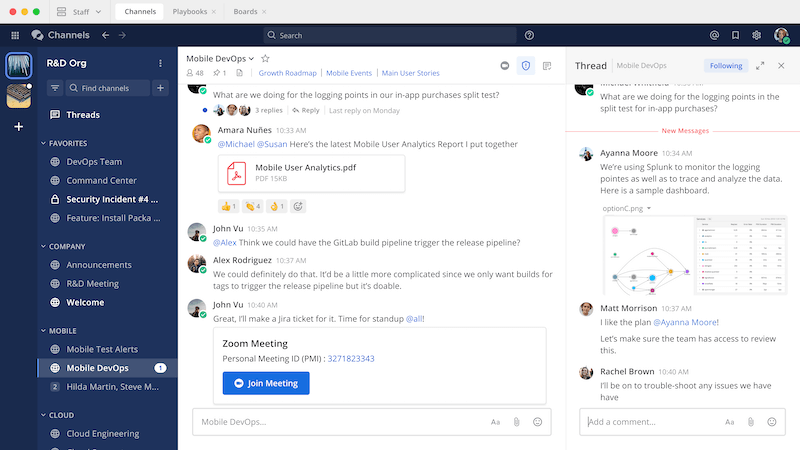
Designed as an open-source alternative to Slack, Mattermost provides private, real-time messaging and integrations with tools like GitLab, Jira, and Jenkins. It supports team channels, direct messages, and even video conferencing with plugins.
Each of these tools can run independently, but when combined, they create a robust productivity ecosystem comparable to commercial suites, without compromising privacy or flexibility.
Integrating Tools into One Workflow
Running multiple apps doesn’t mean they must function in isolation. The power of self-hosted productivity lies in integration and automation.
You can synchronize calendars between Nextcloud and Wekan using CalDAV, so task deadlines appear automatically in your schedule. Notes from Joplin or Outline can be embedded into project boards for quick reference. Many of these apps expose APIs that allow data exchange through automation tools like n8n or custom scripts.
WebDAV and CalDAV protocols form the backbone of most integrations, ensuring compatibility with desktop clients, smartphones, and even external tools. This interoperability enables you to design workflows that are uniquely yours: streamlined, connected, and efficient.
Security, Maintenance, and Data Resilience
Owning your infrastructure means taking responsibility for its security and stability. While self-hosting grants full control, it also requires active maintenance to ensure long-term reliability.
- Regular Updates: Keeping apps and your server software current closes vulnerabilities and ensures smooth operation. Automated update scripts or Docker image pulls make this process easier.
- Access Control: Assign user roles and permissions carefully. Limit admin privileges and create separate accounts for guests or temporary users.
- Encryption: Always use HTTPS with trusted SSL certificates, and consider disk encryption for sensitive environments.
- Monitoring and Alerts: Tools like Uptime Kuma or Grafana can notify you of downtime or performance issues before they affect your workflow.
- Backups and Disaster Recovery: Back up your databases, configurations, and user data on a schedule. Store backups on an external drive or remote location to protect against data corruption or hardware failure.
These measures transform your setup from a hobby project into a professional-grade environment that rivals commercial systems in reliability and trustworthiness.
Who Benefits Most from Self-Hosted Productivity Apps

Self-hosted productivity tools aren’t just for developers or privacy enthusiasts, as they serve a broad spectrum of users.
Freelancers often use them to consolidate their workflow into one private space, combining note-taking, client communication, and task tracking without recurring costs. Small businesses gain affordable, scalable solutions that can be tailored to specific processes, ensuring data compliance and security. Larger organizations, meanwhile, deploy self-hosted tools for on-premise control, integrating them into internal networks that meet strict privacy or legal standards.
Even individual users who simply value independence can benefit; creating a personal digital hub that replaces scattered accounts with one cohesive environment.
Future of Private Productivity
The rise of open-source productivity software has been central to this movement, giving users the ability to self-host complete work environments without relying on proprietary ecosystems. The self-hosted ecosystem is evolving rapidly. Open-source communities continuously innovate, adding AI-assisted features, mobile apps, and improved synchronization tools. Projects like Nextcloud Hub and Mattermost Enterprise Edition are closing the usability gap with big-name SaaS tools while maintaining transparency and control.
As digital sovereignty becomes a mainstream priority, more professionals will shift toward private infrastructure for their productivity needs. The future likely lies in hybrid setups like self-hosted core tools supplemented by optional cloud integrations where convenience outweighs sensitivity. This balance between autonomy and accessibility defines the next era of productivity.
Final Words
Self-hosted productivity apps offer a sustainable way to take ownership of your workflow. With an open-source productivity suite, you can replicate everything from cloud collaboration to document sharing within a fully private environment. They combine privacy, adaptability, and collaboration within your own secure environment. Whether you’re a solo professional or part of a large team, building your own productivity stack allows you to work efficiently without giving up control. Start small, maybe with a note-taking or file-sync tool, and expand your setup as your needs evolve. With each step, you reclaim more of your digital freedom.
Power Your Private Productivity with VPS.us
At VPS.us, we make it simple to host your own productivity tools with high performance and full control. Our VPS infrastructure delivers reliable uptime, SSD storage, and flexible scalability, which is ideal for running apps like Nextcloud, Joplin, or Mattermost.
For most users, the KVM2-US plan offers the perfect starting point. With 2 vCPU cores, 2 GB RAM, and 25 GB of SSD storage, it provides the balance of power and affordability needed to operate multiple self-hosted productivity apps efficiently.
Take the next step toward digital independence: build your private, integrated workspace today on a VPS.us server.