

Project management software is essential for teams that require control over their data and workflows. For technical teams, privacy-conscious organizations, and businesses with unique workflow requirements, self hosted project management platforms offer complete control, ownership, and deployment flexibility. Many teams exploring the best open source project management software are specifically looking for a balance of control, flexibility, and independence.
Self hosting is not automatically the right choice. Running your own project management stack means managing deployment, updates, backups, security, and performance. This approach requires a careful balance of operational management and the benefits of full control.
Why Teams Move Away From SaaS Project Management Platforms
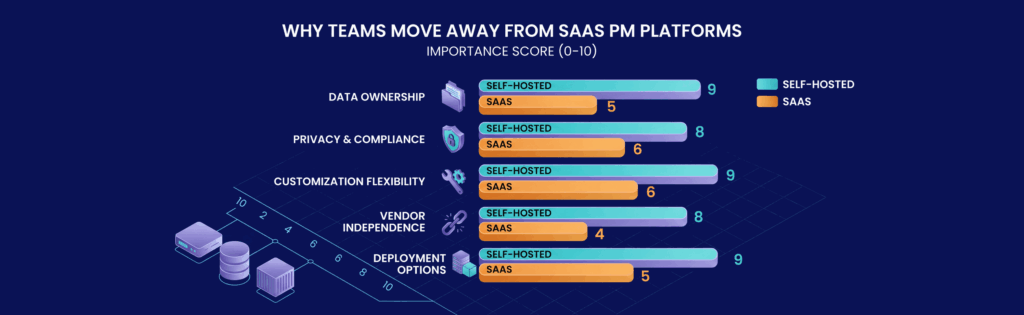
Cloud-based project management platforms simplify setup with features like quick sign up and inviting users; however, this convenience sometimes comes with limitations. When teams grow or have specific operational needs, the following factors gain importance:
- Data Ownership: Keep project timelines, discussions, documentation, and attachments under your control.
- Privacy and Compliance: Companies handling sensitive or regulated data may avoid third-party SaaS providers.
- Customization Flexibility: Self hosted platforms allow deeper workflow customization, API integrations, and infrastructure-level configuration.
- Vendor Independence: Pricing changes and policy shifts of SaaS platforms are beyond your control.
- Deployment Options: Deploy on VPS infrastructure, dedicated hardware, private cloud, or containerized setups.
Core Infrastructure Requirements for Self Hosted Project Management
While the user interface for project management software may seem straightforward, the underlying infrastructure must be prepared for growth. Consider these essentials:
Database Performance
Most platforms rely on databases to manage issue tracking, metadata, comments, permissions, and workflow states. Poor database performance can directly affect the user experience.
Storage Planning
Attachments, screenshots, documentation, reports, and audit history can quickly consume space. Plan for scalable storage expansion to handle the growth in data.
Authentication Infrastructure
Organizations might require LDAP, SSO, OAuth, or centralized identity management rather than local, isolated accounts.
Email Infrastructure
Reliable outbound email delivery is crucial for notifications, assignment alerts, password resets, and workflow updates.
Comparing the Best Self Hosted Project Management Platforms
The ideal solution depends on your team’s workflow. Below is a comparison of several popular options:
OpenProject

OpenProject is suited for organizations that need structured project management, offering formal planning, documentation, milestones, and governance through features like Gantt charts, agile boards, time tracking, document collaboration, and roadmaps. Although it demands more infrastructure management, it works well for larger organizations with complex needs.
Plane
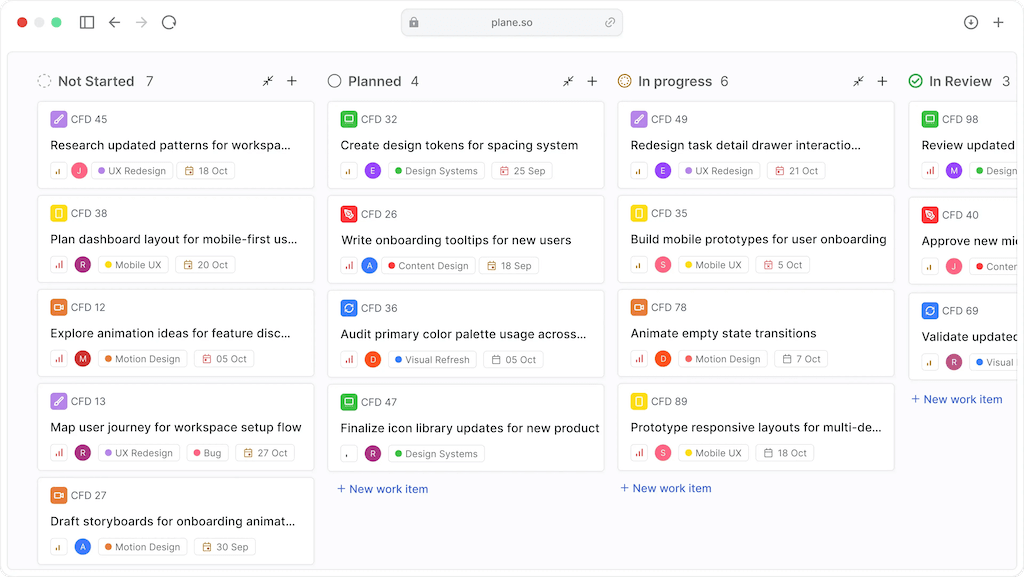
Plane is a modern solution designed for engineering teams. It offers a clean interface for issue tracking, sprint planning, roadmaps, backlog organization, and collaborative workflows. Despite being relatively new, it provides an agile-friendly environment with modern design and straightforward onboarding.
Taiga

Taiga is popular among agile development and product teams. Its support for Scrum and Kanban methodologies makes it suitable for backlog management, sprint planning, issue tracking, and iterative workflows.
Redmine
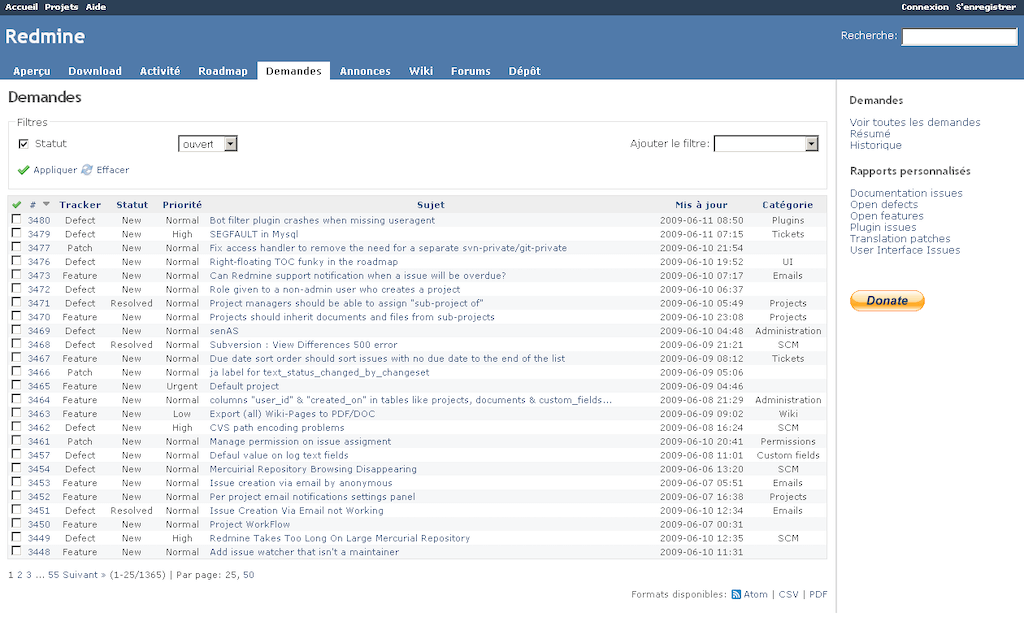
Redmine is a classic platform known for flexibility and reliability. Its extensive plugin ecosystem, role-based access controls, and extensive customization options make it appealing to technical teams. However, the dated interface might not suit those used to modern SaaS experiences.
Leantime
Leantime offers an approachable alternative for smaller teams or startups that need structure without excessive complexity. It supports task tracking, milestone planning, and lightweight collaboration, making it practical for teams that do not require enterprise-level features.
Self Hosted Deployment Challenges Most Teams Underestimate

Managing a self hosted solution involves more than just installation. Common challenges include:
- Update Management: Keeping up with application updates, dependency changes, and database migrations.
- Security Hardening: Configuring access controls, managing patch updates, firewall settings, and secure credential storage.
- Backup Strategy: Ensuring reliable backups for critical data, including issue history, documentation, and attachments.
- Email Reliability: Maintaining a robust SMTP setup for essential notifications.
- User Adoption: Even feature-rich platforms may fail if users are not comfortable with the interface or workflows.
Which Type of Team Should Choose Which Platform?
Different teams have varying priorities:
- IT and Internal Operations Teams: OpenProject is well suited for structured internal operations with thorough planning, documentation support, and governance capabilities.
- Agile Development Teams: Plane and Taiga work well for sprint planning, issue management, and iterative workflows.
- Privacy-Focused Organizations: Redmine and OpenProject are good for teams that emphasize data control and customizability.
- Startups and Smaller Teams: Leantime provides a low-overhead entry point without the complexity of enterprise solutions.
Is Self Hosting Actually Worth It?

Self hosting may not be ideal for every team. For smaller teams, the convenience of SaaS might be preferred over taking on the operational responsibilities. However, for technical organizations, privacy-focused businesses, and teams that require customized infrastructure, self hosted project management platforms offer significant benefits.
Build Your Self Hosted Project Management Stack on Reliable VPS Infrastructure
As your user base, attachments, notifications, and database activity grow, your infrastructure must keep pace. For example, you can deploy your project management stack on VPSus KVM VPS hosting. The KVM1 plan, starting at $10 per month, offers 1 vCore, 1 GB ECC RAM, 20 GB NVMe SSD, and full root access. It is available in reliable locations such as Atlanta and Los Angeles in the USA, and Frankfurt and Amsterdam in Europe. For more details, visit VPSus KVM VPS Hosting.
Frequently Asked Questions
What are the benefits of self hosted project management?
How do self hosted project management tools compare to SaaS platforms?
Is self hosting project management software worth the operational effort?
What infrastructure is needed for effective self hosting?

